
LG Chromebase / Chromebook end of life
Discussion


Hi all,
Just in case there are any other LG Chromebase users out there who have got the "final update" message for ChromeOS this morning and they want to carry on using the machine I have today managed to remove the write protect screw and install new BIOS firmware and a new OS (ElementaryOS) on it.
You can install Neverware Cloudready (basically ChromeOS) or any other Linux distro, I opted for Elementary OS as I have always wanted to try it out, I already have a Ubuntu Dell XPS. You might even be able to try Windows?
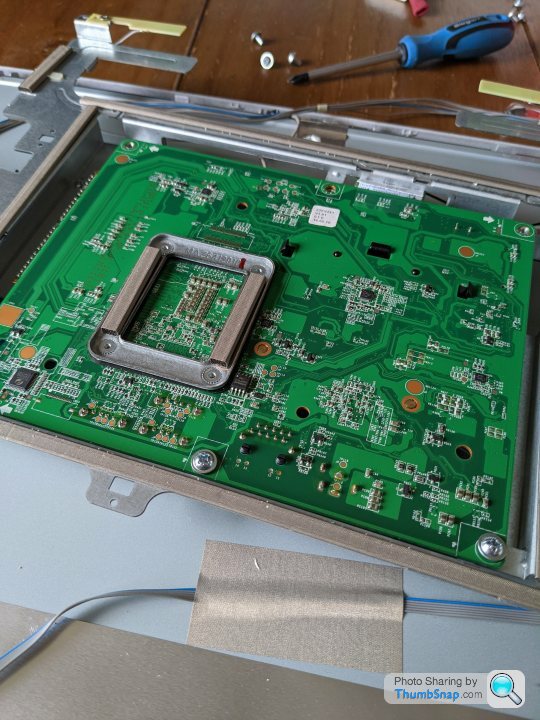
finding the write protect screw
installing new firmware


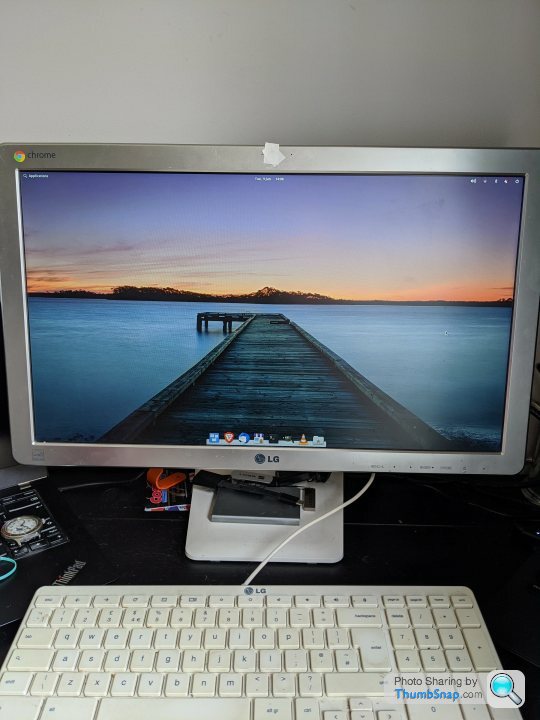
All done
Guide will be very similar for Chromebox/Chromebook's if anybody fancies taking ChromeOS off it!
Just in case there are any other LG Chromebase users out there who have got the "final update" message for ChromeOS this morning and they want to carry on using the machine I have today managed to remove the write protect screw and install new BIOS firmware and a new OS (ElementaryOS) on it.
You can install Neverware Cloudready (basically ChromeOS) or any other Linux distro, I opted for Elementary OS as I have always wanted to try it out, I already have a Ubuntu Dell XPS. You might even be able to try Windows?
finding the write protect screw
installing new firmware
All done
Guide will be very similar for Chromebox/Chromebook's if anybody fancies taking ChromeOS off it!
Elementary OS is nice. I had it on an old laptop a few years ago.
I don't know what firmware you flashed to the BIOS, but if it supports a Win10 installation & UEFI and you have the storage I'd suggest installing Win10 and using the Brunch framework to install a Linux distro and the official builds of Chrome OS. That way you can continue to keep an auto-updated version of Chrome OS on the machine, but have a triple-boot setup of Chrome OS, Win10, and a Linux install. You just need an SSD with enough storage capacity for the different partitions for each OS.
https://github.com/sebanc/brunch
I don't know what firmware you flashed to the BIOS, but if it supports a Win10 installation & UEFI and you have the storage I'd suggest installing Win10 and using the Brunch framework to install a Linux distro and the official builds of Chrome OS. That way you can continue to keep an auto-updated version of Chrome OS on the machine, but have a triple-boot setup of Chrome OS, Win10, and a Linux install. You just need an SSD with enough storage capacity for the different partitions for each OS.
https://github.com/sebanc/brunch
Yeah, deployed Cloudready on maybe 40-50 machines maybe 4-5 years ago now.
The advantage of using the Brunch framework is you're installing an officially updated version of Chrome OS which is running one of the updates pushed by Google, and it has full Play Store and Linux Crostini support. It is full Chrome OS, rather than some version of Chromium OS.
It'll give a new lease of life to any Intel Chrome OS device which reaches EOL.
I suspect it may be in a grey area when it comes to licensing, but then so are many Windows installs in VM's and every version of MacOS in a VM or on a hackintosh.
You can use it with just a Linux install (so just a Linux distro and Chrome OS). You don't need Windows to install it or get setup. It's just when you're setting up a dual boot system it's as easy to put the time in then and have a triple boot system in case the need ever arises someday. It provides ultimate flexibility.
The advantage of using the Brunch framework is you're installing an officially updated version of Chrome OS which is running one of the updates pushed by Google, and it has full Play Store and Linux Crostini support. It is full Chrome OS, rather than some version of Chromium OS.
It'll give a new lease of life to any Intel Chrome OS device which reaches EOL.
I suspect it may be in a grey area when it comes to licensing, but then so are many Windows installs in VM's and every version of MacOS in a VM or on a hackintosh.
You can use it with just a Linux install (so just a Linux distro and Chrome OS). You don't need Windows to install it or get setup. It's just when you're setting up a dual boot system it's as easy to put the time in then and have a triple boot system in case the need ever arises someday. It provides ultimate flexibility.
Ah that is pretty cool! the one thing the Chromebase lacked was Android and Linux app support! Might give it a whirl if Elementary doesn't work out.
I've guessing you have the option to just install ChromeOS as a single boot as well?
I've just installed the Mr Chromebox UEFI firmware
https://mrchromebox.tech/
I've guessing you have the option to just install ChromeOS as a single boot as well?
I've just installed the Mr Chromebox UEFI firmware
https://mrchromebox.tech/
Yeah, I've not used it personally, but I believe that firmware supports UEFI, so you could boot a Linux distro on a live USB and just install Chrome OS to the SSD from within the Linux environment on the live USB. So you'd just have Chrome OS as the solitary OS on the machine.
This should start around the 9m50sec mark to give you a rough idea;
https://youtu.be/ROBpXNonVxc?t=590
This should start around the 9m50sec mark to give you a rough idea;
https://youtu.be/ROBpXNonVxc?t=590
Looks rather nice on the LG.
I've been using elementary os on my aging everyday laptop for over a year now. Latest updates have vastly improved it. Thinking of buying a newer laptop without SSD (to transfer my SSD in the old laptop over to) or building a basic mini PC to stick it in that.
I've been using elementary os on my aging everyday laptop for over a year now. Latest updates have vastly improved it. Thinking of buying a newer laptop without SSD (to transfer my SSD in the old laptop over to) or building a basic mini PC to stick it in that.
TotalControl said:
Looks rather nice on the LG.
I've been using elementary os on my aging everyday laptop for over a year now. Latest updates have vastly improved it. Thinking of buying a newer laptop without SSD (to transfer my SSD in the old laptop over to) or building a basic mini PC to stick it in that.
You will need to to a clean OS install over the top of the SSD though to do that. Can keep the home partition safe for files but would probably be best backing up to the cloud and wiping it all and starting again!I've been using elementary os on my aging everyday laptop for over a year now. Latest updates have vastly improved it. Thinking of buying a newer laptop without SSD (to transfer my SSD in the old laptop over to) or building a basic mini PC to stick it in that.
Yeh its not a bad OS at all, I've got it set up like I had ChromeOS set up but with the exception that I'm using Brave and also have Opera installed. I've ditched a few of the Elementary apps such as Mail and installed Thunderbird.
I could make Ubuntu look like this with the same themes etc installed but cant be bothered, Ubuntu works well on my XPS as its an official Dell install.
Hi.
Sorry for dragging up a thread from last year, but I'm in the middle of trying the same thing with my LG Chromebase.
I opened mine years ago to upgrade the RAM and at the time removed what I thought was the WP screw,
but it still came up reading Fw WP: enabled . I've gone back into it now as there's a keyboard issue since the final Google update which causes it not to wake the keyboard (or maybe USB ports) from sleep - this affects a linux distribution booted from USB as well as ChromeOS.
As you know, there's no more updates coming from Google, so I figure putting full UEFI firmware onto it is my only hope.
You have a photo of the board in your first post, but I don't see you marking which screw you found worked succesfully to remove write protect.
I removed the middle one beside the ethernet port as it's the most common rumour and at this stage I've cut traces around that too - and still comes up as WP. If you can let me know exactly how it worked out for you I'd be thrilled.
My last resort is to flash the firmware directly to the chip, but it shouldn't be this awkward!
Still a nice enough machine and snappy with 8GB RAM, but only until it goes to sleep the first time in the day :-(
Sorry for dragging up a thread from last year, but I'm in the middle of trying the same thing with my LG Chromebase.
I opened mine years ago to upgrade the RAM and at the time removed what I thought was the WP screw,
but it still came up reading Fw WP: enabled . I've gone back into it now as there's a keyboard issue since the final Google update which causes it not to wake the keyboard (or maybe USB ports) from sleep - this affects a linux distribution booted from USB as well as ChromeOS.
As you know, there's no more updates coming from Google, so I figure putting full UEFI firmware onto it is my only hope.
You have a photo of the board in your first post, but I don't see you marking which screw you found worked succesfully to remove write protect.
I removed the middle one beside the ethernet port as it's the most common rumour and at this stage I've cut traces around that too - and still comes up as WP. If you can let me know exactly how it worked out for you I'd be thrilled.
My last resort is to flash the firmware directly to the chip, but it shouldn't be this awkward!
Still a nice enough machine and snappy with 8GB RAM, but only until it goes to sleep the first time in the day :-(
Pretty sure it was the one next to the Ethernet port! I'm typing from it now running ElementaryOS.
I did look into adding a bigger SSD because EOS install takes up most of it, but following guides where you just pull out the SSD and switch it in arent the same as whats inside mine. my SSD seems to be not in a case but just taped to the motherboard.
I did look into adding a bigger SSD because EOS install takes up most of it, but following guides where you just pull out the SSD and switch it in arent the same as whats inside mine. my SSD seems to be not in a case but just taped to the motherboard.
Thanks for that - I've taken a magnifying glass to the screw hole and it looks like the track didn't cut properly in the factory.
It's still connected and there's a bit of tape on the board above it.
Now I'm sure I'm in the right area I'll work on it one more time before flashing it direct.
I should have an old veroboard cutter here somewhere if I can find it!
You may just have helped save another one of these lovely machines!
It's still connected and there's a bit of tape on the board above it.
Now I'm sure I'm in the right area I'll work on it one more time before flashing it direct.
I should have an old veroboard cutter here somewhere if I can find it!
You may just have helped save another one of these lovely machines!
side question: my very very old PC is really struggling with Linux Mint 19. It has an old i5 chip in it from probably 2011
Should I go back to Mint 17 (or earlier) or pick a much lighter Linux distro? I can boot from USB. HDD not SDD.
I use it for Firefox, Youtube and some VLC video at 720p
I've got a 2011 (2nd gen) i5 and that still runs Windows 10, some games, zoom,... feels as fast as the day I got it. I only replaced it as I couldn't connect a third screen and didn't want to invest in a new GPU for it.
My advice: Slot an SSD in there.
Even the cheaper ones will be 5-10x faster than your HDD.
My advice: Slot an SSD in there.
Even the cheaper ones will be 5-10x faster than your HDD.
The_Doc said:
side question: my very very old PC is really struggling with Linux Mint 19. It has an old i5 chip in it from probably 2011
Should I go back to Mint 17 (or earlier) or pick a much lighter Linux distro? I can boot from USB. HDD not SDD.
I use it for Firefox, Youtube and some VLC video at 720p
I'm running Elementary OS on a 4Gb RAM Toshiba laptop with i3 from 2009. Functions fine, updates fine. Chromium browser is the only bottleneck when opened as it consumes too much RAM.Should I go back to Mint 17 (or earlier) or pick a much lighter Linux distro? I can boot from USB. HDD not SDD.
I use it for Firefox, Youtube and some VLC video at 720p
It's only generally used for research, typing and browsing now.
I still want to replace it with better hardware, but that can wait till this one dies.
Gassing Station | Computers, Gadgets & Stuff | Top of Page | What's New | My Stuff