
Mooning Around Some More
Discussion


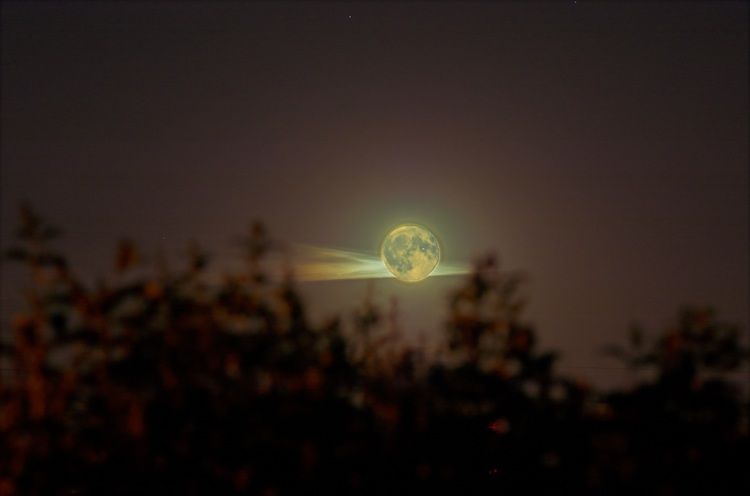
Well, I didn't think my shots would be that stunning, and they're not. Just started playing around in Ye Olde Shoppe, to see if anything grabs me....
[pic]http://i3.photobucket.com/albums/y53/beano1197/Full-Moon.jpg[/pic]
[pic]http://i3.photobucket.com/albums/y53/beano1197/JuneDSC_40960505-01-art1.jpg[/pic]
[pic]http://i3.photobucket.com/albums/y53/beano1197/Full-Moon-Sil2.jpg[/pic]
[pic]http://i3.photobucket.com/albums/y53/beano1197/Full-Moon-Sil.jpg[/pic]
[pic]http://i3.photobucket.com/albums/y53/beano1197/Full-Moon.jpg[/pic]
[pic]http://i3.photobucket.com/albums/y53/beano1197/JuneDSC_40960505-01-art1.jpg[/pic]
[pic]http://i3.photobucket.com/albums/y53/beano1197/Full-Moon-Sil2.jpg[/pic]
[pic]http://i3.photobucket.com/albums/y53/beano1197/Full-Moon-Sil.jpg[/pic]
anonymous said:
[redacted]
Your using the Canon 300D right ?
Well why not use the ten second self-timer ?
I've got a Canon G3 (O.K. not a full blown DSLR but I love pushing it to the limit. It's a great camera)
and place the camera on a tripod then either use the self-timer (which can be set for a 22 or 10 second delay or the IR Remote.
wizzpig said:Wow! Do you like that one? Thanks guys!
This one looks fab: 
Totally agree with the self timer approach. Have used it myself many, many times when I didn't want to carry a cable round. Also, being the complete luddite and a GOM, I hate, hate, hate, little things like the remote "plip" for the D70: as it's only a matter of time before I lose it somewhere I will also use the timer function. However, some cameras seem to be going backwards in functionality - I can adjust the time delay to 2, 5, 10 or 20 seconds, but I see that some cameras don't have this flexibility.
*Another Tip*
Also if you connect your camera to your computer you have many more options.
With my Canon G3 I can take many more photos in a given time period than using the interval function on the camera.
Am also able to save photos directly to the computer's hard disk as well.
I believe the softwar eis called Remote Capture or something very similar.
R
Also if you connect your camera to your computer you have many more options.
With my Canon G3 I can take many more photos in a given time period than using the interval function on the camera.
Am also able to save photos directly to the computer's hard disk as well.
I believe the softwar eis called Remote Capture or something very similar.
R

rich 36 said:Ye Olde 'Shoppe!
...
any special trickery involved ?
Shhhh! Don't tell anyone, but.......It's two images, one exposed for the moon detail, one for the atmosheric cloud. To be quite honest, it was thrown together as a quick and dirty "let's see". I know so many ways that I can improve my PS-craft on that image!!!
rich 36 said:
Mind you saving as a background, oval-ises the moon
can I get a better version somehow ?
**** Quick WallPaper How-To ***
OK the photos above are all 750x750 (Right click and view properties) .
The moon *Squishes* becuase Windows Desktops are normally 800x600, 1024x768, 1280x ...you get the idea.
What you can do:
In Photoshop copy the image (Ctrl-A then Ctrl-c)
Then create a new image (Ctrl-N) with a Windows Desktop compatible size (800x600, 1024x768..).
Paste (Ctrl-V) the image in.
You can then scale it and crop to suit.
Obviously the ideal situation is when you have a photo/image larger than your Windows Desktop.
If the image is smaller (like this case) you will get a border around the image. This is not always a bad thing as the Desktop icons are easier to read against a simple plain background.

Gassing Station | Photography & Video | Top of Page | What's New | My Stuff