
Broadband install kit help
Discussion


Planning on moving soon. The house we're moving into is 4 floors, semi detached.
For the last 9 years I've had Virgin Fibre, after a couple of years we started using Google Mesh to avoid the Virgin Superhub woeful stability for VOIP and Video Conferencing stability (essential at the moment for us, and my wife works from home in her role anyway). I'd planned to copy and paste that to the new house at it's got Virgin FTTP in the road anyway.
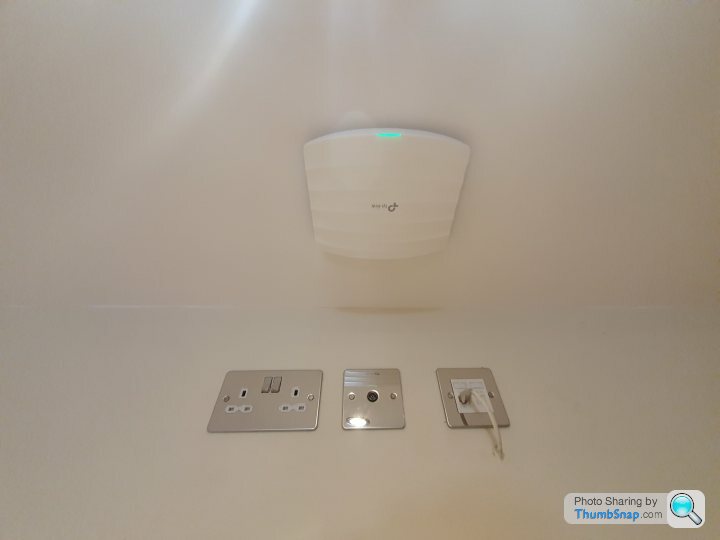
The new place seems to have had a networking solution installed from what I can tell it's been installed based on the new owners only accessing the internet via VDSL as it's all been installed connected to the BT master socket>TP Link VDSL router>Gigabit unmanaged PoE switch>ethernet cabling through the house>TP Link AP


Looking at the above, the simplest solution would use a ISP that is FTTC and using the BT master socket that's already plugged inot the TP link router and although I haven't used a non isp provided router or years, I'm assuming going into the router admin console just put in the ISPs username and password? Google suggests if I just use BT, once the account is set up is generic username/password. Am I right about that?
The other solution is to somehow connect this TP link router to the Virgin Superhub (although I'm not sure I can use this model if it's a VDSL router?) but this will be a pain in the ass given the location the fibre connection will come in through the external wall and the location of this networking kit is the centre of the house/joining wall to the next door on the 1st floor.
For the last 9 years I've had Virgin Fibre, after a couple of years we started using Google Mesh to avoid the Virgin Superhub woeful stability for VOIP and Video Conferencing stability (essential at the moment for us, and my wife works from home in her role anyway). I'd planned to copy and paste that to the new house at it's got Virgin FTTP in the road anyway.
The new place seems to have had a networking solution installed from what I can tell it's been installed based on the new owners only accessing the internet via VDSL as it's all been installed connected to the BT master socket>TP Link VDSL router>Gigabit unmanaged PoE switch>ethernet cabling through the house>TP Link AP
Looking at the above, the simplest solution would use a ISP that is FTTC and using the BT master socket that's already plugged inot the TP link router and although I haven't used a non isp provided router or years, I'm assuming going into the router admin console just put in the ISPs username and password? Google suggests if I just use BT, once the account is set up is generic username/password. Am I right about that?
The other solution is to somehow connect this TP link router to the Virgin Superhub (although I'm not sure I can use this model if it's a VDSL router?) but this will be a pain in the ass given the location the fibre connection will come in through the external wall and the location of this networking kit is the centre of the house/joining wall to the next door on the 1st floor.
Edited by TimmyMallett on Wednesday 16th September 13:41
Edited by TimmyMallett on Wednesday 16th September 13:41
Get virgin installed next to one of the data outlets in the house.
Use that as a link to bring your network up to the cupboard
Just bin the existing router
Plug the cable that comes into the cupboard from your virgin router into the switch
Reconfigure wireless access point or junk that and use your mesh system plugged into the network
Use that as a link to bring your network up to the cupboard
Just bin the existing router
Plug the cable that comes into the cupboard from your virgin router into the switch
Reconfigure wireless access point or junk that and use your mesh system plugged into the network
TimmyMallett said:
Thanks. There appears to be an AP on each floor so I'd like to utilise that ideally rather than buying 4 more Google APs.
You will need to reset them,sometimes it can be done on the power supply if they are using separate power bricks, if not there will be a reset button on them, google the make and model number and you can get the instructions. Many of them use easy to configure apps so its quite simple to follow. 
HantsRat said:
That's a very old model and you don't need the wi-fi aspect of it anyway. Also the ports on that are only 10/100. It will work though but you may need to factory reset it to change settings.
To be honest, when I looked it up, I wasn't thrilled that someone had based it around a £30 modem router. Gigabit switch, APs with Gigabit ports and then this 10/100 port modem router. I think I'll try the Virgin route as that's going to be considerably better long term than the VDSL speeds I'll get, and try to utilise the existing APs eventually.
Gassing Station | Computers, Gadgets & Stuff | Top of Page | What's New | My Stuff