
Poor mobile phone signal in house
Discussion


Hi,
We moved into a new build property in April '19 and the phone signal is pretty much non-existent in the house - on all the networks. I use an iPhone with EE and Vodafone for work (physical and e-sim) and the wife uses a Pixel 4 with EE and Tesco. The wifi calling seems to be intermittent on both devices so the wife tends to use Whatsapp audio and I will use Facetime audio as that works fine, as does MS Teams on there etc. Clearly there's either something wrong with wifi-calling on both devices, or it's trying to connect to the phone network first. Does anybody have any suggestions as to how we can either get a signal, or get the wifi-calling to work properly. I'm this close to buying a cordless phone and diverting my mobile numbers to that but that won't help when we need to dial out a mobile number from a cost POV.
Thanks
We moved into a new build property in April '19 and the phone signal is pretty much non-existent in the house - on all the networks. I use an iPhone with EE and Vodafone for work (physical and e-sim) and the wife uses a Pixel 4 with EE and Tesco. The wifi calling seems to be intermittent on both devices so the wife tends to use Whatsapp audio and I will use Facetime audio as that works fine, as does MS Teams on there etc. Clearly there's either something wrong with wifi-calling on both devices, or it's trying to connect to the phone network first. Does anybody have any suggestions as to how we can either get a signal, or get the wifi-calling to work properly. I'm this close to buying a cordless phone and diverting my mobile numbers to that but that won't help when we need to dial out a mobile number from a cost POV.
Thanks
New build houses are like Faraday cages these days.
Walls full of celotex, windows full of anti radiation glass.
Great for your heating bills, not so good for radio signals.
Wifi calling can be hit and miss as the phone will always default to cellular if any signal is available . If you want to use wifi calling, switch off your cellular, that way the handset is forced onto wifi.
You do have to remember to switch it on again when you go out.
You can get signal boosters legally now but they are not cheap.
Walls full of celotex, windows full of anti radiation glass.
Great for your heating bills, not so good for radio signals.
Wifi calling can be hit and miss as the phone will always default to cellular if any signal is available . If you want to use wifi calling, switch off your cellular, that way the handset is forced onto wifi.
You do have to remember to switch it on again when you go out.
You can get signal boosters legally now but they are not cheap.
We have a similar issue - but due to 2 foot thick stone walls!!
My work did supply a 'Surecall' device, that worked well with Vodafone but now switched to EE. The Sony XA1 I have as a work phone uses wifi calling without any problem.
Both of us now use ID (works on the back of Three - who also use EE masts!!).
Finally picked up a pair of Sony Xperia XA2 phones. Both work very well on wifi calling with no interference or call drop outs....
My work did supply a 'Surecall' device, that worked well with Vodafone but now switched to EE. The Sony XA1 I have as a work phone uses wifi calling without any problem.
Both of us now use ID (works on the back of Three - who also use EE masts!!).
Finally picked up a pair of Sony Xperia XA2 phones. Both work very well on wifi calling with no interference or call drop outs....
Thanks, I've tried turning off cellular etc but it still gives the same issue. Strange as on facetime/whatsapp via the wifi it's perfectly fine. None of the networks show great coverage on the street so it's not even like I can swap and get a booster from them as there's just no signal for it to boost  .
.
Is there anyway of using the laptops to make calls via the mobiles - the missus is worse than me with technology so needs to be something simple
.Is there anyway of using the laptops to make calls via the mobiles - the missus is worse than me with technology so needs to be something simple
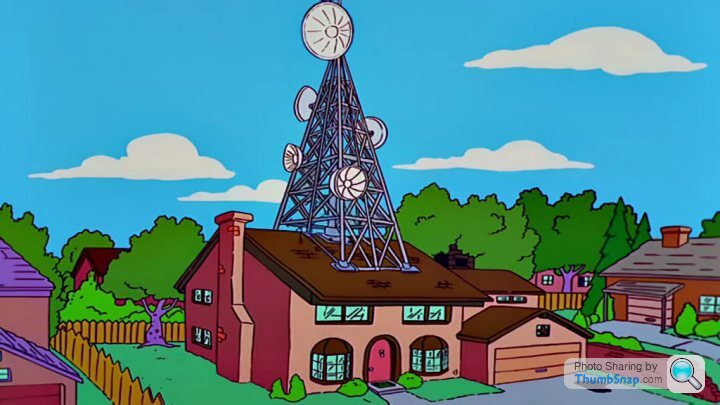
It's crap isn't it - all this talk of 5G and many people seem to stuggle with 3G in their houses.
The back of our 60's estate built house (so nothing 'blocky' about its construction) is about 300 metres from an O2 mast and reception is iffy at the front of the house, where the living room is. Incoming calls often go to voice mail. O2 say we should have good 4G reception but I never see 4G at home.
The back of our 60's estate built house (so nothing 'blocky' about its construction) is about 300 metres from an O2 mast and reception is iffy at the front of the house, where the living room is. Incoming calls often go to voice mail. O2 say we should have good 4G reception but I never see 4G at home.
bristolracer said:
Wifi calling can be hit and miss as the phone will always default to cellular if any signal is available . If you want to use wifi calling, switch off your cellular, that way the handset is forced onto wifi.
Nonsense - or at least it is if you are using any sort of modern handset.My phone has 3 bars of signal at the moment and still the phone has chosen to activate WiFi calling, but if I turn the WiFi off the phone will still happily make calls.
Sheepshanks said:
It's crap isn't it - all this talk of 5G and many people seem to stuggle with 3G in their houses.
The back of our 60's estate built house (so nothing 'blocky' about its construction) is about 300 metres from an O2 mast and reception is iffy at the front of the house, where the living room is. Incoming calls often go to voice mail. O2 say we should have good 4G reception but I never see 4G at home.
Bizarrely, you are probably too close to the mast. It will be optimized to cast a beam a fair bit further down the road than you The back of our 60's estate built house (so nothing 'blocky' about its construction) is about 300 metres from an O2 mast and reception is iffy at the front of the house, where the living room is. Incoming calls often go to voice mail. O2 say we should have good 4G reception but I never see 4G at home.
We’ve the same issue. I bought a Three “signal at home box” which is supposed to produce a good signal from a hotspot, but it needs some sort of sim, and I’ve not worked out yet what it needs.
You can buy a booster that has an external aerial, and broadcasts a signal inside your house, but they all seem to be sold from dodgy looking websites.
You can buy a booster that has an external aerial, and broadcasts a signal inside your house, but they all seem to be sold from dodgy looking websites.
I'm on Smarty (Three) and it works fine in the house, as does Three (obviously) and EE but O2 is non-existent.
My work mobile doesn't work so O2 through work have send me a box that plugs into internet, it now works fine. However this only boost the signal for the numbers that are installed on the box so my mum/sister still get no signal.
My work mobile doesn't work so O2 through work have send me a box that plugs into internet, it now works fine. However this only boost the signal for the numbers that are installed on the box so my mum/sister still get no signal.
chml said:
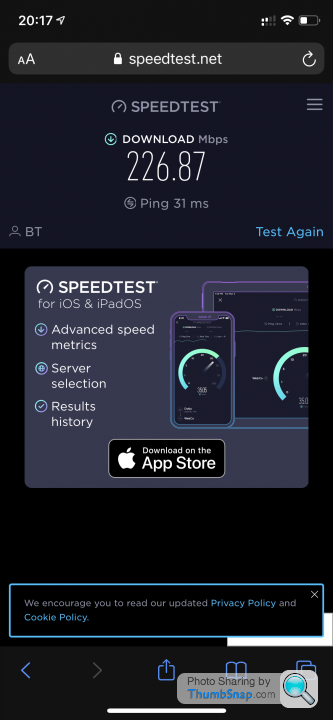
It’s not all about speed, it’s also about latency (the ping you are measuring). Given the speeds are you are getting I’m assuming that you are on FTTP?
If so that’s way more latency than expected. I’m on FTTC (so the last hop is copper telephone wire) and I get around 10ms.
WiFi calling is supposed to work well under 50ms, but I’m my experience it gets noticeably worse when below 25.
Bear in mind the latency might be your home network and nothing to do with the internet connection.
I’ve got 3 wireless access points, but they are wired back to the router. If you are using wireless repeaters or relying on the WiFi from the free router you got from your broadband supplier.
Also, do a few more speed tests and see if the long is routinely better or worse.
I’ve been using WiFi calling for over 4 years and it’s been rock solid. But it’s very dependent on decent WiFi and latency. Bandwidth is almost irrelevant if you’re on broadband.
Only other consideration is if you have someone else in the household using huge amounts of bandwidth. Kids on YouTube/Netflix/Xbox etc. Especially If on the same wireless, as many of the free and/or consumer devices aren’t gray at handling large numbers of wireless clients.
My new build is much the same, due to insulation as others have said.
In my experience the network/phone will tend to use WiFi calling as a fallback - i.e. when you have low signal. I think different networks have different criteria for this. I've just switched from EE to Three and get an equal amount of coverage, but whereas WiFi calling would only activate sporadically on EE, it activates more often on Three.
If WiFi calling is not activating even with your mobile connection disabled (flight mode) then it is possibly an issue with your WiFi connection.
In my experience the network/phone will tend to use WiFi calling as a fallback - i.e. when you have low signal. I think different networks have different criteria for this. I've just switched from EE to Three and get an equal amount of coverage, but whereas WiFi calling would only activate sporadically on EE, it activates more often on Three.
If WiFi calling is not activating even with your mobile connection disabled (flight mode) then it is possibly an issue with your WiFi connection.
Gassing Station | Computers, Gadgets & Stuff | Top of Page | What's New | My Stuff