
New Thinkpad, what port is this?
Discussion


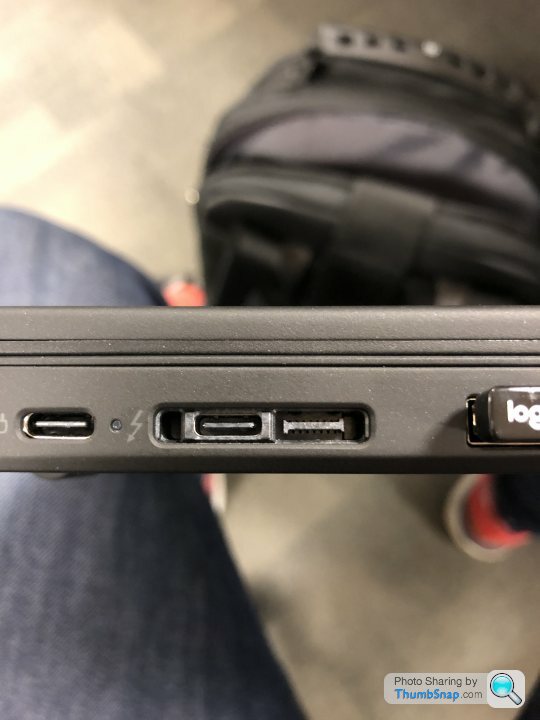
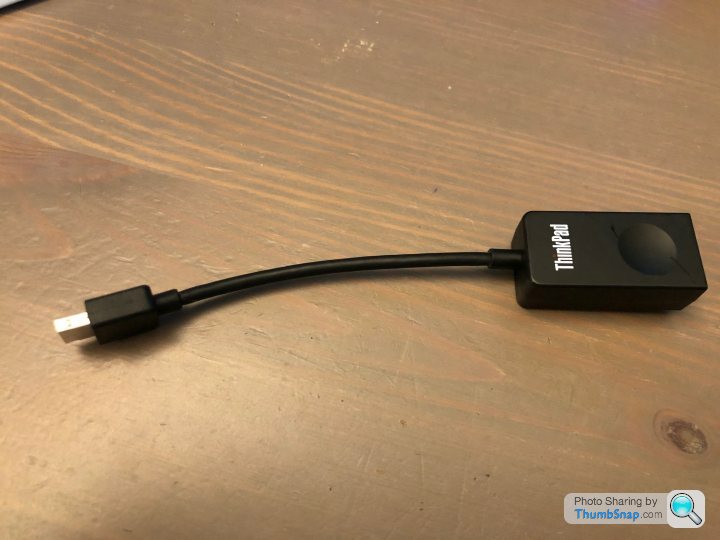

It's their proprietary connector for their Ultra Dock.
https://www.notebookcheck.net/ThinkPad-Ultra-dock-...
https://www.notebookcheck.net/ThinkPad-Ultra-dock-...


Do you have a link for it? I had a quick look and one on Amazon that looks same says its for macbook - the connector has two Type C's (so I guess that's what prompted your original question?).
If the spacing happens to be the same (maybe it's an industry standard, but no idea) then it might physically fit but I guess you'd run into a driver problem then.
I think the stand-alone Lenovo docks just connect with a single USB-C.
The docks are often on eBay but if you go that route make sure you figure out which is which as the functionality varies.
https://support.lenovo.com/gb/en/solutions/pd02962...
If the spacing happens to be the same (maybe it's an industry standard, but no idea) then it might physically fit but I guess you'd run into a driver problem then.
I think the stand-alone Lenovo docks just connect with a single USB-C.
The docks are often on eBay but if you go that route make sure you figure out which is which as the functionality varies.
https://support.lenovo.com/gb/en/solutions/pd02962...
Sheepshanks said:
Do you have a link for it? I had a quick look and one on Amazon that looks same says its for macbook - the connector has two Type C's (so I guess that's what prompted your original question?).
If the spacing happens to be the same (maybe it's an industry standard, but no idea) then it might physically fit but I guess you'd run into a driver problem then.
I think the stand-alone Lenovo docks just connect with a single USB-C.
The docks are often on eBay but if you go that route make sure you figure out which is which as the functionality varies.
https://support.lenovo.com/gb/en/solutions/pd02962...
Thank you. Yeah I was thinking the spacing would be the same, never thought about the driver issue! If the spacing happens to be the same (maybe it's an industry standard, but no idea) then it might physically fit but I guess you'd run into a driver problem then.
I think the stand-alone Lenovo docks just connect with a single USB-C.
The docks are often on eBay but if you go that route make sure you figure out which is which as the functionality varies.
https://support.lenovo.com/gb/en/solutions/pd02962...
I’ll just have to shell out for a proper Lenovo one then I suppose.
Big Rig said:
It depends on what you want to do with it. What you've pasted a picture of there is really an enhanced port replicator with display connections and a memory card, not a USB hub as such. The one pasted is also for a macbook.If you're using the laptop with something like Windows 10 then something like this will also work:
https://www.amazon.co.uk/WAVLINK-Docking-Station-O...
I have one of those and also an HP 3005PR which does much the same thing, provide extra display connections for more monitors and a lots more USB 2/3 ports, no drivers required and autodetected by Windows 10.
Both the WavLink and the HP connect via USB3 which you already have on your laptop. If all you're after are some more USB ports all of these options are fairly pricey and overkill however. Something like this to connect to your USB C would probably be a much cheaper alternative.
https://www.amazon.co.uk/UGREEN-Splitter-Portable-...
Edited by eltawater on Saturday 21st November 19:41
Big Rig said:
Thank you. Yeah I was thinking the spacing would be the same, never thought about the driver issue!
I’ll just have to shell out for a proper Lenovo one then I suppose.
The Lenovo ones have drivers but you should be fine with a generic one, as others have pointed to.I’ll just have to shell out for a proper Lenovo one then I suppose.
I don't know if the spacing on the twin USB one is the same but the description is quite specific for Macbook so don't think I'd risk stuffing it into a ThinkPad.
Thanks lads. Have just ordered one of these...
USB C Hub Multiport Adapter - 7 in 1 Portable Space Aluminium Dongle with 4K HDMI Output, 3 USB 3.0 Ports, SD/Micro SD Card Reader Compatible for MacBook Pro, XPS More Type C Devices https://www.amazon.co.uk/dp/B07VMRB2K1/ref=cm_sw_r...
USB C Hub Multiport Adapter - 7 in 1 Portable Space Aluminium Dongle with 4K HDMI Output, 3 USB 3.0 Ports, SD/Micro SD Card Reader Compatible for MacBook Pro, XPS More Type C Devices https://www.amazon.co.uk/dp/B07VMRB2K1/ref=cm_sw_r...
Gassing Station | Computers, Gadgets & Stuff | Top of Page | What's New | My Stuff