
RGB PC or not??
Discussion


Just about to build a new PC... but I have a sick urge to fill it with RGB fans, with the intention of just having some monochrome schemes, maybe gentle transitions between calming pastel shades to look modern (not a filthy throbbing unicorn rave).
The fans with addressable RGB and the diffused illuminated rings are a bit pricey though...
Anyone got anything cool?
The fans with addressable RGB and the diffused illuminated rings are a bit pricey though...
Anyone got anything cool?
I built a new PC over Christmas and it's RGB-tastic.
I went for Corsair everything so you can control all the lights from one interface. I went for a Corsair case with lights on the outside and it comes with 2 RGB fans. The RAM is also Corsair, again with RGB.
It's completely pointless but I like it !
One thing for me (which I'd not thought of), is that my PC sits on the floor under my desk, so of course you can't see the internal lighting anyway.
I went for Corsair everything so you can control all the lights from one interface. I went for a Corsair case with lights on the outside and it comes with 2 RGB fans. The RAM is also Corsair, again with RGB.
It's completely pointless but I like it !
One thing for me (which I'd not thought of), is that my PC sits on the floor under my desk, so of course you can't see the internal lighting anyway.
Don't forget it's not just the fans you'll need - you'll need the RGB controller and hub - and it's usually much easier to buy a kit from the same manufacturer with it all in.
Also, be careful of mixing fan types, as some of the software only lets you set one fan type per hub (as different fans have different amounts of LEDs to control).
Also, be careful of mixing fan types, as some of the software only lets you set one fan type per hub (as different fans have different amounts of LEDs to control).
mmm-five said:
Don't forget it's not just the fans you'll need - you'll need the RGB controller and hub - and it's usually much easier to buy a kit from the same manufacturer with it all in.
Also, be careful of mixing fan types, as some of the software only lets you set one fan type per hub (as different fans have different amounts of LEDs to control).
Best to get a case that comes with it all included. Mine came with 2 things in the case, a controller and a hub. The hub has 6 connections, 2 already used for the case fans.Also, be careful of mixing fan types, as some of the software only lets you set one fan type per hub (as different fans have different amounts of LEDs to control).
I'd defo suggest getting it all from one place.
Unfortunately my mobo is a different brand, and has RGB bits. Was a nightmare when "lost control" of it, and decided to keep colour cycling of it's own accord.
Now have both keyboard and PC with a mix of Red and Blue bits (motherboard, memory, CPU cooler, case lights and keyboard.)
Unfortunately my mobo is a different brand, and has RGB bits. Was a nightmare when "lost control" of it, and decided to keep colour cycling of it's own accord.
Now have both keyboard and PC with a mix of Red and Blue bits (motherboard, memory, CPU cooler, case lights and keyboard.)
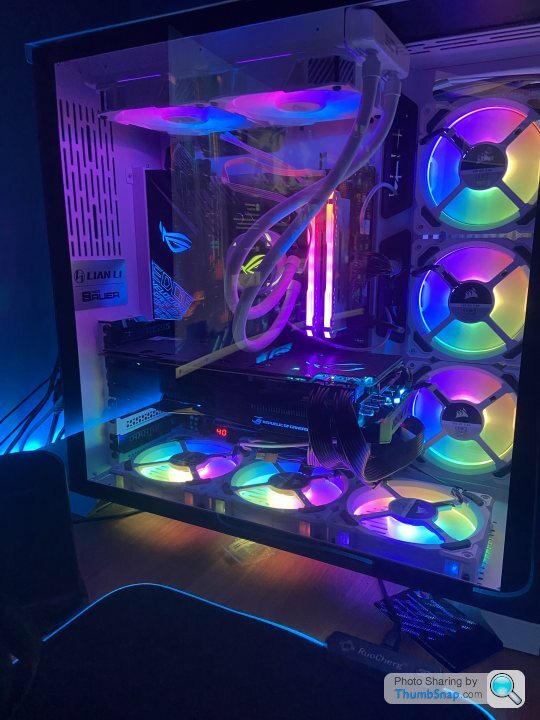
It's a Corsair 4000D airflow case in white.
Asrock mobo which has rgb and argb headers.
Corsair rgb ram.
Seems the asrock software isn't compatible with iCue so I guess I may as well get a corsair kit with a node then I can sync with the corsair icue software.
Now just need to get pissedbefore I can bring myself to buy the fans!!!
Asrock mobo which has rgb and argb headers.
Corsair rgb ram.
Seems the asrock software isn't compatible with iCue so I guess I may as well get a corsair kit with a node then I can sync with the corsair icue software.
Now just need to get pissedbefore I can bring myself to buy the fans!!!
Edited by Glade on Wednesday 13th January 16:52
Glade said:
It's a Corsair 4000D airflow case in white.
Asrock mobo which has rgb and argb headers.
Corsair rgb ram.
Seems the asrock software isn't compatible with iCue so I guess I may as well get a corsair kit with a node then I can sync with the corsair icue software.
Now just need to get pissedbefore I can bring myself to buy the fans!!!
Are you going for ML, LL, QL, HD, SP, AF or something else fans?Asrock mobo which has rgb and argb headers.
Corsair rgb ram.
Seems the asrock software isn't compatible with iCue so I guess I may as well get a corsair kit with a node then I can sync with the corsair icue software.
Now just need to get pissedbefore I can bring myself to buy the fans!!!
iCUE is bloatware and Corsair stuff is generally overpriced and not very good, their noisy maglev fans and crappy performance impacting software being two cases in point. Their disaster of an air cooler plumbs the depths.
I don't understand why people want to add RGB to their systems if it's going to reduce performance. Then again I never understood spoilers that do nothing and stickers for fuel filler caps on cars either. Just stick your now unused Christmas lights round the PC if you like shiny things.
I don't understand why people want to add RGB to their systems if it's going to reduce performance. Then again I never understood spoilers that do nothing and stickers for fuel filler caps on cars either. Just stick your now unused Christmas lights round the PC if you like shiny things.

Motorrad said:
iCUE is bloatware and Corsair stuff is generally overpriced and not very good, their noisy maglev fans and crappy performance impacting software being two cases in point. Their disaster of an air cooler plumbs the depths.
I don't understand why people want to add RGB to their systems if it's going to reduce performance. Then again I never understood spoilers that do nothing and stickers for fuel filler caps on cars either. Just stick your now unused Christmas lights round the PC if you like shiny things.
It's only bloatware if it comes pre-installed and you'll never used it.I don't understand why people want to add RGB to their systems if it's going to reduce performance. Then again I never understood spoilers that do nothing and stickers for fuel filler caps on cars either. Just stick your now unused Christmas lights round the PC if you like shiny things.
If you need it to run your case/AIO fans, then it's not bloatware.
I've had no problems with mine.
I can't understand why people play Minecradt, The Sims, Fortnite, PUBG, etc...but to each their own.
Changed my order from an ASRock mobo to MSI because the ASRock RGB software isn't compatible with Corsair RAM.
Also watched some reviews and the MSI has much better CPU power supply temp e.g. runs very low.
Now looking for some cheapo £40 for 6 ARGB fans to run from the mobo so the ram and fans can be synced in the MSI software.
Also watched some reviews and the MSI has much better CPU power supply temp e.g. runs very low.
Now looking for some cheapo £40 for 6 ARGB fans to run from the mobo so the ram and fans can be synced in the MSI software.

mmm-five said:
It's only bloatware if it comes pre-installed and you'll never used it.
If you need it to run your case/AIO fans, then it's not bloatware.
I've had no problems with mine.
I can't understand why people play Minecradt, The Sims, Fortnite, PUBG, etc...but to each their own.
You might not need an all in one cooler if you weren't running crappy bloatware to produce a lightshow on your PC. If you need it to run your case/AIO fans, then it's not bloatware.
I've had no problems with mine.
I can't understand why people play Minecradt, The Sims, Fortnite, PUBG, etc...but to each their own.
More seriously Corsair's apps are crap and reduce performance. Still if you like it then have at it. I also don't like Minecradt. The Sims, Fortnite, PUBG but at least they don't run all the time and cause a reduction in performance.
edit to add: I should probably state I own a PSU made by Corsair that comes with usb monitoring via their s
 te software. I don't use it because it reminds me of McAfee.
I'm sure you like GN like most right thinking folk. Have at it.
https://www.youtube.com/watch?v=NzAeAFudylI
Edited by Motorrad on Tuesday 19th January 15:44
Gassing Station | Computers, Gadgets & Stuff | Top of Page | What's New | My Stuff