
Discussion


I’ve done a couple of builds with Coolermaster Silencio padded cases, most recently an S600. I’d also say to go for cooler running CPUs (intel run cooler than Ryzens in my experience) and my own preference is to have more 140mm fans running slowly rather than fewer 120mm going flat out. And choose a motherboard that allows you to fine-tune your fan profiles (with something like ASUS FanExpert)
I have a silent, fanless pc that built myself 9 years ago. Intel core i5 2nd generation CPU in a Streacom FC8 case. Still going strong and still use a my main system. Very limited expansion opportunities and you can't run CPUs over 65w TDP ratings but that's the compromise for a small, silent PC.
Quite a few cases on the market have a similar ethos to the Streacom case - small, passive using the case as a heatsink. Streacom do a case called the DB4 which can accommodate a graphics card and run silently. The alternative is to take a well-ventilated case and use a massive CPU heatsink, silent PSU etc Careful component selection is crucial
As Quiet PC, already mentioned, are the UK specialist in this market they use Streacom cases for some of their builds. They also do some builds based on mATX, ATX cases with silent components. If you have a look at their site you'll get an idea of the 2 approaches.
Quite a few cases on the market have a similar ethos to the Streacom case - small, passive using the case as a heatsink. Streacom do a case called the DB4 which can accommodate a graphics card and run silently. The alternative is to take a well-ventilated case and use a massive CPU heatsink, silent PSU etc Careful component selection is crucial
As Quiet PC, already mentioned, are the UK specialist in this market they use Streacom cases for some of their builds. They also do some builds based on mATX, ATX cases with silent components. If you have a look at their site you'll get an idea of the 2 approaches.
Jack_and_MLE said:
Hello All
Quiet PC, who built one?
Which case did you use?
I'm asking as my current PC is quite loud when I'm on my own working.
Jack
Is it a new PC or an old one? If the latter then take the case off and you'll probably find it's chock full of fluff and dust, particularly around the fans. Clear all the crud out and it'll run cool again and be quiet. If it's a new one then disregard Quiet PC, who built one?
Which case did you use?
I'm asking as my current PC is quite loud when I'm on my own working.
Jack
 . My PC is due for another clean as the fans are nearly flying off their spindles when watching Youtube HD in full screen. I can see through the top vents that it's full of fluff but just can't be arsed doing it yet
  .
.Good point. As is replacing TIM paste on your CPU if that's not been done for a couple of years. Noise generally equals fans spinning up. HWInfo64 ( link to free download) should be able to tell you which fans and how fast (apart from maybe the fan in your power supply).\
Supplied case fans are often pretty poor, especially if you motherboard supports 4-pin PWM fans. BeQuiet Silent Wings 3 or Noctua NF-A fans will do a much better and quieter job
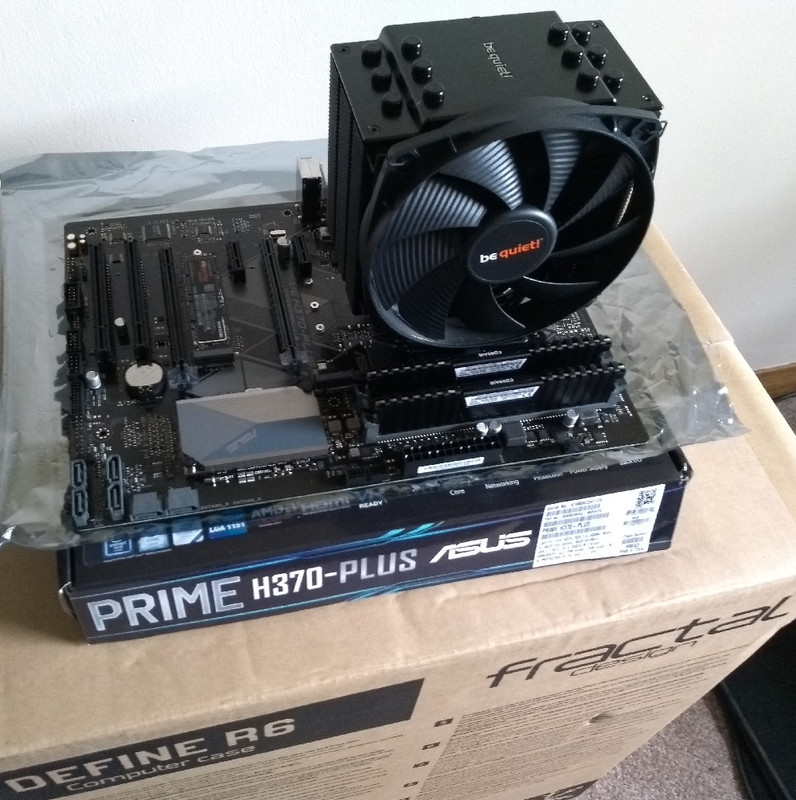
Also check your CPU load and temperature. If your CPU isn't running hot and you have a decent sized case then you could even consider a fanless cooler like this
Supplied case fans are often pretty poor, especially if you motherboard supports 4-pin PWM fans. BeQuiet Silent Wings 3 or Noctua NF-A fans will do a much better and quieter job
Also check your CPU load and temperature. If your CPU isn't running hot and you have a decent sized case then you could even consider a fanless cooler like this
We got a gaming/school laptop for my son for Christmas and by christ it makes a racket. I get the same uncomfortable feeling listening to it as I do when my car is red lining. I keep telling him to put a limit on the FPS but he insists on running games at 150fps+
Can't see it lasting too long at this rate.
Can't see it lasting too long at this rate.
When I built this pc I was after as much silence as possible without going water cooled, case is a Fractal Design Define R5 and the heatsink a Noctua NH-D15 Dual Radiator .
Fantastic case, well designed and the fans that come with it are pretty quiet ( was going to change them for Noctua ones if noisy but did not need to), the Noctua heatsink does the job very well at cooling and is very silent.
Fantastic case, well designed and the fans that come with it are pretty quiet ( was going to change them for Noctua ones if noisy but did not need to), the Noctua heatsink does the job very well at cooling and is very silent.
I've got a fairly low spec PC, with a quiet PSU in a quiet (coolermaster damped panels) case. Also crap low performance graphics card with no fan ! I found that I can run it without case fans, and turn the CPU cooling strategy down quite a bit from the standard BIOS settings, and still never go above 50 degrees chip temperature. It's usually about 28 degrees. The PSU fan actually makes the most noise now.
Edited by outnumbered on Saturday 16th January 11:10
Pretty simple to build a silent PC these days, cooling technology is far improved over ten years ago.
I have an overclocked i7 9700k running at 4.9GHz plus a completely stock 1080ti that is entirely silent at all times. Removed all the rubbish case fans, stuck an all-in-one water cooler on the CPU and replaced the radiator fans (the Corsair cooler is great, their fans are terrible) with Noctua NF-F12s, tweaked the fan profile, et voila. Bearable temperatures under load (80-ish degrees running Prime95, in the real world rarely gets above 60 when gaming) and I can't hear a thing even with my ear right next to the case.
I have an overclocked i7 9700k running at 4.9GHz plus a completely stock 1080ti that is entirely silent at all times. Removed all the rubbish case fans, stuck an all-in-one water cooler on the CPU and replaced the radiator fans (the Corsair cooler is great, their fans are terrible) with Noctua NF-F12s, tweaked the fan profile, et voila. Bearable temperatures under load (80-ish degrees running Prime95, in the real world rarely gets above 60 when gaming) and I can't hear a thing even with my ear right next to the case.
The best way of ensuring a quiet PC is to have too much power. My old setup struggled with video editing software and, very occasionally, graphics software. I recently opted for a Ryzen 9, oodles of RAM and a fairly decent non-gaming GPU and the silence was quite a shock.
I've just started using 3D software and, at times, the demands on the GPU mean that the fans come on, although infrequently. I know when they'll start, and it's always just for a while. I could buy an expensive GPU or fiddle with the setup and go for longer rendering times, but the current compromise is great for me. Cheapness has a certain attraction that can be overwhelming for me.
I've just started using 3D software and, at times, the demands on the GPU mean that the fans come on, although infrequently. I know when they'll start, and it's always just for a while. I could buy an expensive GPU or fiddle with the setup and go for longer rendering times, but the current compromise is great for me. Cheapness has a certain attraction that can be overwhelming for me.
Hi all
Thanks for the comments.
The idea about the fan is a good one, which I have implemented.
I've created two profiles, a quiet one with the fan a slow speed for a quiet-ish machinery when I'm working and full bore when gaiming
I'm planning a new build around a AMD Ryzen and a quiet case.
Jack
Thanks for the comments.
The idea about the fan is a good one, which I have implemented.
I've created two profiles, a quiet one with the fan a slow speed for a quiet-ish machinery when I'm working and full bore when gaiming
I'm planning a new build around a AMD Ryzen and a quiet case.
Jack
Jack_and_MLE said:
I've got a few Noctua and Be-Quiet fan.
I've located the main noise, which is the power supply.
With regards to the power supply, if the current power requirements is 450W is it worth doubling or tripling the power output of the supply?
Jack
Depends how close to the PSU power limit your system is drawing - I'd work on a 25-30% over-provision - so for a 400w draw I would go for a 500-550w PSU (and semi/fully-modular so you can remove stuff you don't need and/or swap out cables as required instead of dumping the whole PSU each time you need an extra connection.I've located the main noise, which is the power supply.
With regards to the power supply, if the current power requirements is 450W is it worth doubling or tripling the power output of the supply?
Jack
You'd also want a 80+ Gold/Platinum to ensure most of the energy is going to powering the system, rather than being radiated as heat....which in turn means less fan use.
Most of my noise/dust comes from the lowest static pressure fan where 50% of the airflow is blocked by the case HDD/PSU housing.
I had to add water cooling and five fans because the company who i bought if from even after telling them I will be playing car games on it didn't add enough.
After 4-5 minutes the CPU would overheat and the entire system will crash.
After all the additional fan, I only have the GPU which over heats if I have high FPS.
Left a around 60-75fps the system is stable.
Jack
After 4-5 minutes the CPU would overheat and the entire system will crash.
After all the additional fan, I only have the GPU which over heats if I have high FPS.
Left a around 60-75fps the system is stable.
Jack
Gassing Station | Computers, Gadgets & Stuff | Top of Page | What's New | My Stuff