
Virgin TV Error code 603
Discussion


Thought I'd ask this question in here before I bang my head against the wall for several hours with Virgin customer services. Hopefully someone can assist. I'm absolutely NOT tech savvy so this may seem like a stupid question...
I have an LG 65C9 and SN11RG sound bar.
I'm completely unable to watch On Demand services. I'm getting error 603 "this show is temporarily unavailable" every time. This has only happened fairly recently.
A bit of googling shows up this but I don't know how true it is:
"If you're watching on a 4K UHD TV, then VOD on the V6 now requires all your A/V equipment to be (industry standard) HDCP 2.2 compliant, and if it's not then Error 603/604 or blank-screens after the lead-in adverts is the intentional behaviour.
Some older 4K TV's don't support HDCP 2.2 on all HDMI ports and you need to be sure of using the correct port."
Allegedly this is down to some sort of update that Virgin have done to the V6 box.
I have these cables:
https://www.amazon.co.uk/dp/B007VQ99GC/ref=cm_sw_r...
Are my cables now not up to the job? Or do I need to swap my cables around in my TV/sound bar ports (something else i also read whilst googling)? I can't see cable location being the issue cos everything else works and On Demand also used to work.
Any pointers greatly appreciated.
I have an LG 65C9 and SN11RG sound bar.
I'm completely unable to watch On Demand services. I'm getting error 603 "this show is temporarily unavailable" every time. This has only happened fairly recently.
A bit of googling shows up this but I don't know how true it is:
"If you're watching on a 4K UHD TV, then VOD on the V6 now requires all your A/V equipment to be (industry standard) HDCP 2.2 compliant, and if it's not then Error 603/604 or blank-screens after the lead-in adverts is the intentional behaviour.
Some older 4K TV's don't support HDCP 2.2 on all HDMI ports and you need to be sure of using the correct port."
Allegedly this is down to some sort of update that Virgin have done to the V6 box.
I have these cables:
https://www.amazon.co.uk/dp/B007VQ99GC/ref=cm_sw_r...
Are my cables now not up to the job? Or do I need to swap my cables around in my TV/sound bar ports (something else i also read whilst googling)? I can't see cable location being the issue cos everything else works and On Demand also used to work.
Any pointers greatly appreciated.
If it was me I’d start by changing the video settings on the v6 to see if this helps.
Change the video settings on the TV box
Select Home
Select Home and Settings
Select Settings
Select Video Output
Select Video Output Format
Untick the box 2160p resolution and make sure the 1080p box is ticked
Select Continue
Press Thumbs Up 3 times to save the new settings
Change the video settings on the TV box
Select Home
Select Home and Settings
Select Settings
Select Video Output
Select Video Output Format
Untick the box 2160p resolution and make sure the 1080p box is ticked
Select Continue
Press Thumbs Up 3 times to save the new settings
Thank you chaps for the assistance.
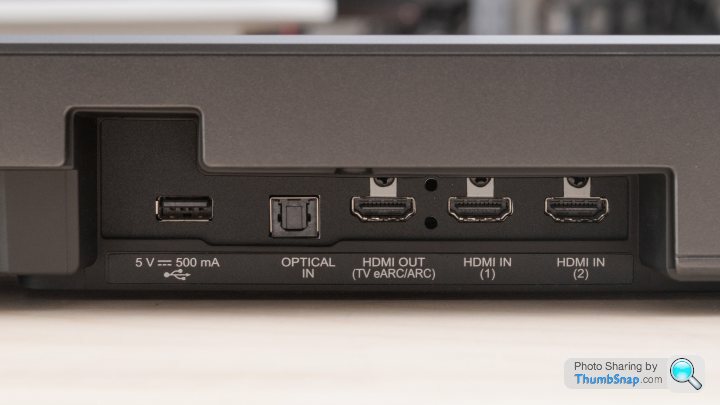
I'm not up on all the terminology, and I set this all up months ago with help from the SN11 sound bar thread on AV Forums (and it all worked for a good while), but I believe this is some sort of recommended pass-through configuration.
I think I'm in Virgin > HDMI 1 on my sound bar, then out of the eARC port on the sound bar and into HDMI 2 on the TV, which is the corresponding eARC port.
See Google images below

KIN6 said:
If it was me I’d start by changing the video settings on the v6 to see if this helps.
Change the video settings on the TV box
Select Home
Select Home and Settings
Select Settings
Select Video Output
Select Video Output Format
Untick the box 2160p resolution and make sure the 1080p box is ticked
Select Continue
Press Thumbs Up 3 times to save the new settings
I'll try that, thank you. Change the video settings on the TV box
Select Home
Select Home and Settings
Select Settings
Select Video Output
Select Video Output Format
Untick the box 2160p resolution and make sure the 1080p box is ticked
Select Continue
Press Thumbs Up 3 times to save the new settings
Chozza said:
Which port on the TV are you plugging the HDMI from the virgin box into?
Try changing the port... I'd suggest HDMI1 as that seems to the normal 4K UHD support from my quick sample of 2 LG TVs and 2 4K monitors
I think, from memory, I've gone Virgin box > sound bar > TV, but I'd have to check. Try changing the port... I'd suggest HDMI1 as that seems to the normal 4K UHD support from my quick sample of 2 LG TVs and 2 4K monitors
I'm not up on all the terminology, and I set this all up months ago with help from the SN11 sound bar thread on AV Forums (and it all worked for a good while), but I believe this is some sort of recommended pass-through configuration.
I think I'm in Virgin > HDMI 1 on my sound bar, then out of the eARC port on the sound bar and into HDMI 2 on the TV, which is the corresponding eARC port.
See Google images below
KIN6 said:
If it was me I’d start by changing the video settings on the v6 to see if this helps.
Change the video settings on the TV box
Select Home
Select Home and Settings
Select Settings
Select Video Output
Select Video Output Format
Untick the box 2160p resolution and make sure the 1080p box is ticked
Select Continue
Press Thumbs Up 3 times to save the new settings
I've just done this. I had a few minutes of minor panic after pressing the 3 thumbs up where the screen instantly changed to snow and none of the buttons on the remote worked Change the video settings on the TV box
Select Home
Select Home and Settings
Select Settings
Select Video Output
Select Video Output Format
Untick the box 2160p resolution and make sure the 1080p box is ticked
Select Continue
Press Thumbs Up 3 times to save the new settings
 ... Switching the whole lot off and on at the wall cured it thankfully.
At the moment, it all now seems to be working. But we've had this before where resetting the box has worked temporarily, so ill have to see how it goes. Thanks for the suggestion.
Curious as to why this may have worked at what made you suggest it...?
FunkyGibbon said:
As suggested above, remove the sound bar as a possible culprir,
Virgin -> TV test with TV speakers
If all OK then Virgin -> TV then TV -> sound bar with the ARC HDMI ports
Thank you, I'll do that. Would it need to be Virgin > into HDMI 1, then out again via TV eARC > in to sound bar eARC?Virgin -> TV test with TV speakers
If all OK then Virgin -> TV then TV -> sound bar with the ARC HDMI ports
- edit, yeah that's actually what you said

Gassing Station | Computers, Gadgets & Stuff | Top of Page | What's New | My Stuff