
Noisy Tower Fan on Startup
Discussion


For some time now a fan in my PC tower has made a loud noise on start-up only,
after about a minutes it quietens down to normal.
Last week it only reduced its noise to something that was not acceptable
and so I changed the CPU heatsink and its fan.
It's now back to only being noisy on start-up.
Bearing in mind it's been like this before for ..... ages,
should I be worried?
I can't easily see the other fans and I don't really feel confident
in physically delving any deeper onto what is an awkward to access box of mystery to me .
.
after about a minutes it quietens down to normal.
Last week it only reduced its noise to something that was not acceptable
and so I changed the CPU heatsink and its fan.
It's now back to only being noisy on start-up.
Bearing in mind it's been like this before for ..... ages,
should I be worried?
I can't easily see the other fans and I don't really feel confident
in physically delving any deeper onto what is an awkward to access box of mystery to me
.I'm a bit confused that you were confident to replace/repaste the CPU fan/cooler, but not confident enough to have a look for some other fans 
Do you have a photo of the inside of your case (well lit would help), or the model of the computer so that we can find some stock photos online?
However:
Do you have a photo of the inside of your case (well lit would help), or the model of the computer so that we can find some stock photos online?
However:
- there's likely to be one in the PSU (which you can't do much about, other than try to clean the dust/fluff out with an air-duster);
- there may be a fan or two on the GPU;
- there may be a fan or six on the front/top/back of the case.
Edited by mmm-five on Friday 7th January 13:58
mmm-five said:
You were happy to repaste & replace a CPU fan/cooler, but not confident to have a look for some fans
Indeed!Also it should be noted that many PCs will by default spin up all the fans to max on POST, then quieten down/off once booted and fan management control kicks in.
Is the fan noisy purely because of the speed it's running? If it needs to be running, replace with a Noctua or Noiseblocker eLoop which should be quieter. If it's noisy because it's dying then....replace it with a Noctua or Noiseblocker eLoop.
Edit: per mmm-five's post, isolate where it's coming from and replace the offending component.
Edited by Funk on Friday 7th January 14:05
This is what it is:

I felt confident in replacing the CPU fan because it was the only one I could see without doing any more than removing one side of the case and there was a lot of room around it, but even then I struggled to get the connector block back with my (fat?) fingers, so not giving me confidence to take this further.
I felt confident in replacing the CPU fan because it was the only one I could see without doing any more than removing one side of the case and there was a lot of room around it, but even then I struggled to get the connector block back with my (fat?) fingers, so not giving me confidence to take this further.
Take the side off and then power it up. If you can't determine which fan the noise is coming from then stick your finger on the top of each case fan to stop it (not in the blades of course, cus that will hurt(your finger that is, not the fan)).
You might need to power cycle a few times, stopping a fan each time, until you work out which is the offending on.
Then replace the knackered fan. The bearings will have gone, but as said above, they will come on at full speed on boot and then slow down, hence making a noise a start up (or under load).
You might need to power cycle a few times, stopping a fan each time, until you work out which is the offending on.
Then replace the knackered fan. The bearings will have gone, but as said above, they will come on at full speed on boot and then slow down, hence making a noise a start up (or under load).
Does it look like this (this is the COLOURSIT or CiT Knight case - not the MX, which I couldn't find)?
If so, it looks like it came with a single rear fan as standard...and your posted spec seems to say 2 x 120mm (12cm) fans were fitted also, but they should be easy to see as there doesn't seem to be many places that you could easily mount them.
With the motherboard, cooler, GPU in the way, it might not be that simple to replace it, but you should be able to see if it's the one making the noise, by carefully stopping it with your finger (on the centre spindle, not the fan blades).
If it is the rear exhaust fan, then removing the GPU (which isn't difficult) may be enough to get access to it (after you've unscrewed it from the rear), and a replacement fan can probably be had for £5.
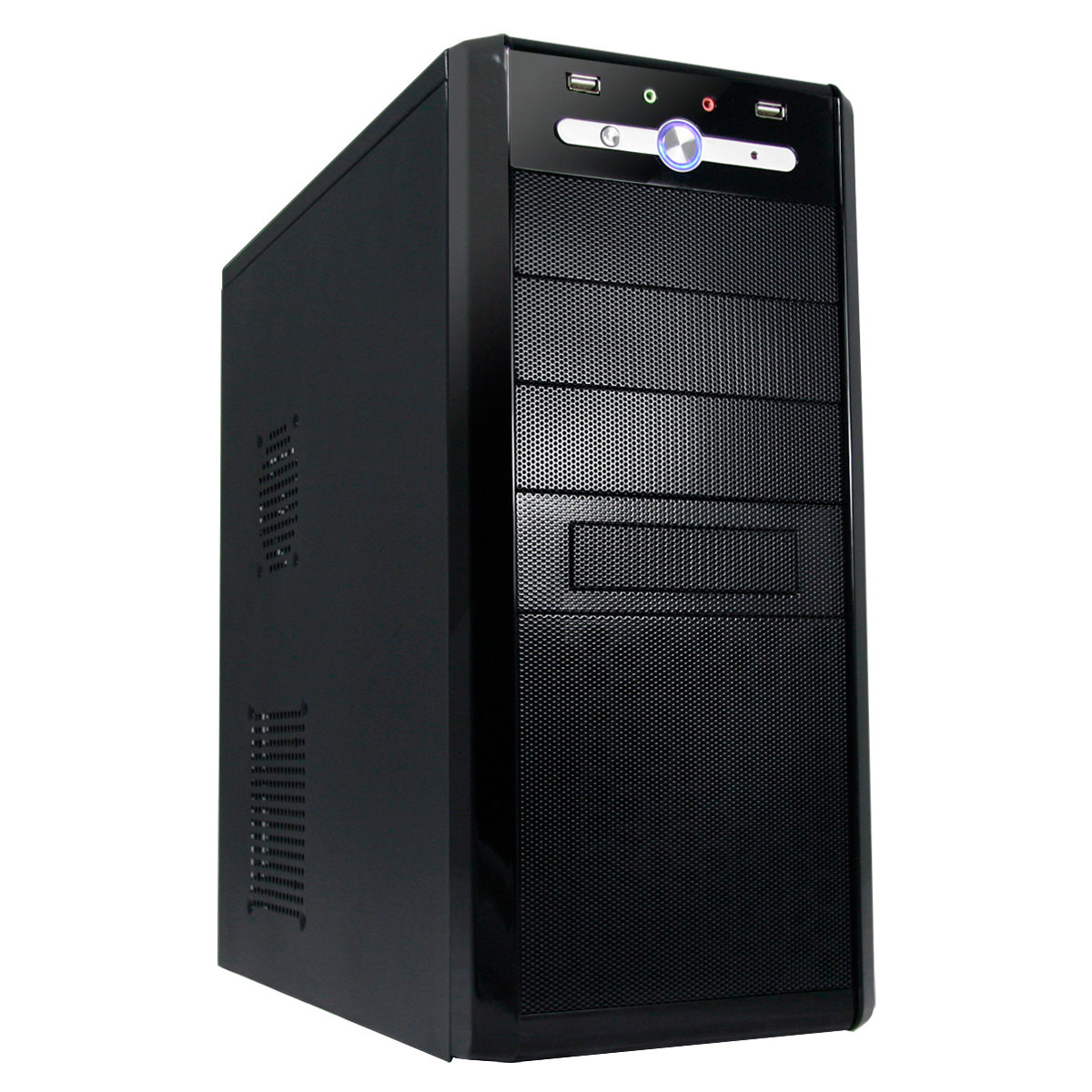
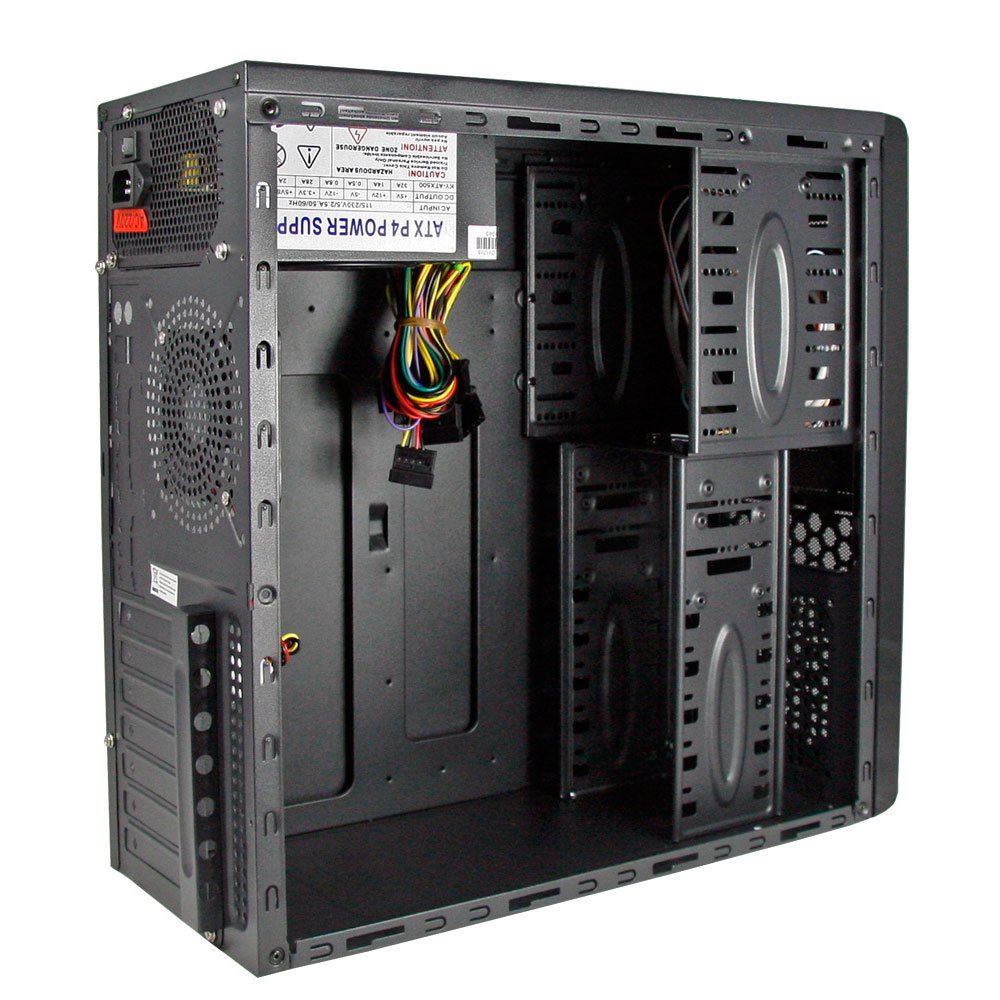
If so, it looks like it came with a single rear fan as standard...and your posted spec seems to say 2 x 120mm (12cm) fans were fitted also, but they should be easy to see as there doesn't seem to be many places that you could easily mount them.
With the motherboard, cooler, GPU in the way, it might not be that simple to replace it, but you should be able to see if it's the one making the noise, by carefully stopping it with your finger (on the centre spindle, not the fan blades).
If it is the rear exhaust fan, then removing the GPU (which isn't difficult) may be enough to get access to it (after you've unscrewed it from the rear), and a replacement fan can probably be had for £5.
Edited by mmm-five on Friday 7th January 14:34
mmm-five said:
Does it look like this (this is the COLOURSIT or CiT Knight case - not the MX, which I couldn't find)?
It's probably too old to be found :-( .Thanks for your responses ALL of you.
Actually it's a real pain to run it anywhere except where its 'hidden' because of my cable management
(I hate seeing cables, wires, pipes etc.), I've almost got to demolish my desk area, as no (hidden) cable
is quite long enough to remove it sufficiently from where its situated, and allow it to run.
I do clean/maintain its innards, but I can unplug and re-connect all the connections by feel from behind.
When I next get it out, I'll do it properly and have a better look/feel at the other fans - if I can see them whilst it's running.
ETA. My initial question was should I be worried.
Maybe I'll put up with the noise in the short term (the leave well alone syndrome) if it's not likely to lead to some kind of 'melt down'.
Edited by Elderly on Friday 7th January 14:59
Find another fan header on the board (if you have one), plug the CPU cooler fan into that. You'll need to go into the BIOS and turn off the CPU fan monitoring/warning otherwise it will warn you everytime you boot that it can't see a CPU fan connected.
You can then either use an application from your motherboard provider (i.e. Asus's Fanxpert3 or similar) to create a custom fan curve for that header (make a note of which one you plug it into, or Fanxpert for example lets you speed one fan up to 100% and turn the others off temporarily to help you ID it) based on temperature.
Ultimately though you'll always have swings up and down when the chip loads up and then ramps down again. One way around this is to increase the fan speed up time to something like 5 seconds so that any short peaks of activity don't set the fan to 100% and then back down to 30%.
The other way is to completely watercool all the components in your PC, monitor the coolant temperature and set a custom fan curve off that, but this is slightly overkill, trust me. It does make your computer super quiet though, even when the processor/GPU is spiking on/off in terms of load.
Hope that helps
You can then either use an application from your motherboard provider (i.e. Asus's Fanxpert3 or similar) to create a custom fan curve for that header (make a note of which one you plug it into, or Fanxpert for example lets you speed one fan up to 100% and turn the others off temporarily to help you ID it) based on temperature.
Ultimately though you'll always have swings up and down when the chip loads up and then ramps down again. One way around this is to increase the fan speed up time to something like 5 seconds so that any short peaks of activity don't set the fan to 100% and then back down to 30%.
The other way is to completely watercool all the components in your PC, monitor the coolant temperature and set a custom fan curve off that, but this is slightly overkill, trust me. It does make your computer super quiet though, even when the processor/GPU is spiking on/off in terms of load.
Hope that helps
Elderly said:
It's probably too old to be found :-( .
Thanks for your responses ALL of you.
Actually it's a real pain to run it anywhere except where its 'hidden' because of my cable management
(I hate seeing cables, wires, pipes etc.), I've almost got to demolish my desk area, as no (hidden) cable
is quite long enough to remove it sufficiently from where its situated, and allow it to run.
I do clean/maintain its innards, but I can unplug and re-connect all the connections by feel from behind.
When I next get it out, I'll do it properly and have a better look/feel at the other fans - if I can see them whilst it's running.
ETA. My initial question was should I be worried.
Maybe I'll put up with the noise in the short term (the leave well alone syndrome) if it's not likely to lead to some kind of 'melt down'.
Just use any old kettle lead to power it up when you pull it out of wherever it lives. It'll run quite happily with nothing connected while you play hunt-the-noise. I need to pull mine apart as I have a new GPU and a USB3.1 PCI card to install but I never seem to get round to it...Thanks for your responses ALL of you.
Actually it's a real pain to run it anywhere except where its 'hidden' because of my cable management
(I hate seeing cables, wires, pipes etc.), I've almost got to demolish my desk area, as no (hidden) cable
is quite long enough to remove it sufficiently from where its situated, and allow it to run.
I do clean/maintain its innards, but I can unplug and re-connect all the connections by feel from behind.
When I next get it out, I'll do it properly and have a better look/feel at the other fans - if I can see them whilst it's running.
ETA. My initial question was should I be worried.
Maybe I'll put up with the noise in the short term (the leave well alone syndrome) if it's not likely to lead to some kind of 'melt down'.
Edited by Elderly on Friday 7th January 14:59
There's nothing in that build that generates a lot of heat/needs a lot of cooling. If the CPU fan is good, then the only other fan that really matters is the PSU, and you can't easily replace that yourself.
It also may simply be the machine running fans fast on power on making a noise.
If it is awkward to get at, I'd be tempted to leave it alone until something actively stops working.
It also may simply be the machine running fans fast on power on making a noise.
If it is awkward to get at, I'd be tempted to leave it alone until something actively stops working.
Gassing Station | Computers, Gadgets & Stuff | Top of Page | What's New | My Stuff