
Changing LAN settings on BT Smart Hub 2
Discussion


Due to have BT FTTP installed next week, happy to let them install the new Smart Hub 2 which they will supply.
I currently use a non BT router (a TP Link one) with my BT Halo 3 FTTC, one of the main reasons for using a third party router being that I do not want my LAN to be the BT default 192.168.1.xxx, with the router being 192.168.1.254
I currently have my LAN set to (something like) 192.169.0.xxx, with my TP Link router being 192.169.0.2
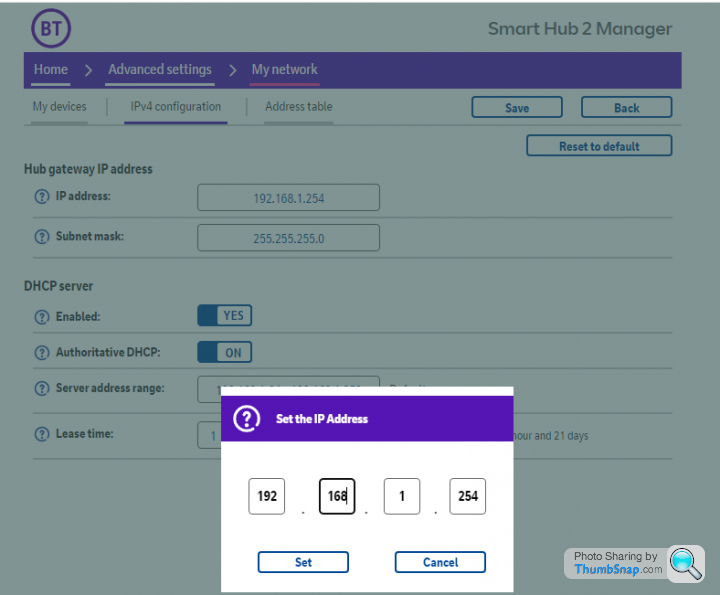
With previous BT supplied routers it was not possible to change the LAN settings, anyone know if it's possible with the latest Smart Hub 2?
I currently use a non BT router (a TP Link one) with my BT Halo 3 FTTC, one of the main reasons for using a third party router being that I do not want my LAN to be the BT default 192.168.1.xxx, with the router being 192.168.1.254
I currently have my LAN set to (something like) 192.169.0.xxx, with my TP Link router being 192.169.0.2
With previous BT supplied routers it was not possible to change the LAN settings, anyone know if it's possible with the latest Smart Hub 2?
sgrimshaw said:
Due to have BT FTTP installed next week, happy to let them install the new Smart Hub 2 which they will supply.
I currently use a non BT router (a TP Link one) with my BT Halo 3 FTTC, one of the main reasons for using a third party router being that I do not want my LAN to be the BT default 192.168.1.xxx, with the router being 192.168.1.254
I currently have my LAN set to (something like) 192.169.0.xxx, with my TP Link router being 192.169.0.2
With previous BT supplied routers it was not possible to change the LAN settings, anyone know if it's possible with the latest Smart Hub 2?
Why don't you want to use the default 192.168.1.0 network?I currently use a non BT router (a TP Link one) with my BT Halo 3 FTTC, one of the main reasons for using a third party router being that I do not want my LAN to be the BT default 192.168.1.xxx, with the router being 192.168.1.254
I currently have my LAN set to (something like) 192.169.0.xxx, with my TP Link router being 192.169.0.2
With previous BT supplied routers it was not possible to change the LAN settings, anyone know if it's possible with the latest Smart Hub 2?
192.169.0.0 is a public network, so you shouldn't be using that, as you'll have issues connecting to any server that uses an address within that range.
If you want to avoid the default range, you should be using a network assigned to the RFC1918 private address block.
Private Address Space
The Internet Assigned Numbers Authority (IANA) has reserved the
following three blocks of the IP address space for private internets:
10.0.0.0 - 10.255.255.255 (10/8 prefix)
172.16.0.0 - 172.31.255.255 (172.16/12 prefix)
192.168.0.0 - 192.168.255.255 (192.168/16 prefix)
Edited by TonyRPH on Tuesday 22 March 12:08
somouk said:
If you're having FTTP then you probably wont have to worry as the BT system will present ethernet from the fibre termination point. Just plug your existing router in to that.
I know I can do that and I most likely will.For now, ALL I would like to know is can the BT Smart Hub2's LAN settings be changed.
sgrimshaw said:
TonyRPH said:
Why don't you want to use the default 192.168.1.0 network?
The "why" is not relevant, I just want to know if the Smart Hub2's network address can be changed.192.169.0.xxx was just an example of a different address range, it's not what I actually use.
Gassing Station | Computers, Gadgets & Stuff | Top of Page | What's New | My Stuff