
Google Home + kids
Discussion


Hi all,
I have a large number of Nest/Google devices at home including doorbell, cameras and screens all set up through Google Home with me and my partner having access to them.
We have just bought her 10 year old a Nest Hub (gen 2, we have a gen 1 in our bedroom), this will be going in his bedroom for him to set alarms on, see the time and also listen to audio books, Ideally I want to block full youtube and just allow youtube kids (hes one of them that will sit and watch minecraft videos for 12 hours a day).
So the Nest Hub is now set up on my home, but how do I tell the device its a kids device? currently If I swipe on the screen he has access to all the other nest devices, can turn lights on an off, has access to my Google Calendar etc.
Just want him to have access to his own stuff, I've got Family Link app, hes in there but the app doesn't seem to do much.
I have a large number of Nest/Google devices at home including doorbell, cameras and screens all set up through Google Home with me and my partner having access to them.
We have just bought her 10 year old a Nest Hub (gen 2, we have a gen 1 in our bedroom), this will be going in his bedroom for him to set alarms on, see the time and also listen to audio books, Ideally I want to block full youtube and just allow youtube kids (hes one of them that will sit and watch minecraft videos for 12 hours a day).
So the Nest Hub is now set up on my home, but how do I tell the device its a kids device? currently If I swipe on the screen he has access to all the other nest devices, can turn lights on an off, has access to my Google Calendar etc.
Just want him to have access to his own stuff, I've got Family Link app, hes in there but the app doesn't seem to do much.
If you go to the "wifi" section on the Home app there is a box to set up family wifi and one of the options is to group devices.
You can select the devices there and limit time and adult material.
You don't seem to be able to block specific sites in that area so I think you'd have to do that on your router.
You can select the devices there and limit time and adult material.
You don't seem to be able to block specific sites in that area so I think you'd have to do that on your router.
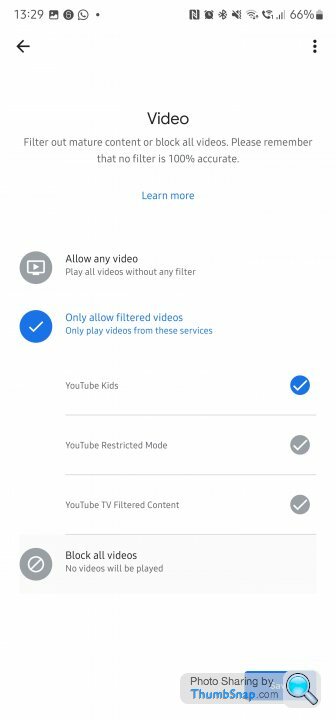
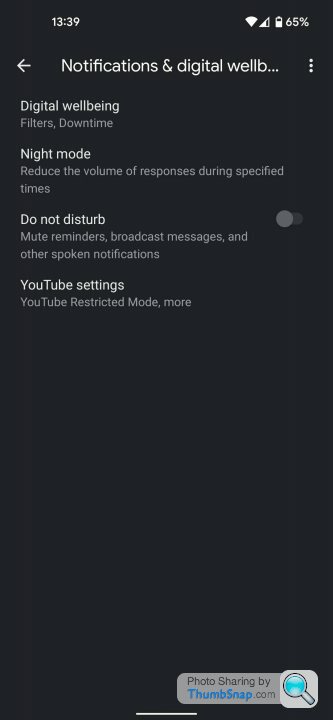
I have a Nest Hub at home and just had a quick look in the settings. I am not sure about how to remove access to your calendars and such like but for video restrictions, if you go into the Home app, select the relevant Hub, go to settings, under 'Notifications and Digital Wellbeing' then 'Digital Wellbeing' you can set filters for video, music etc. In the videos section you can specifically limit it to YouTube Kids. Hopefully that will do the job on that bit at least.
if your kids become little b ds with it like our niece and nephew are when they visit ....
i have this on the units in the kitchen and front room..
https://www.screwfix.com/p/lightwave-13a-plug-thro...
Alexa play fart noises.... -=-Click-=-
no response...
ds with it like our niece and nephew are when they visit ....i have this on the units in the kitchen and front room..
https://www.screwfix.com/p/lightwave-13a-plug-thro...
Alexa play fart noises.... -=-Click-=-
no response...
JeffreyD said:
If you go to the "wifi" section on the Home app there is a box to set up family wifi and one of the options is to group devices.
You can select the devices there and limit time and adult material.
You don't seem to be able to block specific sites in that area so I think you'd have to do that on your router.
I've put it into the child wifi section already but that still doesn't stop the screen having access at the moment to all my Google stuff. You can select the devices there and limit time and adult material.
You don't seem to be able to block specific sites in that area so I think you'd have to do that on your router.
JagYouAre said:
I have a Nest Hub at home and just had a quick look in the settings. I am not sure about how to remove access to your calendars and such like but for video restrictions, if you go into the Home app, select the relevant Hub, go to settings, under 'Notifications and Digital Wellbeing' then 'Digital Wellbeing' you can set filters for video, music etc. In the videos section you can specifically limit it to YouTube Kids. Hopefully that will do the job on that bit at least.
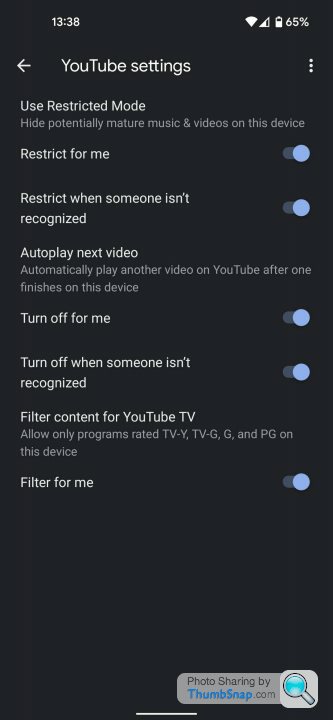
I've set it as restricted but no where do I see use Youtube Kids. Also looking at https://support.google.com/families/answer/9071584...
Step 2 says to go into family link manage settings > Google assistant
I go into manage settings and Google assistant isn't there.
Finally given up with this, reset the Google Hub and moved it into the kitchen to replace a Google Mini. Have replaced it in his room with an Amazon Echo 5 (set up on my account using my Amazon Music because I don't use Amazon Music).
I was out on my bike the other day listening to music on my phone through Spotify when the kid decided to try and listen to music in his room which came off my account and stopped my phone music. No way of setting up a proper childs account that doesn't have access to all your stuff etc. Really thought Google would of nailed this but they haven't.
I was out on my bike the other day listening to music on my phone through Spotify when the kid decided to try and listen to music in his room which came off my account and stopped my phone music. No way of setting up a proper childs account that doesn't have access to all your stuff etc. Really thought Google would of nailed this but they haven't.
the-norseman said:
Finally given up with this, reset the Google Hub and moved it into the kitchen to replace a Google Mini. Have replaced it in his room with an Amazon Echo 5 (set up on my account using my Amazon Music because I don't use Amazon Music).
I was out on my bike the other day listening to music on my phone through Spotify when the kid decided to try and listen to music in his room which came off my account and stopped my phone music. No way of setting up a proper childs account that doesn't have access to all your stuff etc. Really thought Google would of nailed this but they haven't.
The solution is that you need to have a Spotify family account, which is yet again more money per month unfortunately.I was out on my bike the other day listening to music on my phone through Spotify when the kid decided to try and listen to music in his room which came off my account and stopped my phone music. No way of setting up a proper childs account that doesn't have access to all your stuff etc. Really thought Google would of nailed this but they haven't.
Gassing Station | Computers, Gadgets & Stuff | Top of Page | What's New | My Stuff