
Why won't Windows 10 sleep
Discussion


Windows 10 is a complete load of f king st. Why the fk haven't fking Microsoft fking fixed simple sleep in fking 2022? Every other OS/Device solved this issue back in the 1990s.
There are 6 computers in my house, 3xMacs, an Intel NUC running Ubuntu (or Yocto Linux) a client;t Windows 10 laptop (which is rarely used) and my son's Windows 10 Desktop gaming PC. Needless to say only one of them ever crashes or has any problems is the gaming PC. Currently the big bugbear is that it will not sleep on its own. Why? This is something that most system solved 25 years ago. The fking thing will only sleep if I manually max it sleep. I have tried looking for a solution and found that running powercfg -requests indicates an Audio Device is keeping the machine alive.
Further research suggests that this is "Cortana" which I believe is like low IQ Alexa.
The instructions then suggest disabling via Windows + R gpedit.msc - but this simply opens a search in "Bing"...
Sorry for the rant but this really really annoys me. How can I simply make it sleep without having to spend ages hunting for the right dialog box?
Note with the gaming PC I have never managed to get it to reliably stay connected to Wifi - from the day it arrived it would disconnect and require either a manual driver reset or a reboot to make it work. The supplier/manufacturer suggested this was a hardware fault with the Wifi card so I bought a more expensive WiFi card but that made no difference (note al the other machine have no issues with Wifi). In the end I fixed this by running a cable from the router.
king st. Why the fk haven't fking Microsoft fking fixed simple sleep in fking 2022? Every other OS/Device solved this issue back in the 1990s.There are 6 computers in my house, 3xMacs, an Intel NUC running Ubuntu (or Yocto Linux) a client;t Windows 10 laptop (which is rarely used) and my son's Windows 10 Desktop gaming PC. Needless to say only one of them ever crashes or has any problems is the gaming PC. Currently the big bugbear is that it will not sleep on its own. Why? This is something that most system solved 25 years ago. The f
king thing will only sleep if I manually max it sleep. I have tried looking for a solution and found that running powercfg -requests indicates an Audio Device is keeping the machine alive.Further research suggests that this is "Cortana" which I believe is like low IQ Alexa.
The instructions then suggest disabling via Windows + R gpedit.msc - but this simply opens a search in "Bing"...
Sorry for the rant but this really really annoys me. How can I simply make it sleep without having to spend ages hunting for the right dialog box?
Note with the gaming PC I have never managed to get it to reliably stay connected to Wifi - from the day it arrived it would disconnect and require either a manual driver reset or a reboot to make it work. The supplier/manufacturer suggested this was a hardware fault with the Wifi card so I bought a more expensive WiFi card but that made no difference (note al the other machine have no issues with Wifi). In the end I fixed this by running a cable from the router.
jesusbuiltmycar said:
The instructions then suggest disabling via Windows + R gpedit.msc - but this simply opens a search in "Bing"...
Apologies if I'm missing the obvious here, but Windows+R means holding down the Windows key and pressing R. This opens the run window.Here, type 'gpedit.msc' to start the Local Group Policy editor.
Go to Computer Configuration > Administrative Templates > Windows Components > Search and you should be able to permanently disable Cortana.
SS2. said:
Apologies if I'm missing the obvious here, but Windows+R means holding down the Windows key and pressing R. This opens the run window.
Here, type 'gpedit.msc' to start the Local Group Policy editor.
Go to Computer Configuration > Administrative Templates > Windows Components > Search and you should be able to permanently disable Cortana.
When I hold down Windows + R it simply gives me a text input field not a "run" window.Here, type 'gpedit.msc' to start the Local Group Policy editor.
Go to Computer Configuration > Administrative Templates > Windows Components > Search and you should be able to permanently disable Cortana.
By "run window" do you mean a DOS shell running with "Administrator" privileges? If so when the machine is next awake I will give it a try.
Edited by jesusbuiltmycar on Monday 30th May 16:54
jesusbuiltmycar said:
When I hold down Windows + R it simply gives me a text input field not a "run" window.
By "run window" do you mean a DOS shell running with "Administrator" privileges? If so when the machine is next awake I will give it a try.
One of these:By "run window" do you mean a DOS shell running with "Administrator" privileges? If so when the machine is next awake I will give it a try.
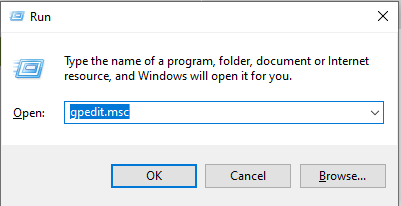
You should also be able to get the 'Run' option by right clicking on the Windows Start button.
Ahh... when I hit Windows + R I do not get one of those - I get a text entry field. ..... It may be due to the keyboard (now thinking ALT & Windows Key may be swapped, is there a "registry" setting which does this??).
That sort of inconsistency is why I loathe Windows - on Linux (or MacOS) everything can be launched from a terminal and all settings are accessible if you find the correct config file (which can be easily found via grep)...
That sort of inconsistency is why I loathe Windows - on Linux (or MacOS) everything can be launched from a terminal and all settings are accessible if you find the correct config file (which can be easily found via grep)...
Edited by jesusbuiltmycar on Monday 30th May 17:31
Further updates:
Windows + R cycles a few icons on the desktop ...
If I type "run" into the text field of the bar at the bottom, I get the dialog box shows above.
If I then enter "gpedit.msc" I get a dialog box telling me that it does not exists (apparently not part of the version of Windows he has installed).
I have tried turning off Cortana's access to the microphone - maybe that will do it, I'll report back later on whether I need to manually power it off.
Is a hard power off still bad for Windows machines in the days of SSDs? If not a smart plug could be an option.
Windows + R cycles a few icons on the desktop ...
If I type "run" into the text field of the bar at the bottom, I get the dialog box shows above.
If I then enter "gpedit.msc" I get a dialog box telling me that it does not exists (apparently not part of the version of Windows he has installed).
I have tried turning off Cortana's access to the microphone - maybe that will do it, I'll report back later on whether I need to manually power it off.
Is a hard power off still bad for Windows machines in the days of SSDs? If not a smart plug could be an option.
Suggest:
Type 'cmd' into the text box and run Command Prompt as Administrator.
Paste in: DISM.exe /Online /Cleanup-image /Restorehealth
wait until it finishes.
Then paste in: SFC /SCANNOW
wait until it finishes.
Restart computer.
Try looking for the settings again.
Edited to add: Restart.
Type 'cmd' into the text box and run Command Prompt as Administrator.
Paste in: DISM.exe /Online /Cleanup-image /Restorehealth
wait until it finishes.
Then paste in: SFC /SCANNOW
wait until it finishes.
Restart computer.
Try looking for the settings again.
Edited to add: Restart.
Edited by Ydnaroo on Monday 30th May 18:58
https://www.tenforums.com/tutorials/63136-see-wake...
This is as good as any resource to see what wakes the thing up. That will certainly help solve the problem.
How is your mouse and keyboard connected?
This is as good as any resource to see what wakes the thing up. That will certainly help solve the problem.
How is your mouse and keyboard connected?
eeLee said:
https://www.tenforums.com/tutorials/63136-see-wake...
This is as good as any resource to see what wakes the thing up. That will certainly help solve the problem.
How is your mouse and keyboard connected?
It used to randomly wake up but I fixed that … now it only sleeps if I manually put it to sleep - as I mentioned every other is solved this years ago..This is as good as any resource to see what wakes the thing up. That will certainly help solve the problem.
How is your mouse and keyboard connected?
Just checked Nd looks like my Cortana mod may have fixed things ….
xeny said:
jesusbuiltmycar said:
Is a hard power off still bad for Windows machines in the days of SSDs? If not a smart plug could be an option.
A short press of the power button should do a graceful shutdown. What is the history of the machine that the keyboard mapping is broken?Last night it did at least sleep after a disabled Cortana's access to the microphone - IMHO Cortana preventing sleep is just poor testing/requirements/design.
I will monitor it over the next couple of days - hopefully it will behave. I do wonder when MS will officially throw in the towel OS wise and make Windows a thin layer on top of Linux....
jesusbuiltmycar said:
xeny said:
jesusbuiltmycar said:
Is a hard power off still bad for Windows machines in the days of SSDs? If not a smart plug could be an option.
A short press of the power button should do a graceful shutdown. What is the history of the machine that the keyboard mapping is broken?Last night it did at least sleep after a disabled Cortana's access to the microphone - IMHO Cortana preventing sleep is just poor testing/requirements/design.
I will monitor it over the next couple of days - hopefully it will behave. I do wonder when MS will officially throw in the towel OS wise and make Windows a thin layer on top of Linux....
jesusbuiltmycar said:
Nothing software changed on the keyboard (AFAIK). The keyboard is a Mechanical TKL Chinese keyboard that has a Mac layout, so when you look at it the keys are CTRL-OPT-COMMAND as opposed to CTRL-WINDOWS-ALT, which shouldn't be a problem unless Windows has decided to do something "Windowsy".
Alt is Opt, so that explains the behaviour you're seeing. Some of that genre of keyboard (I think my Royal Kludge for example) have a key combination to switch the behaviour depending on what I've connected it to.Ok further update. Since I disabled Cortana Windows 10 does sleep more often but there are still some issues. My Son plays a lot of Roblox and if he doesn't close the app/launcher it also keeps the audio open.
Is there any way of changing the behaviour so that windows simply sleeps if there is no input from the keyboard or mouse after a pre-defied amount of time? Or alternatively can I set up a forced sleep schedule, e.g. always got to sleep at 21:30?
Is there any way of changing the behaviour so that windows simply sleeps if there is no input from the keyboard or mouse after a pre-defied amount of time? Or alternatively can I set up a forced sleep schedule, e.g. always got to sleep at 21:30?
I do this after a clean install:
* disable Magic Wake for Ethernet ( otherwise it'll prevent sleep )
* disable power wake for all mice
* start to play via the device to have it appear in the output:
* from an elevated command prompt:
* `powercfg /requests`
* `powercfg /requestsoverride DRIVER "High Definition Audio Device" SYSTEM`
* `powercfg /requestsoverride PROCESS msedge.exe`
- devices:
* disable Magic Wake for Ethernet ( otherwise it'll prevent sleep )
* disable power wake for all mice
* start to play via the device to have it appear in the output:
* from an elevated command prompt:
* `powercfg /requests`
* `powercfg /requestsoverride DRIVER "High Definition Audio Device" SYSTEM`
* `powercfg /requestsoverride PROCESS msedge.exe`
- for the Sleep plan in advanced:
Gassing Station | Computers, Gadgets & Stuff | Top of Page | What's New | My Stuff