
Which MacBook? Arghh...
Discussion


I've been holding off replacing my 2017 MacBook Pro (i5, 8gb, 256gb). There's nothing wrong with it, but it does take a while to bounce video and can get a bit warm with media-heavy web browsing.
I expected to be pre-ordering an M2 MacBook Air, but I was disappointed to see the price hike (par for the course, I guess, with M2 & the increased cost of parts & logistics), but also the omission of the Pro-motion display. I've been in John Lewis today, and compared a 14" MacBook Pro and an M1 Air, and Pro-motion was SO much better and nicer to use. I can't justify spending £1300 on a laptop that I will be forever annoyed with the screen!
I suppose this leaves me two options:
1. Plump for an M1 MacBook Air. Same screen size as my current Pro (which is fine) and available for £949, which I could justify without the fandango screen.
2. Spend on a 14" MacBook Pro, but with the M1 processor. Again, I would be spending £1700+ on a laptop with a c.2020 processor. I don't know if that would grate on me...
3. Stick with the i5 Pro for another year.
It's probably all academic, as I'm sure even the M1 processor will be more than I need, but I guess there is perception involved too.
WWYD?
I expected to be pre-ordering an M2 MacBook Air, but I was disappointed to see the price hike (par for the course, I guess, with M2 & the increased cost of parts & logistics), but also the omission of the Pro-motion display. I've been in John Lewis today, and compared a 14" MacBook Pro and an M1 Air, and Pro-motion was SO much better and nicer to use. I can't justify spending £1300 on a laptop that I will be forever annoyed with the screen!
I suppose this leaves me two options:
1. Plump for an M1 MacBook Air. Same screen size as my current Pro (which is fine) and available for £949, which I could justify without the fandango screen.
2. Spend on a 14" MacBook Pro, but with the M1 processor. Again, I would be spending £1700+ on a laptop with a c.2020 processor. I don't know if that would grate on me...
3. Stick with the i5 Pro for another year.
It's probably all academic, as I'm sure even the M1 processor will be more than I need, but I guess there is perception involved too.
WWYD?
I’d monitor the Apple UK certified refurbished store until I found the 14” in a good spec.
I’m running a 16” M1 Pro now, and it’s utterly brilliant. Takes everything I throw at it, without fans coming on. The other big advantages to the 14 & 16 are more ports (HDMI, MagSafe, more Thunderbolt, SD Card), and ability to drive multiple external displays (the 13” M1 only supports a single external monitor)
I’m running a 16” M1 Pro now, and it’s utterly brilliant. Takes everything I throw at it, without fans coming on. The other big advantages to the 14 & 16 are more ports (HDMI, MagSafe, more Thunderbolt, SD Card), and ability to drive multiple external displays (the 13” M1 only supports a single external monitor)
I just swapped from an i7 to an M1 macbook pro and to be honest I don’t notice much difference as I’m not pushing the performance that much.
Battery life is a bit better and I don’t hear the fan as much, may as well wait and see what else comes out or look for refurb stock when it is available.
Battery life is a bit better and I don’t hear the fan as much, may as well wait and see what else comes out or look for refurb stock when it is available.
Currently on a 2015 i7 15” MBP which is really struggling with what I use it for, particularly multiple monitors. The fan is constantly humming at speed.
I have the 2021 M1 16” MBP arriving this morning so will be interesting to see the difference. Mainly used for video editing so pushed fairly hard.
I have the 2021 M1 16” MBP arriving this morning so will be interesting to see the difference. Mainly used for video editing so pushed fairly hard.
SebastienClement said:
I suppose this leaves me two options:
1. Plump for an M1 MacBook Air. Same screen size as my current Pro (which is fine) and available for £949, which I could justify without the fandango screen.
2. Spend on a 14" MacBook Pro, but with the M1 processor. Again, I would be spending £1700+ on a laptop with a c.2020 processor. I don't know if that would grate on me...
3. Stick with the i5 Pro for another year.
Do note though that it's the M1 Pro and M1 Max variants in the 14" MacBook Pro, and not just the regular M1 processor. Speculative benchmarks have the M2 catching up to the M1 Pro in some areas, whilst the M1 Pro still exceeds in a number of other places.1. Plump for an M1 MacBook Air. Same screen size as my current Pro (which is fine) and available for £949, which I could justify without the fandango screen.
2. Spend on a 14" MacBook Pro, but with the M1 processor. Again, I would be spending £1700+ on a laptop with a c.2020 processor. I don't know if that would grate on me...
3. Stick with the i5 Pro for another year.
For what it's worth, I recently upgraded to the 14" Pro from a 2018 redesigned MacBook Air i5 with 512GB SSD and 16GB RAM.
I knew WWDC would potentially unveil some new hardware, but I was quietly confident the 14" MacBook Pro would not receive an update.
I am very happy with my entry level 14" Pro. I've yet to hear the fans fire up and have thrown some hefty Photoshop files at it with many layers etc. This pretty much choked my previous 2018 MacBook Air.
Pros of the 14" Pro over the M2 MacBook Air
- Significantly better screen
- Still ultimately faster in multicore performance and sustained performance due to the fan
- Up to 32GB of RAM
- Better audio
- More available ports and connectivity
- Can connect more than one external display
- Can charge from the left or right side (this one is important to me)
Pros of the M2 MacBook Air over the 14" MacBook Pro
- More portable
- Better battery life
- More colours
- Cheaper
- Potentially similar or marginally better performance for single core use (which many casual workloads are)
If your needs are casual and infrequently heavy, the M2 MacBook Air will be absolutely fine. If you like some of the additional quality of life extras on the MacBook Pro 14", it's a very good machine. Whether the 14" Pro gets updated in the autumn or not, only Apple knows. It's taken 2 years for Apple to go from M1 MacBook Air without a redesign to M2 MacBook Air with a redesign. There is plenty of headroom in these M processors to remain usable for years to come.
somouk said:
I just swapped from an i7 to an M1 macbook pro and to be honest I don’t notice much difference as I’m not pushing the performance that much.
Battery life is a bit better and I don’t hear the fan as much, may as well wait and see what else comes out or look for refurb stock when it is available.
Are the 14 inch pros available on the refurb store nowadays? I know Apple waits a long time after release before putting things on the refurb site. Wife fancies a new laptop but 14 pro is hard to justify at rrp.Battery life is a bit better and I don’t hear the fan as much, may as well wait and see what else comes out or look for refurb stock when it is available.
cb31 said:
Are the 14 inch pros available on the refurb store nowadays? I know Apple waits a long time after release before putting things on the refurb site. Wife fancies a new laptop but 14 pro is hard to justify at rrp.
Sometimes. I got my 16" via refurb, after giving up on the lead time for a new one. Just have to keep watching it regularly and jump when you see something good.Magnum 475 said:
Sometimes. I got my 16" via refurb, after giving up on the lead time for a new one. Just have to keep watching it regularly and jump when you see something good.
Got impatient so ordered one from John Lewis, £1735 which is a chunk cheaper than Apple at £1899. Not sure why they are so much cheaper.Get the M1 Air - with the memory and SDD disk size you need and save your pennies.
It still blows away everything I can throw at it.
And I'm coming from a £4000 - 2017 MacBook Pro.
It is crazy fast.
The M2 is only 12% or so faster on single CPU tasks - which is 90 odd % which I do.
I wouldn't be able to tell the difference.
Heck - you could almost buy 2 M1 Air's from Amazon for your budget.
And M1 Air is just a gnat's hair slower than the M1 Studio in single CPU mode too.
How much Muticore CPU apps are you really running?
Please list them.
It still blows away everything I can throw at it.
And I'm coming from a £4000 - 2017 MacBook Pro.
It is crazy fast.
The M2 is only 12% or so faster on single CPU tasks - which is 90 odd % which I do.
I wouldn't be able to tell the difference.
Heck - you could almost buy 2 M1 Air's from Amazon for your budget.
And M1 Air is just a gnat's hair slower than the M1 Studio in single CPU mode too.
How much Muticore CPU apps are you really running?
Please list them.
Edited by Jenny Tailor on Thursday 16th June 18:22
SebastienClement said:
I've been holding off replacing my 2017 MacBook Pro (i5, 8gb, 256gb). There's nothing wrong with it, but it does take a while to bounce video and can get a bit warm with media-heavy web browsing.
I expected to be pre-ordering an M2 MacBook Air, but I was disappointed to see the price hike (par for the course, I guess, with M2 & the increased cost of parts & logistics), but also the omission of the Pro-motion display. I've been in John Lewis today, and compared a 14" MacBook Pro and an M1 Air, and Pro-motion was SO much better and nicer to use. I can't justify spending £1300 on a laptop that I will be forever annoyed with the screen!
I suppose this leaves me two options:
1. Plump for an M1 MacBook Air. Same screen size as my current Pro (which is fine) and available for £949, which I could justify without the fandango screen.
2. Spend on a 14" MacBook Pro, but with the M1 processor. Again, I would be spending £1700+ on a laptop with a c.2020 processor. I don't know if that would grate on me...
3. Stick with the i5 Pro for another year.
It's probably all academic, as I'm sure even the M1 processor will be more than I need, but I guess there is perception involved too.
WWYD?
The 14" Apple MacBook Pro doesn't have an M1 chip. it has an M1 Pro chip from 2021. It's quite a bit more powerful and still faster than the M2 chip.I expected to be pre-ordering an M2 MacBook Air, but I was disappointed to see the price hike (par for the course, I guess, with M2 & the increased cost of parts & logistics), but also the omission of the Pro-motion display. I've been in John Lewis today, and compared a 14" MacBook Pro and an M1 Air, and Pro-motion was SO much better and nicer to use. I can't justify spending £1300 on a laptop that I will be forever annoyed with the screen!
I suppose this leaves me two options:
1. Plump for an M1 MacBook Air. Same screen size as my current Pro (which is fine) and available for £949, which I could justify without the fandango screen.
2. Spend on a 14" MacBook Pro, but with the M1 processor. Again, I would be spending £1700+ on a laptop with a c.2020 processor. I don't know if that would grate on me...
3. Stick with the i5 Pro for another year.
It's probably all academic, as I'm sure even the M1 processor will be more than I need, but I guess there is perception involved too.
WWYD?
Lots of good input on this thread - thank you!
Having put a spreadsheet together and some scoring criteria, and it shows that the best spec vs cost comes with the 13.6 MacBook Pro M2, however I'm not sure I'd want to spend £1349 and NOT have the pro-motion screen.
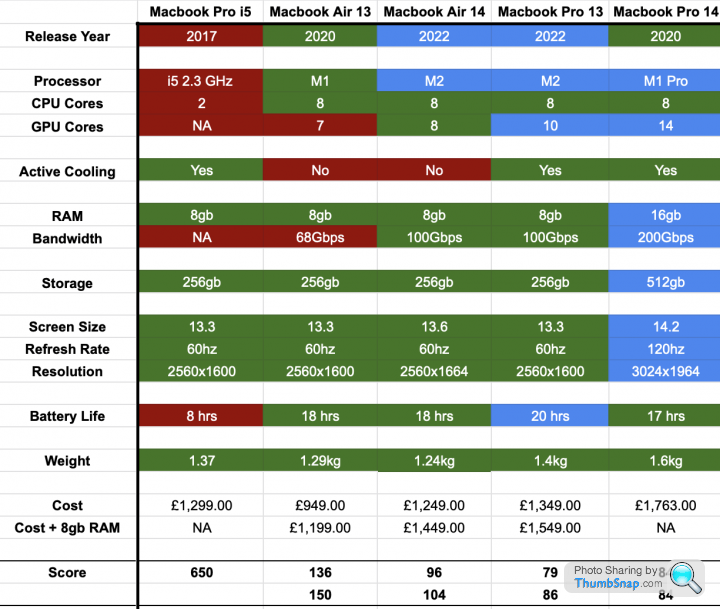
I think there are two sensible options, and it would very much depend on how long I was looking to keep the laptop for:
1. Buy a base-spec MacBook Air for £949. Aim to keep for 2.5 years or so, anything else would be a bonus.
2. Go for the 14" Pro M2. As someone above has pointed out, it has the M1 Pro processor which I wasn't taking into account. It would be a 5-year investment though, to keep the value the same as an Air over 2.5 years.
Having put a spreadsheet together and some scoring criteria, and it shows that the best spec vs cost comes with the 13.6 MacBook Pro M2, however I'm not sure I'd want to spend £1349 and NOT have the pro-motion screen.
I think there are two sensible options, and it would very much depend on how long I was looking to keep the laptop for:
1. Buy a base-spec MacBook Air for £949. Aim to keep for 2.5 years or so, anything else would be a bonus.
2. Go for the 14" Pro M2. As someone above has pointed out, it has the M1 Pro processor which I wasn't taking into account. It would be a 5-year investment though, to keep the value the same as an Air over 2.5 years.
I have gradually migrated my entire computing life to a MacBook....
2013 MacBook Air - still running, used by my son at uni until recently.
2000 and something iMac - hardly ever used.
2019 13" MacBook Pro. Not great. Got very hot, screen flickering, colours odd. Son now using and may repair.
2021 14" MacBook Pro (M1). Excellent - hopefully will last as long as my elderly 2013 Air.
I'd go for the 14" if you spend your life on a laptop (as I do). I use it in my business 9 hours a day and for everything else.
2013 MacBook Air - still running, used by my son at uni until recently.
2000 and something iMac - hardly ever used.
2019 13" MacBook Pro. Not great. Got very hot, screen flickering, colours odd. Son now using and may repair.
2021 14" MacBook Pro (M1). Excellent - hopefully will last as long as my elderly 2013 Air.
I'd go for the 14" if you spend your life on a laptop (as I do). I use it in my business 9 hours a day and for everything else.
SebastienClement said:
Lots of good input on this thread - thank you!
Having put a spreadsheet together and some scoring criteria, and it shows that the best spec vs cost comes with the 13.6 MacBook Pro M2, however I'm not sure I'd want to spend £1349 and NOT have the pro-motion screen.
I think there are two sensible options, and it would very much depend on how long I was looking to keep the laptop for:
1. Buy a base-spec MacBook Air for £949. Aim to keep for 2.5 years or so, anything else would be a bonus.
2. Go for the 14" Pro M2. As someone above has pointed out, it has the M1 Pro processor which I wasn't taking into account. It would be a 5-year investment though, to keep the value the same as an Air over 2.5 years.
You are just torturing yourself for no reason. You made your decision already. Just listen to yourself.Having put a spreadsheet together and some scoring criteria, and it shows that the best spec vs cost comes with the 13.6 MacBook Pro M2, however I'm not sure I'd want to spend £1349 and NOT have the pro-motion screen.
I think there are two sensible options, and it would very much depend on how long I was looking to keep the laptop for:
1. Buy a base-spec MacBook Air for £949. Aim to keep for 2.5 years or so, anything else would be a bonus.
2. Go for the 14" Pro M2. As someone above has pointed out, it has the M1 Pro processor which I wasn't taking into account. It would be a 5-year investment though, to keep the value the same as an Air over 2.5 years.
I think I must be really tight but when I bought my MacBook Pro Retina 13 inch back in 2013 the salesman for Apple told me it would last for ever so I've taken his word for it and have no intention of changing it. Admittedly I only use it for my photo collection (enormous) and browsing the internet and it's always plugged in so maybe the battery isn't as good as it should be but always being plugged in I don't care. I have a similar age iMac that was a decent spec at the time which again I won't change that copes with my word processing and reports.
Gassing Station | Computers, Gadgets & Stuff | Top of Page | What's New | My Stuff