
Home pc help? Google searches hijacked
Discussion


Hi there
After a bit of help please, or at least pointers where to look for help?
My 12 yo son has a windows 11 laptop, which he uses for Minecraft, youTube vids and steam games.
Recently, any attempt to do a Google search in either ie or firefoxngets hijacked to some random site, with Norton flagging up a threat
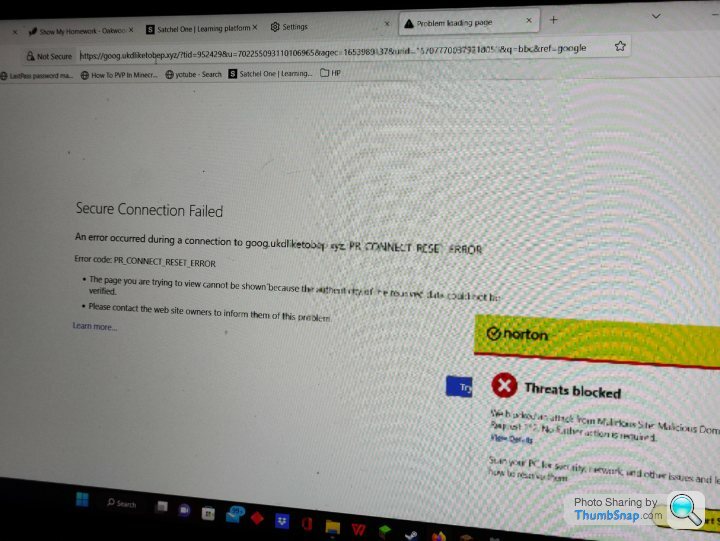
He download Minecraft mods, so we think has accidentally clicked the junk that is plastered all over those sorts of pages, and downloaded some sort of malware.
Perhaps 10 years ok I was ok at this sort of stuff, but think I've been left behind a bit by it.
We can't see any obvious app on the pc that we could delete, so it's probably more sneaky.
So, the question: can anyone suggest a course of action to clean the pc up?
Either to restore it to an earlier version, or some sort of cleaner I can run that is recommended?
Boy has had a talking to about downloading stuff, but this was an innocent mistake I think. (Some fun times ahead I'm sure)
Thanks
Ian
After a bit of help please, or at least pointers where to look for help?
My 12 yo son has a windows 11 laptop, which he uses for Minecraft, youTube vids and steam games.
Recently, any attempt to do a Google search in either ie or firefoxngets hijacked to some random site, with Norton flagging up a threat
He download Minecraft mods, so we think has accidentally clicked the junk that is plastered all over those sorts of pages, and downloaded some sort of malware.
Perhaps 10 years ok I was ok at this sort of stuff, but think I've been left behind a bit by it.
We can't see any obvious app on the pc that we could delete, so it's probably more sneaky.
So, the question: can anyone suggest a course of action to clean the pc up?
Either to restore it to an earlier version, or some sort of cleaner I can run that is recommended?
Boy has had a talking to about downloading stuff, but this was an innocent mistake I think. (Some fun times ahead I'm sure)
Thanks
Ian
When Microsoft get outsmarted on virus removal. ( A top 500 company). When that happened in the company I was working for - Microsoft could not eradicate it from the corporate network - they called in these guys.
https://www.bitdefender.com
Having seen the carnage the virus outbreak caused. And how impossible that one was to remove. And how quickly Bitdefender tackled it..
For the price of a coffee a week - I use them.
Many free options are available.
https://www.bitdefender.com
Having seen the carnage the virus outbreak caused. And how impossible that one was to remove. And how quickly Bitdefender tackled it..
For the price of a coffee a week - I use them.
Many free options are available.
Jenny Tailor said:
When Microsoft get outsmarted on virus removal. ( A top 500 company). When that happened in the company I was working for - Microsoft could not eradicate it from the corporate network - they called in these guys.
https://www.bitdefender.com
Having seen the carnage the virus outbreak caused. And how impossible that one was to remove. And how quickly Bitdefender tackled it..
For the price of a coffee a week - I use them.
Many free options are available.
None of that will help if the user is so desperate to get the latest mod/DLC for free that they ignores/cancels/over-rides/white-lists everything to download/install it. https://www.bitdefender.com
Having seen the carnage the virus outbreak caused. And how impossible that one was to remove. And how quickly Bitdefender tackled it..
For the price of a coffee a week - I use them.
Many free options are available.
Edited by mmm-five on Sunday 11th December 20:14
mmm-five said:
None of that will help if the user is so desperate to get the latest mod/DLC for free that they ignores/cancels/over-rides/white-lists everything to download/install it.
That is very sage advice.Edited by mmm-five on Sunday 11th December 20:14
The pioneers get the arrows - the settlers get the land.
Install malwarebytes and superantispyware. Update both. Run both.
Your pc may stop their download due to the malware so you'll need another pc to Google how to get round this.
Running both those apps and doing as they ask kills most stuff, or, will give you a name so you can download a specific tool to remove what you have.
Don't panic take your time and be methodical, you'll get it cleaned up after a while.
Your pc may stop their download due to the malware so you'll need another pc to Google how to get round this.
Running both those apps and doing as they ask kills most stuff, or, will give you a name so you can download a specific tool to remove what you have.
Don't panic take your time and be methodical, you'll get it cleaned up after a while.
After you've got the current stuff cleaned up, the best defense going forward is continuing the "talking to". It's good you've made it clear this could have been a result of what he did. So going forwarding, either keeping 'educating' him, or even get him online 'training' (there's stuff for kids out there to build basic awareness) will help way more than one tool or another. And provide him good skills for the future.
Looks like a possible browser search hijacker to me. Needs removing from Chrome settings and then other clean-up done to mop up any malware that may have been installed as others have mentioned.
- Click on the 3 dots top-right, then 'Search Engine' on the left.
- Make sure that "Search engine used in the address bar" is Google (or whatever you prefer.
- Click on 'Manage search engines & site search' underneath and under 'Search engines' I suspect you'll find the search engine that's added itself to Chrome and made itself the default. Click on the 3 dots to the right of the unwanted search engine and delete it.
Gassing Station | Computers, Gadgets & Stuff | Top of Page | What's New | My Stuff