
Discussion


THread hijack. I've been trying Waze.
IS there a way to remove ALL icons and warnings other than speed traps, via the app, or a hack? I've tried using it solely as a cop detector but I can't see the small icons and most often they are bloody car incident icons or petrol stations.
Also, it pops up with updates/ yes/no buttons mid journey which is annoy
IS there a way to remove ALL icons and warnings other than speed traps, via the app, or a hack? I've tried using it solely as a cop detector but I can't see the small icons and most often they are bloody car incident icons or petrol stations.
Also, it pops up with updates/ yes/no buttons mid journey which is annoy
THread hijack. I've been trying Waze.
IS there a way to remove ALL icons and warnings other than speed traps, via the app, or a hack? I've tried using it solely as a cop detector but I can't see the small icons and most often they are bloody car incident icons or petrol stations.
Also, it pops up with updates/ yes/no buttons mid journey which is annoying and dangerous. I don't want to have to touch my phone whilst driving.
IS there a way to remove ALL icons and warnings other than speed traps, via the app, or a hack? I've tried using it solely as a cop detector but I can't see the small icons and most often they are bloody car incident icons or petrol stations.
Also, it pops up with updates/ yes/no buttons mid journey which is annoying and dangerous. I don't want to have to touch my phone whilst driving.
Griffith4ever said:
THread hijack. I've been trying Waze.
IS there a way to remove ALL icons and warnings other than speed traps, via the app, or a hack? I've tried using it solely as a cop detector but I can't see the small icons and most often they are bloody car incident icons or petrol stations.
Also, it pops up with updates/ yes/no buttons mid journey which is annoying and dangerous. I don't want to have to touch my phone whilst driving.
No I don't think so, you're using it as a police detector when it's primarily a navigation tool. Snooper do police radar detectors I think. IS there a way to remove ALL icons and warnings other than speed traps, via the app, or a hack? I've tried using it solely as a cop detector but I can't see the small icons and most often they are bloody car incident icons or petrol stations.
Also, it pops up with updates/ yes/no buttons mid journey which is annoying and dangerous. I don't want to have to touch my phone whilst driving.
If you wait 10 seconds the warning messages disappear.


Griffith4ever said:
THread hijack. I've been trying Waze.
IS there a way to remove ALL icons and warnings other than speed traps, via the app, or a hack? I've tried using it solely as a cop detector but I can't see the small icons and most often they are bloody car incident icons or petrol stations.
Also, it pops up with updates/ yes/no buttons mid journey which is annoy
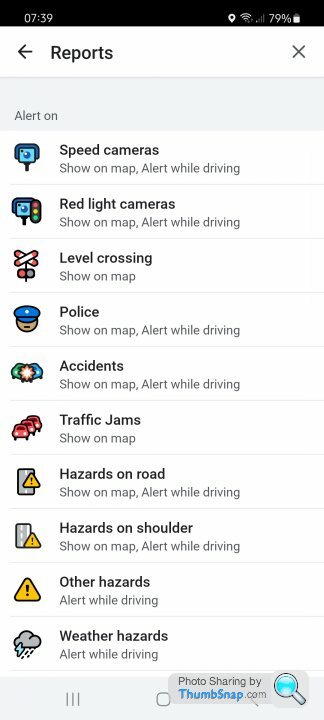
Yes. Settings / Alerts & Reports / Reports or Settings / Map Display / ReportsIS there a way to remove ALL icons and warnings other than speed traps, via the app, or a hack? I've tried using it solely as a cop detector but I can't see the small icons and most often they are bloody car incident icons or petrol stations.
Also, it pops up with updates/ yes/no buttons mid journey which is annoy
select the ones you don't want and turn them off.
I don't think you can turn petrol stations off.
Gassing Station | Computers, Gadgets & Stuff | Top of Page | What's New | My Stuff