
Cloning garage door remote / or programming it
Discussion


I have a set of SWS garage doors.
Hooked up to Teleco EC891O0 control box and Teleco 4 button remote - this one - https://www.remotecontrol-express.co.uk/remote+TEL...
I thought I’d struck gold with this video
https://m.youtube.com/shorts/CJqYD6pXAOI
But the process did not work for me and I’m Googled out.
I have two spare remotes I would like to get working - any ideas please folks?
Hooked up to Teleco EC891O0 control box and Teleco 4 button remote - this one - https://www.remotecontrol-express.co.uk/remote+TEL...
I thought I’d struck gold with this video
https://m.youtube.com/shorts/CJqYD6pXAOI
But the process did not work for me and I’m Googled out.
I have two spare remotes I would like to get working - any ideas please folks?
Are you doing this?
Programming instructions
remotecontrol-express.com - Tel : +44 203 355 5033 - Fax : +44 (0) 207 927 3151
Please note: if you keep the programming button of your receiver pressed down too long, you will erase the
programming code of all of your remote controls that have already been programmed
Programming of your new remote control:
1. Open the casing of your receiver. It is located next to your motor.
2. On the receiver circuit board, press the programming button and let it go (ENR, MEMO, PROG, REC… according to the
model)
1. The LED light on the receiver illuminates or blinks.
2. Press a button on your new remote control for 1 second.
3. Let the button go. The LED light on the receiver turns off immediately or in the following 10 seconds according to the
model.
4. Your new remote control is programmed.
Programming instructions
remotecontrol-express.com - Tel : +44 203 355 5033 - Fax : +44 (0) 207 927 3151
Please note: if you keep the programming button of your receiver pressed down too long, you will erase the
programming code of all of your remote controls that have already been programmed
Programming of your new remote control:
1. Open the casing of your receiver. It is located next to your motor.
2. On the receiver circuit board, press the programming button and let it go (ENR, MEMO, PROG, REC… according to the
model)
1. The LED light on the receiver illuminates or blinks.
2. Press a button on your new remote control for 1 second.
3. Let the button go. The LED light on the receiver turns off immediately or in the following 10 seconds according to the
model.
4. Your new remote control is programmed.
OutInTheShed said:
Are you doing this?
Programming instructions
remotecontrol-express.com - Tel : +44 203 355 5033 - Fax : +44 (0) 207 927 3151
Please note: if you keep the programming button of your receiver pressed down too long, you will erase the
programming code of all of your remote controls that have already been programmed
Programming of your new remote control:
1. Open the casing of your receiver. It is located next to your motor.
2. On the receiver circuit board, press the programming button and let it go (ENR, MEMO, PROG, REC according to the
model)
1. The LED light on the receiver illuminates or blinks.
2. Press a button on your new remote control for 1 second.
3. Let the button go. The LED light on the receiver turns off immediately or in the following 10 seconds according to the
model.
4. Your new remote control is programmed.
I opened the box up see picture below. There is 1 red button, but no idea what it does. Programming instructions
remotecontrol-express.com - Tel : +44 203 355 5033 - Fax : +44 (0) 207 927 3151
Please note: if you keep the programming button of your receiver pressed down too long, you will erase the
programming code of all of your remote controls that have already been programmed
Programming of your new remote control:
1. Open the casing of your receiver. It is located next to your motor.
2. On the receiver circuit board, press the programming button and let it go (ENR, MEMO, PROG, REC according to the
model)
1. The LED light on the receiver illuminates or blinks.
2. Press a button on your new remote control for 1 second.
3. Let the button go. The LED light on the receiver turns off immediately or in the following 10 seconds according to the
model.
4. Your new remote control is programmed.
Press that and see if there's a flashing led, if there is follow the above instructions.
Failing that ask where you purchased it from.
Or you didn't buy from Remote control express.
Or try this
https://www.youtube.com/watch?v=gq0iey9VC94
Failing that ask where you purchased it from.
Or you didn't buy from Remote control express.
Or try this
https://www.youtube.com/watch?v=gq0iey9VC94
Edited by netherfield on Friday 1st August 16:24
Can't comment on the brand but i recently bought a generic 433mhz one off ebay as a backup.
Despite following the instructions it wouldn't clone. I found a youtube video on how to wipe the device - i needed to do that first, despite it being brand new. Either it copied but incorrectly or it already had data on it.
Despite following the instructions it wouldn't clone. I found a youtube video on how to wipe the device - i needed to do that first, despite it being brand new. Either it copied but incorrectly or it already had data on it.
netherfield said:
Press that and see if there's a flashing led, if there is follow the above instructions.
Failing that ask where you purchased it from.
Or didn't buy from Remote control express.
Did that. Ended up with a blue and red flashing led rather than just blue. Both still flashing, flashing lights on remote have stopped. Yikes not sure what to press next.Failing that ask where you purchased it from.
Or didn't buy from Remote control express.
After a few weeks of sending an email I got a response, in French, with a French pdf.
Managed to use this to track down the English version
4.6
https://www.manualslib.com/manual/2720418/Teleco-A...
Or tried it yet but sharing for the rest of the world.
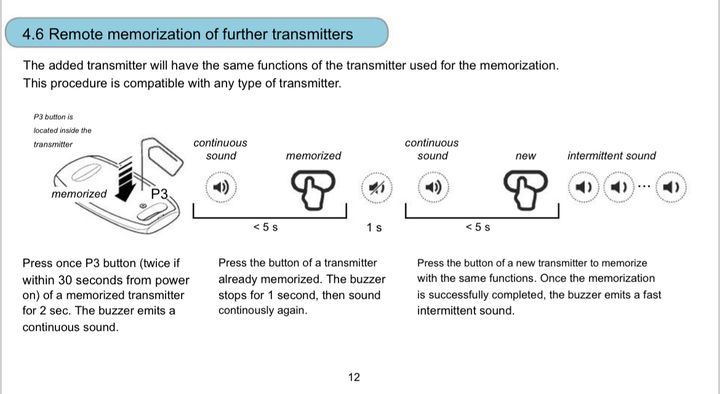
Managed to use this to track down the English version
4.6
https://www.manualslib.com/manual/2720418/Teleco-A...
Or tried it yet but sharing for the rest of the world.
Gassing Station | Homes, Gardens and DIY | Top of Page | What's New | My Stuff