
Google maps direction icons - when did they get so bad?
Discussion


I've been using Google maps for directions for years, hadn't had any issues until I arrived in the UK last week but now I've noticed that the direction banner and arrows are very misleading in a country with roundabouts. The display bears little or no relationship to the actual road layout and it happily confuses me by making the arrows that pop up different to the direction I need to take, or simplifies the display to remove exits I'm not going to take. Not handy when I naturally tend to count the exits to see where I need to go.
Is this a recent change or has it been this way for ages and I just didn't suffer due to the lack of roundabouts where I live? Or is it possibly related to using offline maps to save data connection usage? Can't see why it would be but you never know.
Going to try Waze for a while...
Is this a recent change or has it been this way for ages and I just didn't suffer due to the lack of roundabouts where I live? Or is it possibly related to using offline maps to save data connection usage? Can't see why it would be but you never know.
Going to try Waze for a while...
Occasionally I’ll take the wrong exit on a slip road in a complicated road I don’t know due to Google maps inaccuracy or lack of clarity (I don’t have verbal instructions on though so maybe that would help).
I forgive it though as generally it’s exceptional especially considering the price I pay for it. It does seem to be getting better all the time with little improvements here and there.
I forgive it though as generally it’s exceptional especially considering the price I pay for it. It does seem to be getting better all the time with little improvements here and there.
A different issue, but I think I have realised why ABRP is better for routing with EV charge stops than Google Maps - I think Google’s algorithm finds the optimal route and then finds charging along it, while ABRP finds the optimal route taking charging into consideration - which can give quite different outcomes.
My favourite "confused" Google Maps navigation is the M6 South/M42 junction where the arrows & text on the screen say "Stay on the M42" and yet the voice says "Stay on M6 South" alongside the blue direction on the map showing the same - I mean how bloody stupid to give two different instructions at the same time, bloody awful programming there!

Quick screenshot of what I mean - I'm turning right at a roundabout. Roundabout icon points right, lane icon points left. Both show at the same time.
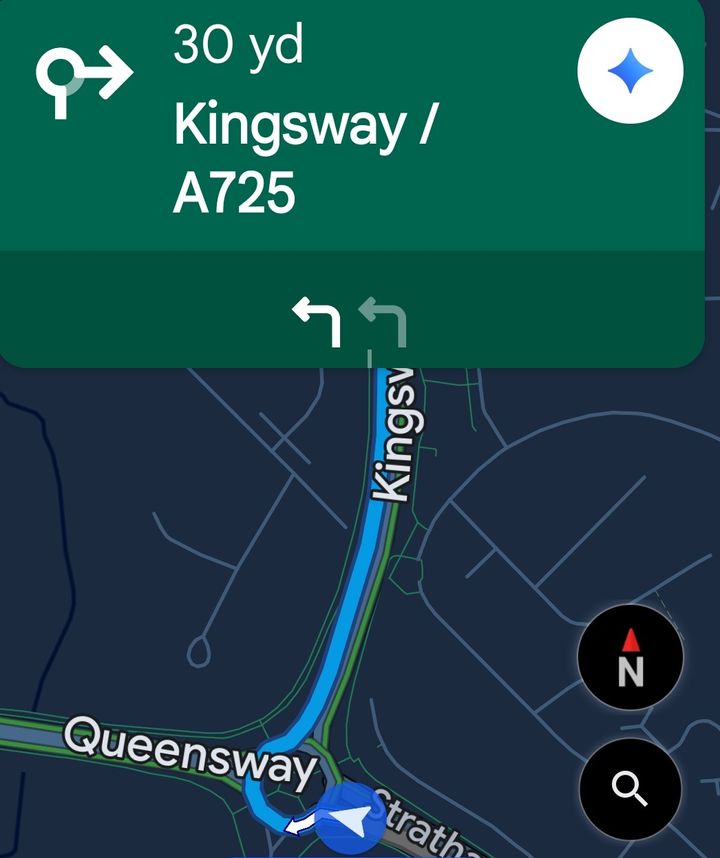
It's not so bad when reading it on the sofa, but at a glance in a hurry? Imagine this at a much more complex multi stage junction with many lanes in an unfamiliar area, in busy traffic, in the dark when it's raining. That was the trigger for my tour of a few Glasgow suburbs last Friday
I'm assuming the lower icon is lane guidance since the route afterwards was straight. If there's a setting that would help I would love to know, haven't found it yet.
It's not so bad when reading it on the sofa, but at a glance in a hurry? Imagine this at a much more complex multi stage junction with many lanes in an unfamiliar area, in busy traffic, in the dark when it's raining. That was the trigger for my tour of a few Glasgow suburbs last Friday
I'm assuming the lower icon is lane guidance since the route afterwards was straight. If there's a setting that would help I would love to know, haven't found it yet.

IanH755 said:
My favourite "confused" Google Maps navigation is the M6 South/M42 junction where the arrows & text on the screen say "Stay on the M42" and yet the voice says "Stay on M6 South" alongside the blue direction on the map showing the same - I mean how bloody stupid to give two different instructions at the same time, bloody awful programming there!
Apple Maps gets similarly bewildered on the M40 north M42 South interchange where it thinks you should stay on the M40 even though it ends there. zax said:
Quick screenshot of what I mean - I'm turning right at a roundabout. Roundabout icon points right, lane icon points left. Both show at the same time.
It's not so bad when reading it on the sofa, but at a glance in a hurry? Imagine this at a much more complex multi stage junction with many lanes in an unfamiliar area, in busy traffic, in the dark when it's raining. That was the trigger for my tour of a few Glasgow suburbs last Friday
I'm assuming the lower icon is lane guidance since the route afterwards was straight. If there's a setting that would help I would love to know, haven't found it yet.
Yes, those are lane guidance. I suspect that if they pointed right, people would turn onto the roundabout the wrong way. Looking at the roundabout on Google Maps, I'm not sure why it's advising you to take the left lane.It's not so bad when reading it on the sofa, but at a glance in a hurry? Imagine this at a much more complex multi stage junction with many lanes in an unfamiliar area, in busy traffic, in the dark when it's raining. That was the trigger for my tour of a few Glasgow suburbs last Friday
I'm assuming the lower icon is lane guidance since the route afterwards was straight. If there's a setting that would help I would love to know, haven't found it yet.

Perhaps user error or a setting I have not discovered, but for me the biggest issue is when trying to zoom out or scroll around to get an idea of the journey ahead
It seems to want to argue and disagree with me and insist that it returns to maximum zoom instead.
I have occasionally missed a slip road because it is too slow to show me what is approaching because it is zoomed right in - particularly those slip roads that track the motorway for some time and you cannot tell if you are supposed to be on or off
It seems to want to argue and disagree with me and insist that it returns to maximum zoom instead.
I have occasionally missed a slip road because it is too slow to show me what is approaching because it is zoomed right in - particularly those slip roads that track the motorway for some time and you cannot tell if you are supposed to be on or off
Gassing Station | General Gassing | Top of Page | What's New | My Stuff