
Script to hide posts from chosen users on Pistonheads forum
Discussion


I've written a quick tampermonkey script to hide posts from chosen users on Pistonheads forum.
I hacked it together across a couple of lunch breaks so there might be a few bugs. Use at your own risk, YMMV, etc.
Works on Chrome and Firefox.
You will need Tamper Monkey browser extension installed.
On Chrome you will need to right click on the Tamper Monkey toolbar icon > Manage Extension > enable "Allow User Scripts"
You can then install the script by going to this page:
https://greasyfork.org/en/scripts/563614-pistonhea...
Then open a Pistonheads thread (or refresh one) and right click a user. Select block and their posts & quotes should disappear.
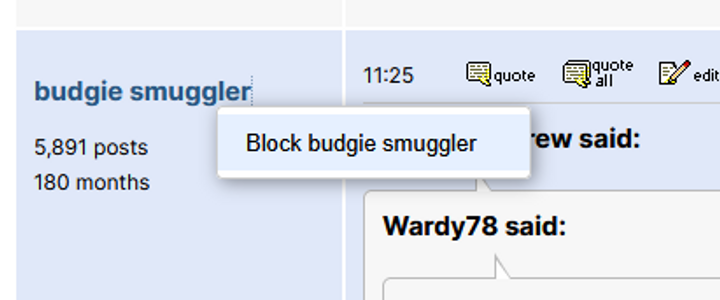

You can temporarily show the content by clicking it, or you can right click their username again to unblock them.
Note: currently this just blocks posts not entire threads.
If anything goes wrong just uninstall my script or Tamper Monkey itself.
Post up any bugs/feature requests etc. Enjoy your finely curated echo chamber ;-)
I hacked it together across a couple of lunch breaks so there might be a few bugs. Use at your own risk, YMMV, etc.
Works on Chrome and Firefox.
You will need Tamper Monkey browser extension installed.
On Chrome you will need to right click on the Tamper Monkey toolbar icon > Manage Extension > enable "Allow User Scripts"
You can then install the script by going to this page:
https://greasyfork.org/en/scripts/563614-pistonhea...
Then open a Pistonheads thread (or refresh one) and right click a user. Select block and their posts & quotes should disappear.
You can temporarily show the content by clicking it, or you can right click their username again to unblock them.
Note: currently this just blocks posts not entire threads.
If anything goes wrong just uninstall my script or Tamper Monkey itself.
Post up any bugs/feature requests etc. Enjoy your finely curated echo chamber ;-)


There is already one as mentioned here.
https://www.pistonheads.com/gassing/topic.asp?h=0&...
And yes, the Trump thread is astonishingly quiet
https://www.pistonheads.com/gassing/topic.asp?h=0&...
And yes, the Trump thread is astonishingly quiet
RustyMX5 said:
There is already one as mentioned here.
https://www.pistonheads.com/gassing/topic.asp?h=0&...
And yes, the Trump thread is astonishingly quiet
Probably wouldn't have bothered if I'd seen that! https://www.pistonheads.com/gassing/topic.asp?h=0&...
And yes, the Trump thread is astonishingly quiet

Oh well it seems like mine works a bit differently to all those in that thread anyway. Theirs completely nukes a user from the page as if they never existed. Mine obscures the post but leaves it clickable, so you can reveal the post/quote when you need to for the thread to make sense.
I do like Jagnet's idea to track member IDs so you can continue blocking them after a username change, I may
Edited by budgie smuggler on Friday 23 January 14:20
budgie smuggler said:
RustyMX5 said:
There is already one as mentioned here.
https://www.pistonheads.com/gassing/topic.asp?h=0&...
And yes, the Trump thread is astonishingly quiet
Probably wouldn't have bothered if I'd seen that! https://www.pistonheads.com/gassing/topic.asp?h=0&...
And yes, the Trump thread is astonishingly quiet
Oh well it seems like mine works a bit differently to all those in that thread anyway. Theirs completely nukes a user from the page as if they never existed. Mine obscures the post but leaves it clickable, so you can reveal the post/quote when you need to for the thread to make sense.
I do like Jagnet's idea to track member IDs so you can continue blocking them after a username change, I may
Edited by budgie smuggler on Friday 23 January 14:20
I was half-heartedly writing an updated script last year as a v2 version, jokingly called "PH PBCD Mode" but decided that I couldn't be bothered any more!
This was how I was determining the member ID: (with standard parentheses after the function keywords, but PH's posting protection doesn't like it so 403s me). It's also part of the main loop of my script so the two nested .each statements obv need closing curlies/parens etc.
let postheadertags = window.jQuery(".msg-header");
postheadertags.each(function {
let authortags = window.jQuery(this).find(".js-author");
authortags.each(function {
let str = this.lastChild;
let name = this.innerText;
let memberid = String(str).match(/memberId=([^&]*)/);
The whole script ran on a loop across the page, determined the memberID per post then applied the block level (either removing the post completely, or blurring the content) and doing anything else that was needed on a per-member basis.
Keep going with yours - definitely! It'll make parts of this site actually bearable to go back into!!
Edited by Joseph Ducreux on Friday 23 January 20:02
Gassing Station | Computers, Gadgets & Stuff | Top of Page | What's New | My Stuff