
Unexpected PC Failure
Discussion


Evening All,
I have a GMKTec Nucbox K4 with 32gb Ram and 2TB drive.
About a week ago, I (correctly) closed down the PC, switched off the mains and disconnected the power supply and any other cables. I did this with the intention of letting my son borrow it - but as it worked out, I decided to lend him a laptop instead.
Today, I re-connected all the cabling to the Nucbox and switched it on - nothing came up on the monitor. The powerlight stayed on for about 6 or 7 seconds and then went off; I pressed the power button again and the powerlight stayed on, but still no display on the monitor. There's also no light on the mouse - which is connected by USB.
I know the monitor is working perfectly well, as I've connected a laptop to it.
I then took the 2TB NVME drive out of the Nucbox and put it in a Medion Erazer laptop that I have - this laptop has a 'standard' Sata drive and a bay for an NVME drive. I (wrongly) assumed that the laptop would start up from the Sata drive, but it booted up perfectly well from the NVME drive from the Nucbox. I took the opportunity, to copy all my files to the SATA drive and as overkill, I made a further backup to a 2TB IDE drive.
Because the Nucbox NVME drive works perfectly well in the laptop, I assume it is not at fault. But what I can't understand, is if it starts up the laptop, why not the Nucbox ?
Obviously, Nucboxes are tiny devices - apart from the drive, I'd only be confident of taking the RAM out and giving it a clean.
Anyone experienced this kind of thing with a Nucbox ? Because it was switched off for nearly a week, could it have gone into some kind of 'sleep' mode - or could the BIOS have failed somehow ?
I connected a USB Installation drive (with WIN 11), but nothing happened - it's as if all connections and outputs have failed.
At least I've the consolation of knowing that I've retained all my files and additionally, I've two RAM sticks and a NVME drive.
I'm not sure whether it's worth taking it to a PC repair shop - can anyone advise on this ?
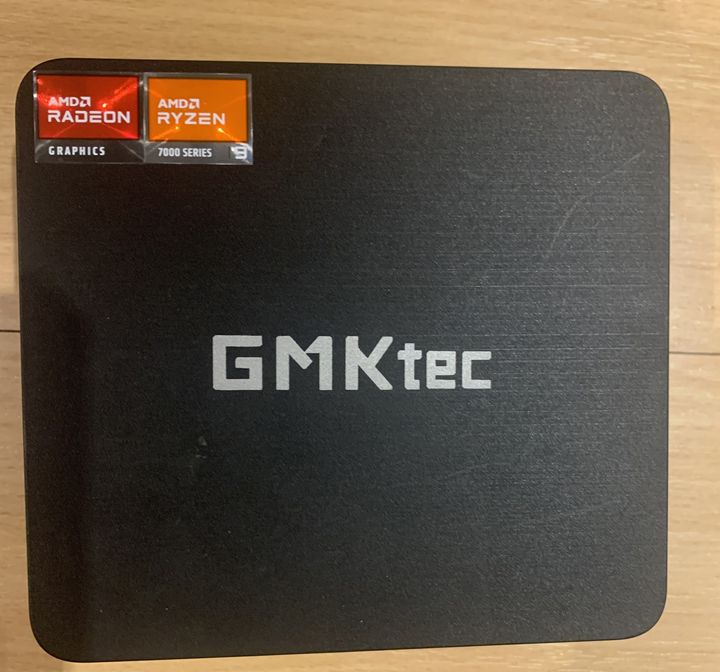
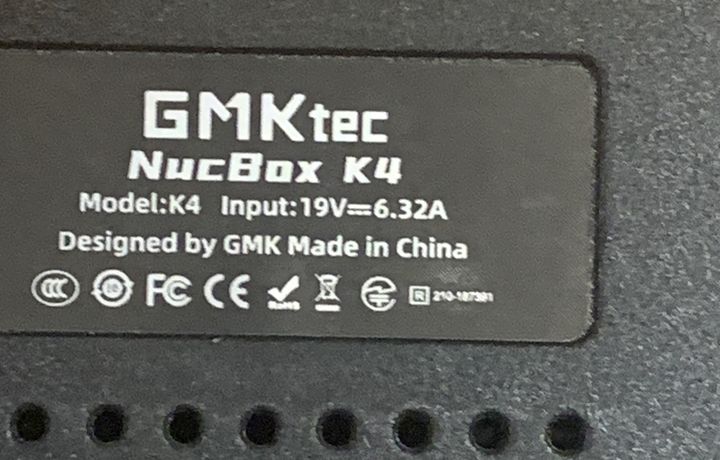
I have a GMKTec Nucbox K4 with 32gb Ram and 2TB drive.
About a week ago, I (correctly) closed down the PC, switched off the mains and disconnected the power supply and any other cables. I did this with the intention of letting my son borrow it - but as it worked out, I decided to lend him a laptop instead.
Today, I re-connected all the cabling to the Nucbox and switched it on - nothing came up on the monitor. The powerlight stayed on for about 6 or 7 seconds and then went off; I pressed the power button again and the powerlight stayed on, but still no display on the monitor. There's also no light on the mouse - which is connected by USB.
I know the monitor is working perfectly well, as I've connected a laptop to it.
I then took the 2TB NVME drive out of the Nucbox and put it in a Medion Erazer laptop that I have - this laptop has a 'standard' Sata drive and a bay for an NVME drive. I (wrongly) assumed that the laptop would start up from the Sata drive, but it booted up perfectly well from the NVME drive from the Nucbox. I took the opportunity, to copy all my files to the SATA drive and as overkill, I made a further backup to a 2TB IDE drive.
Because the Nucbox NVME drive works perfectly well in the laptop, I assume it is not at fault. But what I can't understand, is if it starts up the laptop, why not the Nucbox ?
Obviously, Nucboxes are tiny devices - apart from the drive, I'd only be confident of taking the RAM out and giving it a clean.
Anyone experienced this kind of thing with a Nucbox ? Because it was switched off for nearly a week, could it have gone into some kind of 'sleep' mode - or could the BIOS have failed somehow ?
I connected a USB Installation drive (with WIN 11), but nothing happened - it's as if all connections and outputs have failed.
At least I've the consolation of knowing that I've retained all my files and additionally, I've two RAM sticks and a NVME drive.
I'm not sure whether it's worth taking it to a PC repair shop - can anyone advise on this ?
I don't know anything about this particular device but I do work on a lot of computers. Plug everything back in and then hold down the power button for up to 30 seconds. I'm guessing that your BIOS backup battery is flat and disconnecting it from power for a while has scrambled the BIOS/EFI content. The 30-second reset thing should allow it to start, but might not automatically boot from the NVMe.
If that 30-second power button press doesn't cause it to start, then you likely have a knackered system board or a knackered PSU.
If that 30-second power button press doesn't cause it to start, then you likely have a knackered system board or a knackered PSU.
LunarOne said:
I don't know anything about this particular device but I do work on a lot of computers. Plug everything back in and then hold down the power button for up to 30 seconds. I'm guessing that your BIOS backup battery is flat and disconnecting it from power for a while has scrambled the BIOS/EFI content. The 30-second reset thing should allow it to start, but might not automatically boot from the NVMe.
If that 30-second power button press doesn't cause it to start, then you likely have a knackered system board or a knackered PSU.
Thank you for the suggestion - but sadly, it didn't work out for me.If that 30-second power button press doesn't cause it to start, then you likely have a knackered system board or a knackered PSU.
I held the power button down, the light came on, but went off after 12 seconds; it's doing this consistently - the strange thing is, if I immediately press the power button again, the power display light stays on.
I suspect that you are right about the BIOS backup battery.
Thank you for taking the time to reply - appreciated.
.
LunarOne said:
You say it went off after 12 seconds, but did you hold for at least 30 seconds. Some boards require that extended press to wipe nvram and insert factory defaults.
Yes, I did try just that.LunarOne said:
There may also be a jumper on the board to do that.
Tomorrow, in daylight, I'll see if I can find the jumper - thank you for the suggestions.Maybe that unplugging the HDMI broke a near-already-broken HDMI socket/connection - the final straw.
Unless your PSU is faulty its highly unusual for a PC to not show BIOS screen, or at least an error, on boot.
Maybe boot it, then do an ARP search for it on your lan or query your router (and look for its activive IP) and see if its actually alive. Do the LAN lights on the back flash/flicker when its "on".?
Unless your PSU is faulty its highly unusual for a PC to not show BIOS screen, or at least an error, on boot.
Maybe boot it, then do an ARP search for it on your lan or query your router (and look for its activive IP) and see if its actually alive. Do the LAN lights on the back flash/flicker when its "on".?
megaphone said:
Try a different 19v DC power supply. Does your laptop PSU have the same connector?
Thank you one and all - the NucBox is now up and running.As suggested above, I changed the power supply and it is now working fine.
The only issue that I've identified, is that the built-in WIFI is no longer working (?)
I'm not overly concerned about the built-in WIFI, because there's always the option (if needed), of buying a USB dongle - possibly, one of these :
https://www.amazon.co.uk/UGREEN-Adapter-Wireless-N...
Or can anyone suggest a better option ?
Thank you, once again, for all your help - it's very pleasing, that some many are willing to provide expert guidance.
I had this recently and it was the bios battery, replaced but then there were bios setting issues. Only fix was to re-install operating system and loses all data. 90% was backed up so not a major issue. Is there a way to replace Bios battery (CR2032) with out it losing settings and having to re-build. I have an older pc, currently working but suspect battery in that likely to fail soon. All backed up but reluctant to change battery and have to go through re-build again. Apologies for thread hi-jack !!
peekay74 said:
I had this recently and it was the bios battery, replaced but then there were bios setting issues. Only fix was to re-install operating system and loses all data. 90% was backed up so not a major issue. Is there a way to replace Bios battery (CR2032) with out it losing settings and having to re-build. I have an older pc, currently working but suspect battery in that likely to fail soon. All backed up but reluctant to change battery and have to go through re-build again. Apologies for thread hi-jack !!
There's absolutely no reason to lose your data and need to re-install your operating system just because the BIOS battery has died. It's conceivable that your OS might detect a change in hardware configuration and ask for a decryption key before booting, but you should have printed out the decryption key or written it down and kept it safe. If you haven't done it already, then do it now. Assuming Windows, then follow the guide here:https://support.microsoft.com/en-gb/windows/back-u...
LunarOne said:
peekay74 said:
I had this recently and it was the bios battery, replaced but then there were bios setting issues. Only fix was to re-install operating system and loses all data. 90% was backed up so not a major issue. Is there a way to replace Bios battery (CR2032) with out it losing settings and having to re-build. I have an older pc, currently working but suspect battery in that likely to fail soon. All backed up but reluctant to change battery and have to go through re-build again. Apologies for thread hi-jack !!
There's absolutely no reason to lose your data and need to re-install your operating system just because the BIOS battery has died. It's conceivable that your OS might detect a change in hardware configuration and ask for a decryption key before booting, but you should have printed out the decryption key or written it down and kept it safe. If you haven't done it already, then do it now. Assuming Windows, then follow the guide here:https://support.microsoft.com/en-gb/windows/back-u...
Gassing Station | Computers, Gadgets & Stuff | Top of Page | What's New | My Stuff