
Home networking
Discussion


Who makes the best home networking kits (AP's / poe switches etc) which have a very easy to use set up/ user interface.
Just about to start putting cat 6 round the house, and want to improve/ extend wifi coverage and hard wire some devices (see diagram of plan).
Ideally leaving our starlink router in place, and using the existing SSID/ Password on the new IP's so I dont have to set up any kit on a new network.
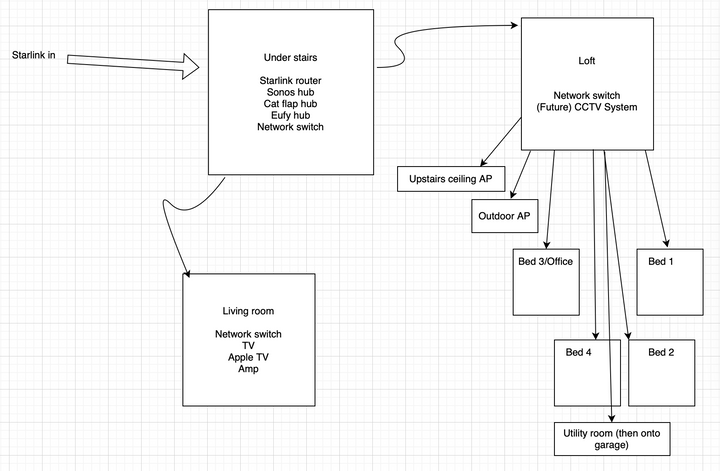
Just about to start putting cat 6 round the house, and want to improve/ extend wifi coverage and hard wire some devices (see diagram of plan).
Ideally leaving our starlink router in place, and using the existing SSID/ Password on the new IP's so I dont have to set up any kit on a new network.
Ubiquity isn't cheap and probably isn't a patch on pro systems, but its user interface is really easy to get on with, and it integrates nicely with Home Assistant if you're interested in that kind of thing. They do outdoor APs, POE switches, cameras etc so could get the whole lot from the same place. They'll be a fair bit more than just using bog standard Netgear or TPlink though, and won't necessarily give you anything extra except a nice dashboard unless you plan to start messing about with VLANS etc.
With Ubiquity you'd go from the Starlink, acting just as a modem, to a Cloudgateway, which would act as your router, then to your switches, but there's no issue with setting up the SSID and password to be the same as your old one
I'm no networking expert but I'd try to put in enough cabling to run the lounge off the main switch, to minimise the number of switches the signal has to go through, which might mean running multiple cables between the under stairs and the loft and patching a loft cable to a lounge cable under the stairs.
With Ubiquity you'd go from the Starlink, acting just as a modem, to a Cloudgateway, which would act as your router, then to your switches, but there's no issue with setting up the SSID and password to be the same as your old one
I'm no networking expert but I'd try to put in enough cabling to run the lounge off the main switch, to minimise the number of switches the signal has to go through, which might mean running multiple cables between the under stairs and the loft and patching a loft cable to a lounge cable under the stairs.
I too am looking at this. Similar idea to you.
Will be going Starlink, but when I do it can go straight into the loft, less downstairs. I will put an AP point upstairs, chatGPT tells me to try one AP point first, then if needed one downstairs too. May also add one to cover the garden.
I have started buying Ubiquiti things to spread the cost. All my research points to Ubiquiti being the best of the best at the moment.
So far have:
Unifi Wifi AP U7 Pro
Unifi 8 POE Swith
Unifi 16 POE Swith
Cloud Gateway
Will be going Starlink, but when I do it can go straight into the loft, less downstairs. I will put an AP point upstairs, chatGPT tells me to try one AP point first, then if needed one downstairs too. May also add one to cover the garden.
I have started buying Ubiquiti things to spread the cost. All my research points to Ubiquiti being the best of the best at the moment.
So far have:
Unifi Wifi AP U7 Pro
Unifi 8 POE Swith
Unifi 16 POE Swith
Cloud Gateway
joestifff said:
s, chatGPT tells me to try one AP point first, then if needed one downstairs too.
Their WifiMan app is pretty good for mapping out signal strength on a phone, if you have one of the iphones with lidar built in I believe it can even plot it on a map. Bear in mind though that while the higher frequency bands have faster data rates they have much less penetration, so one centrally mounter AP might give you a slow but stable signal on 2.4GHz at the far end of the hours, but the fastest speeds on 6 GHz only in the room with the AP, so it might make sense to put an AP in the room you want to fastest wifi speeds in even if it's not the best place for whole home coverage. I have reinforced concrete floors that even 2.4 GHz struggles to penetrate so have an AP on each floor.
RizzoTheRat said:
joestifff said:
s, chatGPT tells me to try one AP point first, then if needed one downstairs too.
Their WifiMan app is pretty good for mapping out signal strength on a phone, if you have one of the iphones with lidar built in I believe it can even plot it on a map. Bear in mind though that while the higher frequency bands have faster data rates they have much less penetration, so one centrally mounter AP might give you a slow but stable signal on 2.4GHz at the far end of the hours, but the fastest speeds on 6 GHz only in the room with the AP, so it might make sense to put an AP in the room you want to fastest wifi speeds in even if it's not the best place for whole home coverage. I have reinforced concrete floors that even 2.4 GHz struggles to penetrate so have an AP on each floor.
geeks said:
Unif kit is excellent but as an ecosystem it isn't cheap and their support these days is utter utter garbage!
we pay 30k a year for our management system and they have no direct numbers, no direct emails, no account managers, all sacked / stopped in the last 18 months, just a s tty AI that you hope logs a support call to the right deparment in india ...
unless you go with small companies i suspect the days even basic levels of competant support are long dead, even dell's enterprise support has declined over the last couple of years and they used to be brilliant
Edited by Dave Hedgehog on Tuesday 12th May 17:19
Dave Hedgehog said:
RizzoTheRat said:
joestifff said:
s, chatGPT tells me to try one AP point first, then if needed one downstairs too.
Their WifiMan app is pretty good for mapping out signal strength on a phone, if you have one of the iphones with lidar built in I believe it can even plot it on a map. Bear in mind though that while the higher frequency bands have faster data rates they have much less penetration, so one centrally mounter AP might give you a slow but stable signal on 2.4GHz at the far end of the hours, but the fastest speeds on 6 GHz only in the room with the AP, so it might make sense to put an AP in the room you want to fastest wifi speeds in even if it's not the best place for whole home coverage. I have reinforced concrete floors that even 2.4 GHz struggles to penetrate so have an AP on each floor.
My house is of basic construction just wooden floors etc.
Now you’ve said about interfering with each other I’ll plan to stagger them accordingly.
I’ll get the app too. My phone is an iPhone 15 pro. Maybe it has the requirements?
I've got a pretty massive Unifi set-up at home, including lesser used stuff like Access. It just works 99+% of the time and I like that. Protect is IMO many times better than the Hikvision software offering which I hated so much.
But it isn't cheap kit and you absolutely will end up getting more than you planned because you can just plug in product X to do Y...
I've only had need to use their support once and they gave me an obvious fob off answer as to why my UDMP wouldn't boot after an update. To proceed to the next step of my issue I had to do what their stupid suggestion said.
It only fixed the bloody thing.
So annoyingly, I can't fault their support!
But it isn't cheap kit and you absolutely will end up getting more than you planned because you can just plug in product X to do Y...
I've only had need to use their support once and they gave me an obvious fob off answer as to why my UDMP wouldn't boot after an update. To proceed to the next step of my issue I had to do what their stupid suggestion said.
It only fixed the bloody thing.
So annoyingly, I can't fault their support!
joestifff said:
I ll get the app too. My phone is an iPhone 15 pro. Maybe it has the requirements?
yep the 15 pro has lidar (it will have the augmented reality measuring tool)once you have an account and the app setup it should just be a case of turning on each device one at a time and clicking add device on the app
RizzoTheRat said:
Ubiquity isn't cheap and probably isn't a patch on pro systems, but its user interface is really easy to get on with, and it integrates nicely with Home Assistant if you're interested in that kind of thing. They do outdoor APs, POE switches, cameras etc so could get the whole lot from the same place. They'll be a fair bit more than just using bog standard Netgear or TPlink though, and won't necessarily give you anything extra except a nice dashboard unless you plan to start messing about with VLANS etc.
With Ubiquity you'd go from the Starlink, acting just as a modem, to a Cloudgateway, which would act as your router, then to your switches, but there's no issue with setting up the SSID and password to be the same as your old one
I'm no networking expert but I'd try to put in enough cabling to run the lounge off the main switch, to minimise the number of switches the signal has to go through, which might mean running multiple cables between the under stairs and the loft and patching a loft cable to a lounge cable under the stairs.
Sounds perfect - thanks, I do have an interest in home assistant but not delved too far into that yet. With Ubiquity you'd go from the Starlink, acting just as a modem, to a Cloudgateway, which would act as your router, then to your switches, but there's no issue with setting up the SSID and password to be the same as your old one
I'm no networking expert but I'd try to put in enough cabling to run the lounge off the main switch, to minimise the number of switches the signal has to go through, which might mean running multiple cables between the under stairs and the loft and patching a loft cable to a lounge cable under the stairs.
Regarding the cloud gateway, where would that sit in my diagram? (under stairs with the starlink router, or up in the loft? or...?)
The lounge cable will have to go externally as the downstairs floor has only recently been finished so no chance to go under it for the time being... so dont really want to run multiple cables to the lounge unless absolutely necessary.
We currently run 3 wifi networks off the starlink router (2.4ghz House smart tech, 5ghz guest wifi, 5ghz our wifi).. I assume those networks would be lost with the starlink in modem mode?
Audis5b9 said:
We currently run 3 wifi networks off the starlink router (2.4ghz House smart tech, 5ghz guest wifi, 5ghz our wifi).. I assume those networks would be lost with the starlink in modem mode?
You can easily set up three (or more) on unifi. It’s a really good ecosystem for use cases that sit between basic resi and full scale commercial. LooneyTunes said:
You can easily set up three (or more) on unifi. It s a really good ecosystem for use cases that sit between basic resi and full scale commercial.
Great, if i use the same SSID/ Password for those additional networks, I assume I wont need to re-add any of my existing kit to the new networks?Edited by Audis5b9 on Tuesday 12th May 19:35
Edited by Audis5b9 on Tuesday 12th May 19:35
Audis5b9 said:
LooneyTunes said:
You can easily set up three (or more) on unifi. It s a really good ecosystem for use cases that sit between basic resi and full scale commercial.
Great, if i use the same SSID/ Password for those additional networks, I assume I wont need to re-add any of my existing kit to the new networks?I have ubiquity unifi at home.
10 x ap 1 x rack dream machine and 2 additional 24 way rack routers half of which are poe. Many sure you get enough Poe sockets on what you buy
CCTV is protect.
It works well and is reliable. I wanted as much from one eco system as possible for the core network. If you have multiple networks it is complex to get right specially how data shares across networks but one done it just works. Banning a new access point you just plug it in and it adopts settings from the others.
10 x ap 1 x rack dream machine and 2 additional 24 way rack routers half of which are poe. Many sure you get enough Poe sockets on what you buy
CCTV is protect.
It works well and is reliable. I wanted as much from one eco system as possible for the core network. If you have multiple networks it is complex to get right specially how data shares across networks but one done it just works. Banning a new access point you just plug it in and it adopts settings from the others.
Audis5b9 said:
Sounds perfect - thanks, I do have an interest in home assistant but not delved too far into that yet.
Regarding the cloud gateway, where would that sit in my diagram? (under stairs with the starlink router, or up in the loft? or...?)
The lounge cable will have to go externally as the downstairs floor has only recently been finished so no chance to go under it for the time being... so dont really want to run multiple cables to the lounge unless absolutely necessary.
We currently run 3 wifi networks off the starlink router (2.4ghz House smart tech, 5ghz guest wifi, 5ghz our wifi).. I assume those networks would be lost with the starlink in modem mode?
I'm using the HA integration to let me use when our mobiles are connected to the WiFi as a proxy for whether we're at home, and can then change the way other stuff works accordingly. Regarding the cloud gateway, where would that sit in my diagram? (under stairs with the starlink router, or up in the loft? or...?)
The lounge cable will have to go externally as the downstairs floor has only recently been finished so no chance to go under it for the time being... so dont really want to run multiple cables to the lounge unless absolutely necessary.
We currently run 3 wifi networks off the starlink router (2.4ghz House smart tech, 5ghz guest wifi, 5ghz our wifi).. I assume those networks would be lost with the starlink in modem mode?
The gateway would sit between your Starlink modem and everything else, so if you don't want the cabling to go up to the loft switch and then back down then you'd need it with the starlink modem.
I'm running 3 wifi networks on mine with no problem, a 2.4 GHz only for a few smart devices, 5GHz main network, and a guest network so I track if I have visitors connected to network so the lights don't all turn off if we go out and thier still at home

Gassing Station | Homes, Gardens and DIY | Top of Page | What's New | My Stuff