
How to uninstall MS edge
Discussion


alock said:
The guts of it is the HTML rendering engine for lots of the operating system. You can't remove it.
The best you could ever achieve is to remove shortcuts and maybe the wrapper application. The core engine itself will remain (which itself is a wrapper around chromium)
What he said.The best you could ever achieve is to remove shortcuts and maybe the wrapper application. The core engine itself will remain (which itself is a wrapper around chromium)
Also, any browser you install in its place will use a hell of a lot more than 2 GB.
Besides, storage space is cheap and 2 GB is almost nothing. There are probably 15 other things you could get rid of that would save more space (hibernation file, old Windows updates etc.)
rene7 said:
, there has to be someway of stopping this happening?????
TA
rene
Use linux TA
rene

Or just don't worry about it. I know MS have had a pretty rough time with updates and stuff recently, but you'd be pretty unlucky to be affected by anything catastrophic. Still better to have the on and get security updates than turn them off and potentially be exposed.
rene7 said:
WTF!
can I at least disable it or switch it off somehow??
I've stopped all MS updates - but on 8 aug it updated itself without permission - now the pc has all kinds of problems, there has to be someway of stopping this happening?????
TA
rene
No, Edge really is needed by Windows. alock explained why.can I at least disable it or switch it off somehow??
I've stopped all MS updates - but on 8 aug it updated itself without permission - now the pc has all kinds of problems, there has to be someway of stopping this happening?????
TA
rene
You really don't want to turn off Windows Update on any PC that is connected to the internet.
I suggest your issues run deeper than having a browser installed. If you really are out of storage space, there are other things you can look at.
p.s. please don't use CCleaner or anything that claims to do this automatically. They create as many problems as they solve, often more.
simon_harris said:
Install Linux
Oh yeah, that's going to help in this situation.Is MS edge not based on chromium? If so just about anything you tried to replace it with will use the same engine and probably as much if not more resource.
Just google how to stop programs automatically starting up, this may clear out enough resource to solve your problem, windows has lots of stuff that you don't need to run at start up. Be careful though not to remove something vital.
Just google how to stop programs automatically starting up, this may clear out enough resource to solve your problem, windows has lots of stuff that you don't need to run at start up. Be careful though not to remove something vital.
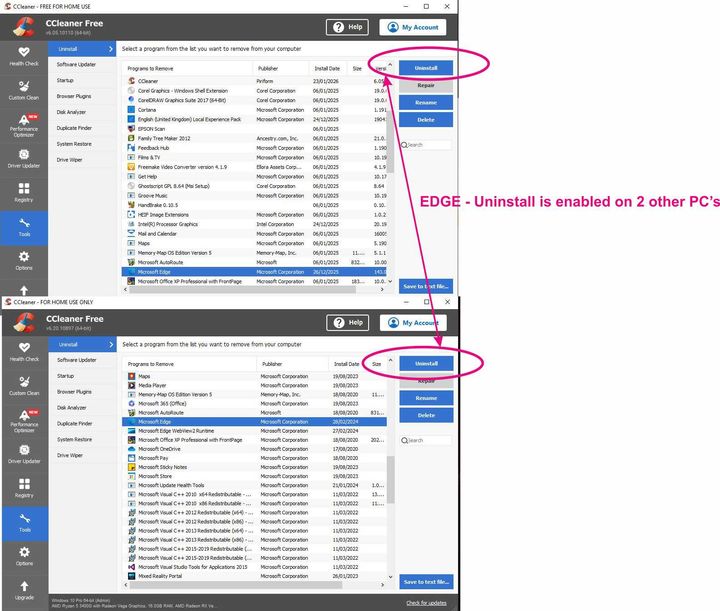
Checked 2 of my other PC's - MS edge is uninstallable on them using CCleaner [see pic] - so MUST be uninstallable on the PC which has the problem - HOW though - someone must know - please help!
MS have obviously switched off the uninstall option in the latest [unwanted] update - how do we all switch this uninstall back on??
Other's must have problem too
TA
Rene
>
MS have obviously switched off the uninstall option in the latest [unwanted] update - how do we all switch this uninstall back on??
Other's must have problem too
TA
Rene
>
rene7 said:
WTF!
can I at least disable it or switch it off somehow??
I've stopped all MS updates - but on 8 aug it updated itself without permission - now the pc has all kinds of problems, there has to be someway of stopping this happening?????
TA
rene
You're thinking about an operating system as if it's just a dumb application launcher. It isn't.can I at least disable it or switch it off somehow??
I've stopped all MS updates - but on 8 aug it updated itself without permission - now the pc has all kinds of problems, there has to be someway of stopping this happening?????
TA
rene
among many other things, an operating system provides a vast library of UI components that all software can use, from simple textboxes, to list and tree view controls to display data in a standardized way.
For decades, a web browser control has been a standard UI component provided by the operating system that third party software can use to display HTML data. Initially Windows 98 (I think) provided the Internet Explorer renderer, until something called WebView2 replaced it. Microsoft also choose to wrap this in a tiny executable and call it Edge.
Removing Edge will have no effect on disk space.
Removing WebView2 will break many installed third party applications.
rene7]Checked 2 of my other PC's - MS edge is uninstallable on them using CCleaner [see pic said:
- so MUST be uninstallable on the PC which has the problem - HOW though - someone must know - please help!
MS have obviously switched off the uninstall option in the latest [unwanted] update - how do we all switch this uninstall back on??
Other's must have problem too
TA
Rene
>
Just for reference, from v7 and later, CCleaner uses WebView2, i.e. EdgeMS have obviously switched off the uninstall option in the latest [unwanted] update - how do we all switch this uninstall back on??
Other's must have problem too
TA
Rene
>
rene7]Checked 2 of my other PC's - MS edge is uninstallable on them using CCleaner [see pic said:
- so MUST be uninstallable on the PC which has the problem - HOW though - someone must know - please help!
MS have obviously switched off the uninstall option in the latest [unwanted] update - how do we all switch this uninstall back on??
Other's must have problem too
TA
Rene
>
Crap on a cracker! Who still uses MS Autoroute? MS have obviously switched off the uninstall option in the latest [unwanted] update - how do we all switch this uninstall back on??
Other's must have problem too
TA
Rene
>

One option to save some space and get away from the MS dictatorship is to jump to another OS - it's not complicated but it does require a but of IT knowledge.
If you're happy to use alternative office packages etc there is Linux, if you must use MS apps there are stripped down versions of Windows out there like Mini11 that aren't full of MS bloat.
There are pros and cons to both approaches, for many people the easiest option is just to bend over and let MS have it's way 😆
If you're happy to use alternative office packages etc there is Linux, if you must use MS apps there are stripped down versions of Windows out there like Mini11 that aren't full of MS bloat.
There are pros and cons to both approaches, for many people the easiest option is just to bend over and let MS have it's way 😆


bigpriest said:
The 2GB folder in Program Files is EdgeCore (or something like that) - as said above it's not just a web browser it's a core component of Windows.
It's only like that because Microsoft made it so when they were forcing Internet Explorer on windows users in their attempts to kill off other browsers back in the 1990's. wiki link to anti-monopoly caseThere was no good reason to entwine a web browser with the OS back in the 90's and there's no good reason now. MS ens
 ttified windows back then, and continue to force such st on it's users. They are currently trying the same trick with AI.
Gassing Station | Computers, Gadgets & Stuff | Top of Page | What's New | My Stuff