
Ripping old mini DVD to desktop to MP4 help
Discussion


I knew this wasn't going to be easy. Ingredients:
-Some mini DVDs from an old Sony Handycam
-A portable DVD player
-A desktop
-Da Vinci Resolve
Theory - plug DVD into PC and display files - rip the files, whack them in Da Vinci then edit and save as MP4.
Fail.
The files have saved as what is imaged below and when trying to import them into Da Vinci nothing happens, the media pool remains empty. What should I be doing?
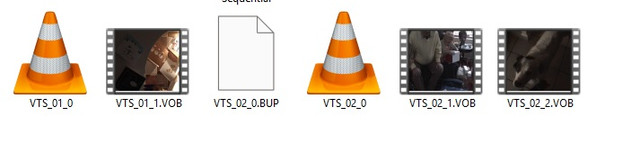
-Some mini DVDs from an old Sony Handycam
-A portable DVD player
-A desktop
-Da Vinci Resolve
Theory - plug DVD into PC and display files - rip the files, whack them in Da Vinci then edit and save as MP4.
Fail.
The files have saved as what is imaged below and when trying to import them into Da Vinci nothing happens, the media pool remains empty. What should I be doing?
The VOB files are the MPEG video files, usually split by chapter.
You can convert them with:
I'm on Mac so can't comment on the usefulness of any Windows tools (I use FFmpeg via a Mac front-end called FF•Works).
You can convert them with:
- VLC (https://www.videolan.org/vlc/download-windows.html)
- Handbrake (https://handbrake.fr/downloads.php)
- FFmpeg (https://ffmpeg.org) if you're comfortable using the command line
- FFBatch AV Convertor (https://ffmpeg-batch.sourceforge.io) if you want a friendlier front-end to FFmpeg conversion
I'm on Mac so can't comment on the usefulness of any Windows tools (I use FFmpeg via a Mac front-end called FF•Works).
eeLee said:
Ubiquitous2024 said:
No just old family vids
same point in my mind - no option to get the material via a torrent....My only guess is that the original recording device may have had a weird format or has encrypted it somehow. Can you play them via the disc using vlc?
VLC plays them yes, however when converting into an MP4 I get a codec problem and audio can't be played, and it only converts 19 seconds of what was a 19 min file then stops.
This are mini DVD discs that you physically put into a Sony camcorder - we bought it in 2006 for our honeymoon.
This are mini DVD discs that you physically put into a Sony camcorder - we bought it in 2006 for our honeymoon.
Are the discs finalised in the camcorder so that they can be played in a dvd player?
If so the process should just be to connect a dvd drive to a computer, run handbrake, choose output profile (vob, mp4 etc) and then hit save.
If you’ve already copied the vobs into the computer, I’m not sure exactly how you restructure them but I would assume handbrake can just load each one in turn and convert.
If so the process should just be to connect a dvd drive to a computer, run handbrake, choose output profile (vob, mp4 etc) and then hit save.
If you’ve already copied the vobs into the computer, I’m not sure exactly how you restructure them but I would assume handbrake can just load each one in turn and convert.
Edited by Cloudy147 on Wednesday 23 September 18:09
Gassing Station | Computers, Gadgets & Stuff | Top of Page | What's New | My Stuff