
Another motion sensor pic
Discussion


I'm still experimenting with the 'Zigview' motion sensor. It's tricky to get right. Sensitivity is crucial - too low and everytime a cloud goes over or a fly passes you get 12 blank frames. (DOH) Once we are up north, I'll do it away from nasty red plastic backgrounds, hopefully with more interesting critters.
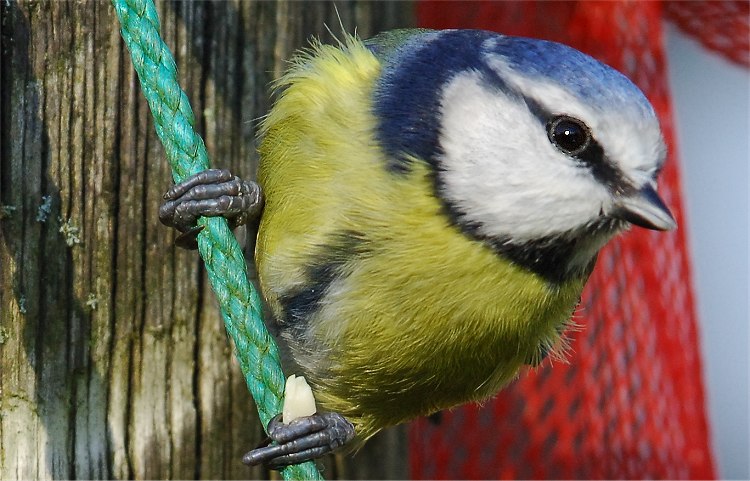
This was it's best effort today. Notable only really because it woke the camera, focussed and took the photo whilst I was in the pub 3 miles away with Mrs Get (That's my kinda' photography). I still can't quite get used to coming back to a card full of photos that nobody took.
As you can see the DOF wasn't deep enough (a shame as this would have been a great pic otherwise methinks), so a slightly shorter lens next time should sort it - my guess the 70-300 would be perfect.
But check out the nut in it's 'hand'. Never seen that before, and didn't know they did it - one 'finger' round the nut.
Camera about 6 feet away with the 80-400 - 320 ISO
This was it's best effort today. Notable only really because it woke the camera, focussed and took the photo whilst I was in the pub 3 miles away with Mrs Get (That's my kinda' photography). I still can't quite get used to coming back to a card full of photos that nobody took.
As you can see the DOF wasn't deep enough (a shame as this would have been a great pic otherwise methinks), so a slightly shorter lens next time should sort it - my guess the 70-300 would be perfect.
But check out the nut in it's 'hand'. Never seen that before, and didn't know they did it - one 'finger' round the nut.
Camera about 6 feet away with the 80-400 - 320 ISO
simpo two said:
How do you control where the subject is in the frame when it fires? Does it trigger the moment it touches the edge of the frame, or the central segment?
The screen divides into 9 segments and you can get it to fire in any or all... plus you can get it to fire just once or up to 999 times on each movement at up to 2 frames per sec.
The on screen menu is very fiddly, and the instructions are translated by a chimp (from Korean)- but it does do what it says on the tin.
BTW... it's the Zigview 'R' & and it'll only work on certain cameras (for Nikon you need the 10 pin shutter release connection)

GetCarter said:
How do you control where the subject is in the frame when it fires? Does it trigger the moment it touches the edge of the frame, or the central segment?
The screen divides into 9 segments and you can get it to fire in any or all... plus you can get it to fire just once or up to 999 times on each movement at up to 2 frames per sec.
The on screen menu is very fiddly, and the instructions are translated by a chimp (from Korean)- but it does do what it says on the tin.
BTW... it's the Zigview 'R' & and it'll only work on certain cameras (for Nikon you need the 10 pin shutter release connection)
So does that mean I'd have to buy a D200 to use it?
GetCarter said:
I'm not sure which of the Nikons has the 10 pin remote shutter connection. That's what one needs.
True, from memory the list is something like, D2, D1, D100 (both only with the MB10 extra battery pack), F6, F5, F4 etc.
[http]www.intro2020.co.uk/pages/zigview4.htm[/http] has the full compatibility list
Chris
>> Edited by CVP on Monday 30th January 16:23
CVP said:
I'm not sure which of the Nikons has the 10 pin remote shutter connection. That's what one needs.
True, from memory the list is something like, D2, D1, D100 (both only with the MB10 extra battery pack), F6, F5, F4 etc.
Chris
Looks like a reason to keep the D100 and delay getting the D200
Should be able on the D200 battery pack - there's no way Nikon will leave this connector off as it means you can utilise many Nikon extras.
I'm glad I kept my D100 & battery pack as it means I too have succumed to getting one of these devices. It's fun experimenting but as Mr Get Carter quite rightly states the instructions are total gibberish in some instances.
Chris
I'm glad I kept my D100 & battery pack as it means I too have succumed to getting one of these devices. It's fun experimenting but as Mr Get Carter quite rightly states the instructions are total gibberish in some instances.
Chris
Gassing Station | Photography & Video | Top of Page | What's New | My Stuff