
"Grainy" pictures - solutions/advice?
Discussion


I was up in Scotland last weekend on a car tour and when I got back I had a flick through my 100-odd pictures. I've got a few decent ones, but a lot of them just don't look quite right. I don't know what it is - the weather, my camera or me  Like this picture of the car park - it looked amazing in real life but in the photo its just boring:

(Also not helped by resizing and reducing quality to put on here!)
Then I fried taking pictures while in the convoy. Most of them are pretty crap, but this one looked great when it was small. Once I've got it on my laptop and removed the dead flies from the windscreen etc, it looks a bit grainy, as if it was taken with a crap camera (sorry about the big image):

I did get one or two which I think look good:
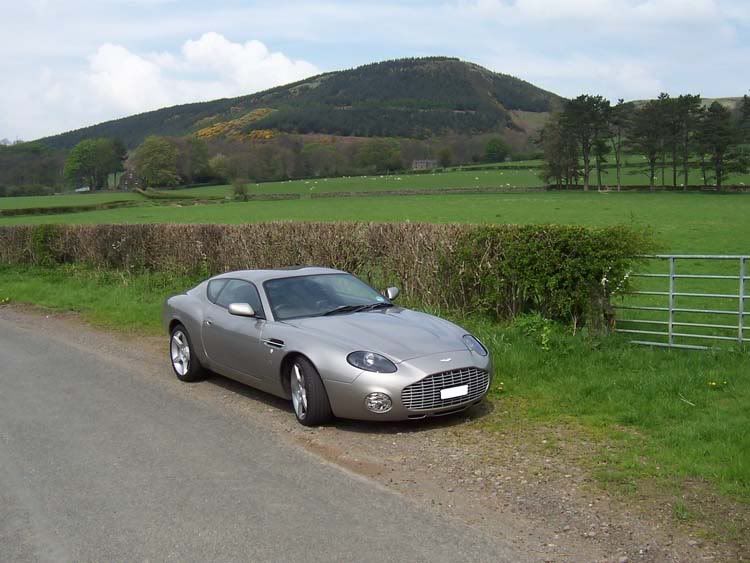


Maybe its my camera (although a bad workman always blames his tools...) - its just a little Kodak 3MP camera. Any advice on what I'm doing wrong? I'm going away this summer and want to get some decent photos - should I get a better (as in bigger MP) camera, or was it just bad weather conditions? Or have you got any tips on how to get a better picture?
Thanks
Like this picture of the car park - it looked amazing in real life but in the photo its just boring: (Also not helped by resizing and reducing quality to put on here!)
Then I fried taking pictures while in the convoy. Most of them are pretty crap, but this one looked great when it was small. Once I've got it on my laptop and removed the dead flies from the windscreen etc, it looks a bit grainy, as if it was taken with a crap camera (sorry about the big image):
I did get one or two which I think look good:
Maybe its my camera (although a bad workman always blames his tools...) - its just a little Kodak 3MP camera. Any advice on what I'm doing wrong? I'm going away this summer and want to get some decent photos - should I get a better (as in bigger MP) camera, or was it just bad weather conditions? Or have you got any tips on how to get a better picture?
Thanks
Your second to the last one could probably benefit from a "fill flash" or even a shadow/highlight adjustment in photoshop. It looks like you might have a small bit of chromatic abberation in a few of them and all of them could benefit from a pass with an unsharp mask (probably 85%, 1 pixel, 4 threshold would do it).
As has been said, postprocessing is key. Does your camera let you choose your focal point or is it in "full auto"? focus seems to fade a bit on the first one.
Very nice picture overall, though. Excellent subject matter...

ErnestM
As has been said, postprocessing is key. Does your camera let you choose your focal point or is it in "full auto"? focus seems to fade a bit on the first one.
Very nice picture overall, though. Excellent subject matter...
ErnestM
mxdi said:
sorry for thread hijack, but that yellow sagaris is an amazing colour, anyone know the name of the colour?
Can't remember the name of the colour but the owner said there were only 2 Saggy's in that colour in the world. They've stopped making it now as it takes way too many coats of paint and its really hard to match up if something needs to be repaired!
For a 3MP I think they are great photos! They look a bit "hard" but maybe that's the gamma set on my monitor. Try bracketing the exposure if the camera will allow you; take the same photo at +/- 0.5 stop and +/- 1 stop, that might tell you if the camera is under/over metering.
Digital cameras don't have the dynamic range that film or the human eye does, so it can mean that a well exposed subject necessitates a loss of detail in the dark or bright areas.
Digital cameras don't have the dynamic range that film or the human eye does, so it can mean that a well exposed subject necessitates a loss of detail in the dark or bright areas.
 The Sagaris one is pretty dakr because the car was just so bright

MAD 20V, looks better. I think the border adds to it a lot as well And without the guy standing behind them the photo is a lot more focused on the cars! I was having a play round with that picture on photoshop this morning as well. I couldn't get the colours right as the proper colour is just so stunning in real life I decided that you can't get it in a photo at all. So I finished with this:

Slightly different from the original...
>> Edited by southpaw on Sunday 14th May 15:02
And without the guy standing behind them the photo is a lot more focused on the cars! I was having a play round with that picture on photoshop this morning as well. I couldn't get the colours right as the proper colour is just so stunning in real life I decided that you can't get it in a photo at all. So I finished with this: Slightly different from the original...
>> Edited by southpaw on Sunday 14th May 15:02

Gassing Station | Photography & Video | Top of Page | What's New | My Stuff