
black & white - opinions please....!!
Discussion


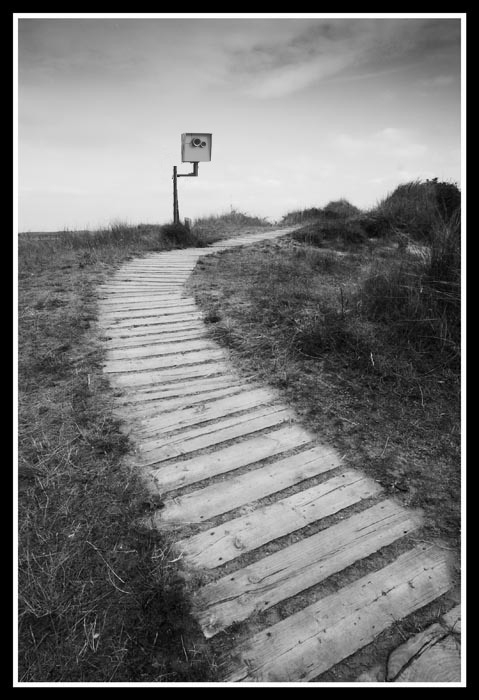
After a hot and dusty weekend with some smelly mates at Le Mans I spent this weekend in cleaner quieter surroundings with Mrs L on the North Norfolk coast. I've been playing with this pic and would appreciate your comments cos so far I've not converted many to B&W.....
Thanks,
Longers

Thanks,
Longers

how did you convert to B&W? just use 'desaturate' in Photoshop? or erm, another method? it's a nice shot I think but would as Gemm has said beneift from some contrast and grain, make the dark tones look black and a bit of noise to the greys...
I don't know much (anything in fact haha) about B&W conversions but might start looking into it on the Canon forum.
I don't know much (anything in fact haha) about B&W conversions but might start looking into it on the Canon forum.


There's a neat way to convert to B&W (if you use Ye Olde Photoshoppe) which allows you, through hue/saturation layers. It has the advantage of allowing you to keep going back and tweaking the conversion as if you had filters to play with
Here is a link to a Quicktime tutorial
http://av.adobe.com/russellbrown/Colo
 WARNING!! The narrator is a complete pl0nk3r - and it's not his "patented" method - loads of people have worked this out. But it's done here at a Janet and John level and even I can follow how it works....
More at www.russellbrown.com/tips_tech.html
Here is a link to a Quicktime tutorial
http://av.adobe.com/russellbrown/Colo
WARNING!! The narrator is a complete pl0nk3r - and it's not his "patented" method - loads of people have worked this out. But it's done here at a Janet and John level and even I can follow how it works.... More at www.russellbrown.com/tips_tech.html


beano500 said:
There's a neat way to convert to B&W (if you use Ye Olde Photoshoppe) which allows you, through hue/saturation layers. It has the advantage of allowing you to keep going back and tweaking the conversion as if you had filters to play with
Here is a link to a Quicktime tutorial
http://av.adobe.com/russellbrown/Colo
WARNING!! The narrator is a complete pl0nk3r - and it's not his "patented" method - loads of people have worked this out. But it's done here at a Janet and John level and even I can follow how it works....
More at www.russellbrown.com/tips_tech.html
Here is a link to a Quicktime tutorial
http://av.adobe.com/russellbrown/Colo
WARNING!! The narrator is a complete pl0nk3r - and it's not his "patented" method - loads of people have worked this out. But it's done here at a Janet and John level and even I can follow how it works.... More at www.russellbrown.com/tips_tech.html
Thanks Beano

Longers
Gassing Station | Photography & Video | Top of Page | What's New | My Stuff