
New PC no Office software
Discussion


Hi folks,
Just ordered a new PC from Dell which comes with MS Works 7 but MS Office 2003 was going to be another £230 and I suspect this is available for much less elsewhere so I didn't ask for it. I now learn I won't get Word either.
I am told the Student Teacher version of Office 2003 is £75 or so but I am not a student or a teacher. Hmm.
I have an Office 2000 CD which came with the previous Dell but assume it is not legal to use that with the new PC as MS say their software should die with the machine it was installed on.
I have also heard of a possible clash between Word and MS Works if Word is installed later though I recall (?) reading of a fix for that.
Should I buy an older version of Office, one which would not clash with Works and which is legal to use??
Cheers
T
Just ordered a new PC from Dell which comes with MS Works 7 but MS Office 2003 was going to be another £230 and I suspect this is available for much less elsewhere so I didn't ask for it. I now learn I won't get Word either.
I am told the Student Teacher version of Office 2003 is £75 or so but I am not a student or a teacher. Hmm.
I have an Office 2000 CD which came with the previous Dell but assume it is not legal to use that with the new PC as MS say their software should die with the machine it was installed on.
I have also heard of a possible clash between Word and MS Works if Word is installed later though I recall (?) reading of a fix for that.
Should I buy an older version of Office, one which would not clash with Works and which is legal to use??
Cheers
T
Tafia said:
Hi folks,
Just ordered a new PC from Dell which comes with MS Works 7 but MS Office 2003 was going to be another £230 and I suspect this is available for much less elsewhere so I didn't ask for it. I now learn I won't get Word either.
I am told the Student Teacher version of Office 2003 is £75 or so but I am not a student or a teacher. Hmm.
I have an Office 2000 CD which came with the previous Dell but assume it is not legal to use that with the new PC as MS say their software should die with the machine it was installed on.
I have also heard of a possible clash between Word and MS Works if Word is installed later though I recall (?) reading of a fix for that.
Should I buy an older version of Office, one which would not clash with Works and which is legal to use??
Cheers
T
Just ordered a new PC from Dell which comes with MS Works 7 but MS Office 2003 was going to be another £230 and I suspect this is available for much less elsewhere so I didn't ask for it. I now learn I won't get Word either.
I am told the Student Teacher version of Office 2003 is £75 or so but I am not a student or a teacher. Hmm.
I have an Office 2000 CD which came with the previous Dell but assume it is not legal to use that with the new PC as MS say their software should die with the machine it was installed on.
I have also heard of a possible clash between Word and MS Works if Word is installed later though I recall (?) reading of a fix for that.
Should I buy an older version of Office, one which would not clash with Works and which is legal to use??
Cheers
T
I use Office 2000 on my latest Dell PC. It was a copy I bought as a stand alone but I can't see that you are breaching any rules by running a copy you bought. After all, you are only using it on 1 machine.
You're right about the possible conflict between Word and MS Works. I used to get quite a few problems on the old PC which required Word to be renamed. When I got my new Dell I removed all traces of Works before loading Office and have had no problems for the 18 months I have had the new machine.

If this is your private computer, you should use OpenOffice www.openoffice.org
It reads and writes MS Office files, and has all the features you would use in a private MS Office installation. Plus, it creates PDF files out of the box.
Give it a try - it's free.
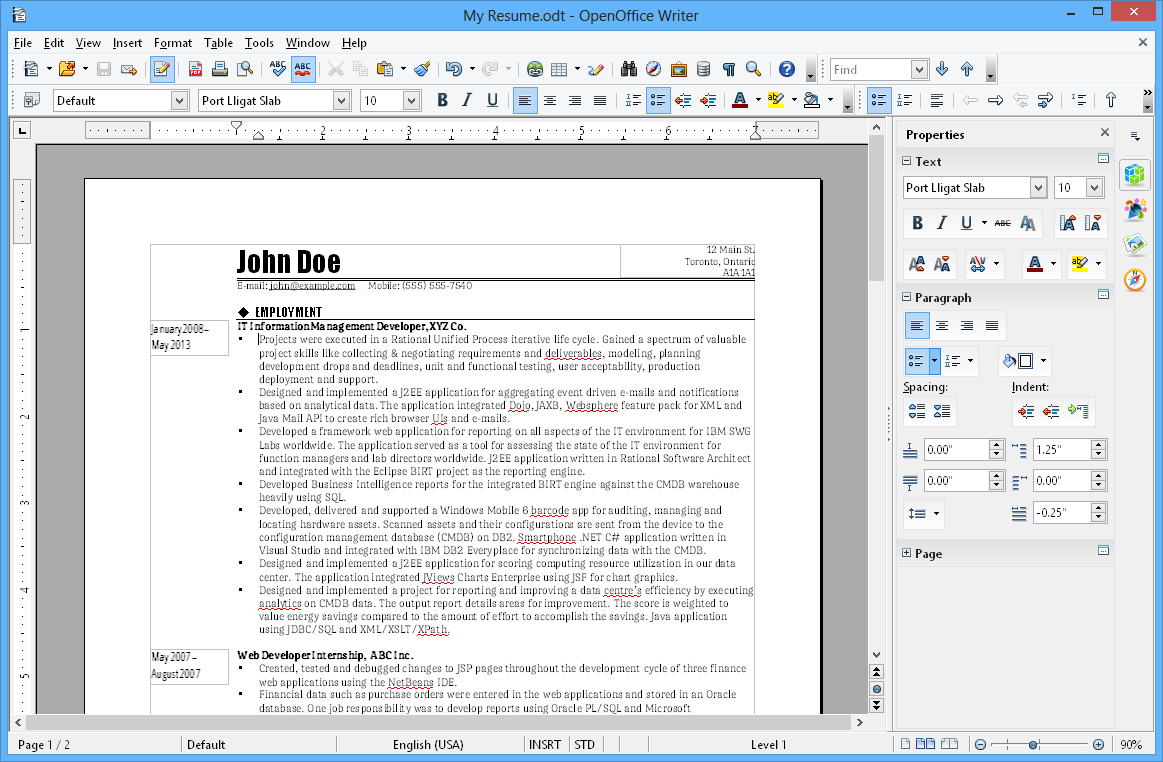
It reads and writes MS Office files, and has all the features you would use in a private MS Office installation. Plus, it creates PDF files out of the box.
Give it a try - it's free.
>> edited to add screenshot of OpenOffice's WORD-equivalent WRITER
Edited by Bodo on Wednesday 2nd August 14:55
Tafia said:
I have an Office 2000 CD which came with the previous Dell but assume it is not legal to use that with the new PC as MS say their software should die with the machine it was installed on.
Is this correct?! I've never noticed this anywhere. Frankly if your old machine is no longer in use, or you have removed office from it, I cant see how on earth this is enforcable. What would happen if you bought a new PC and it went pop after 2 days - would you be expected to fork out for another copy?! (Had a dell do exactly this, they just sent a replacement PC, not replacement everything.)
Denis O said:
I use Office 2000 on my latest Dell PC. It was a copy I bought as a stand alone but I can't see that you are breaching any rules by running a copy you bought. After all, you are only using it on 1 machine.
You're right, but Tafia says his (her?) previous copy came with the old computer, and as such is only licensed to the hardware it was bought with. These licenses (unlike yours) are not transferrable to new hardware.
I think you can still do a competitive upgrade from Works to Office, so that might be worth investigating.
Davi said:
Is this correct?! I've never noticed this anywhere.
Yes, have a look here www.microsoft.com/piracy/YourPC_do.mspx under 'another common misconception'. Not sure exactly how it would work in the scenario you describe, although I suspect Dell have been in this situation before and would know what to do.
edit - that link refers to Windows, but I'm pretty certain that it applies to all Microsoft OEM software.
Edited by jamieboy on Wednesday 2nd August 14:28
jamieboy said:
Davi said:
Is this correct?! I've never noticed this anywhere.
Yes, have a look here www.microsoft.com/piracy/YourPC_do.mspx under 'another common misconception'. Not sure exactly how it would work in the scenario you describe, although I suspect Dell have been in this situation before and would know what to do.
edit - that link refers to Windows, but I'm pretty certain that it applies to all Microsoft OEM software.
Edited by jamieboy on Wednesday 2nd August 14:28
well that for one really is utter crap, MS really are a bunch of arris oles.
Having said that, that is in reference to Windows, rather than office, does the theory follow through?
Davi said:
well that for one really is utter crap, MS really are a bunch of arris oles.
Having said that, that is in reference to Windows, rather than office, does the theory follow through?
Having said that, that is in reference to Windows, rather than office, does the theory follow through?
Yep, on this page office licensing they say: OEM Office is tied to the original PC
Not sure how harsh it is - if you need the flexibility to transfer it to a new machine, then you can buy a more expensive boxed product which doesn't have the same restriction.
Or if you don't like their licensing at all, there's always OpenOffice, as has been mentioned.

jamieboy said:
Davi said:
well that for one really is utter crap, MS really are a bunch of arris oles.
Having said that, that is in reference to Windows, rather than office, does the theory follow through?
Having said that, that is in reference to Windows, rather than office, does the theory follow through?
Yep, on this page office licensing they say: OEM Office is tied to the original PC
Not sure how harsh it is - if you need the flexibility to transfer it to a new machine, then you can buy a more expensive boxed product which doesn't have the same restriction.
Or if you don't like their licensing at all, there's always OpenOffice, as has been mentioned.
Thanks for clarifying that, I'll remember that for the future! TBH for home use I wouldn't use ANY MS product if it weren't for the fact it was supplied by the office. If they ever stop, so will my home use of MS!!!
I had exactly the same dilema.
My brother works with and programs with Sun systems and they have a derivative of Open Office called Star Office.
After 2 years of use I can say it is more intuative and logical to use, (although it is difficult to forget your MS Office indoctrination), saves straight to pdf and even .doc, .xls and .ppt
For £69.00, I think it is great.
Chris
My brother works with and programs with Sun systems and they have a derivative of Open Office called Star Office.
After 2 years of use I can say it is more intuative and logical to use, (although it is difficult to forget your MS Office indoctrination), saves straight to pdf and even .doc, .xls and .ppt
For £69.00, I think it is great.
Chris
vex said:
I had exactly the same dilema.
For £69.00, I think it is great.
Chris
For £69.00, I think it is great.
Chris
Yep Star Office & OpenOffice are pretty much the same thing (as you say). I belive minor interface tweaks and such but basically the same engine underneath.
On the plus side the £69 gives you printed documentation and some support options.
My personal experience of OpenOffice is that it is a remarkably stable and efficient system, the ability to expor directly to PDF is bloody handy for getting documents on websites (or in my case Cafepress's on-line publication system). However their appears to be a rather nasty bug in the 2.0.x code base... it loves speaking American and won't apply any other spell/grammer check language as a global option (even when you download UK English it's still bloody American); only on a per document per session basis. 1.x.x did do this (just like MS Office does) apparently they are trying to find and fix it.
Davi said:
jamieboy said:
Davi said:
well that for one really is utter crap, MS really are a bunch of arris oles.
Having said that, that is in reference to Windows, rather than office, does the theory follow through?
Having said that, that is in reference to Windows, rather than office, does the theory follow through?
Yep, on this page office licensing they say: OEM Office is tied to the original PC
Not sure how harsh it is - if you need the flexibility to transfer it to a new machine, then you can buy a more expensive boxed product which doesn't have the same restriction.
Or if you don't like their licensing at all, there's always OpenOffice, as has been mentioned.
Thanks for clarifying that, I'll remember that for the future! TBH for home use I wouldn't use ANY MS product if it weren't for the fact it was supplied by the office. If they ever stop, so will my home use of MS!!!
The OEM licensing came in after Office 2000. I couldn't see anything in the EULA for O2K that prevents you from transferring a copy from an old PC onto a new one. You can legally put an extra copy on one laptop as well.
It's only the OEM licensing in later versions that is restrictive. A full license allows you to transfer software which is why it costs more
Davi said:
Tafia said:
I have an Office 2000 CD which came with the previous Dell but assume it is not legal to use that with the new PC as MS say their software should die with the machine it was installed on.
Is this correct?! I've never noticed this anywhere. Frankly if your old machine is no longer in use, or you have removed office from it, I cant see how on earth this is enforcable. What would happen if you bought a new PC and it went pop after 2 days - would you be expected to fork out for another copy?! (Had a dell do exactly this, they just sent a replacement PC, not replacement everything.)
I wonder if Microsoft would detect that the Office 2000 disc I had with my previos Dell was being used on a PC other than the one it was originally on. I obviously want to stay legal.
I read the "software should die with the original PC" quote in Computer Active some time ago.
Bodo said:
If this is your private computer, you should use OpenOffice www.openoffice.org
It reads and writes MS Office files, and has all the features you would use in a private MS Office installation. Plus, it creates PDF files out of the box.
Give it a try - it's free.
It reads and writes MS Office files, and has all the features you would use in a private MS Office installation. Plus, it creates PDF files out of the box.
Give it a try - it's free.
>> edited to add screenshot of OpenOffice's WORD-equivalent WRITER
Edited by Bodo on Wednesday 2nd August 14:55
This looks interesting. Thanks
spivvy said:
there is no way of microsoft know which pc the OEM software came with they are personally not going to go after you
becuase you have installed an old version onto a new machine.
install and be dammed
becuase you have installed an old version onto a new machine.
install and be dammed
Not on 2k, but 2k3 they can - you need to register the copy of the software.
It's not so much them coming after you, its the softwar updates and support that you lose by not having a legal copy that affects you more.
However if you have a copy of 2k, use that, you won't really need to sweat over that.
Gassing Station | Computers, Gadgets & Stuff | Top of Page | What's New | My Stuff