
How did they do this ?
Discussion


I found this incredible shot on the porsche website, and i wondered how they photoshopped it? I understand how you isolate an object then desaturate the colour from the background, but this shot looks like it was a little more complicated.
It can't have been a rig shot as its too far away - could it?
The shadow the car casts, looks fake to me. Was it taken trackside then the car selected, selection inversed to select the background then a motion blur added? Or was it a studio shot of the car, cleverly placed onto a pre-blurred Nordschleife track photo, Then some clever attention to the reflections on the side of the car?????
Any thoughts?!

click for higher res
It can't have been a rig shot as its too far away - could it?
The shadow the car casts, looks fake to me. Was it taken trackside then the car selected, selection inversed to select the background then a motion blur added? Or was it a studio shot of the car, cleverly placed onto a pre-blurred Nordschleife track photo, Then some clever attention to the reflections on the side of the car?????
Any thoughts?!
click for higher res
rigs are quite long! Chase car is also an option (probable here). The shots are taken at about 1 mph. Lots of shopping gone on though.
Here's Matt (Gravy from this place) doing the rig thing on mine:
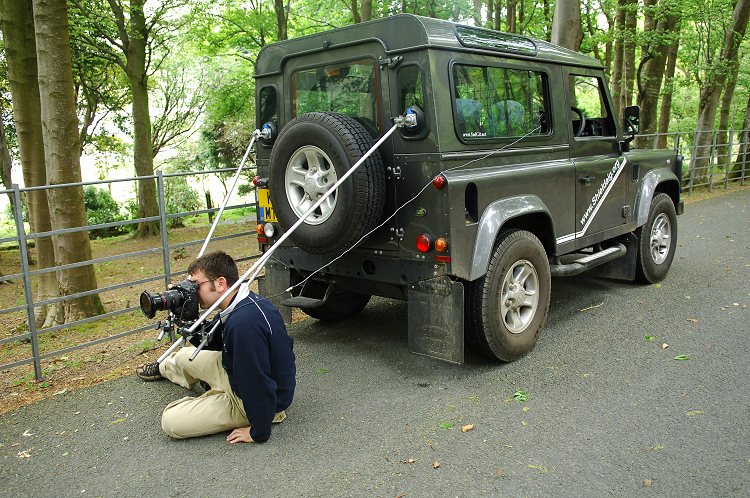
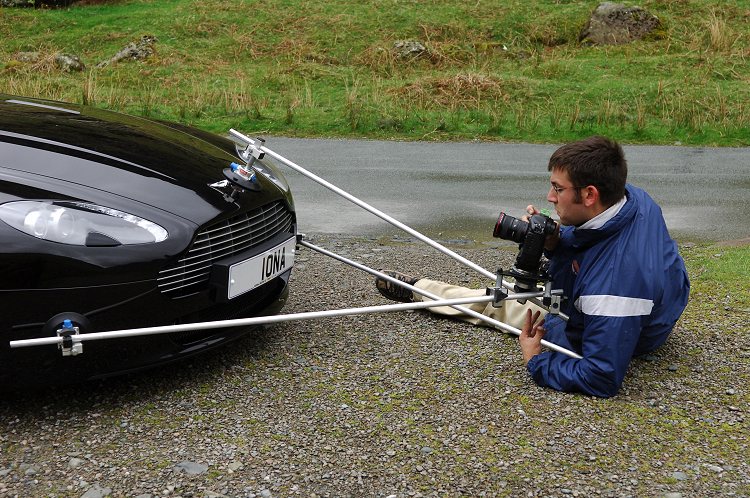
and the bottom 2 shots here are the results (rig & chase) www.stevecarter.com/astonV8.htm
Matt's site: www.MattWatkinson.com (check out the first photo you see!)
Here's Matt (Gravy from this place) doing the rig thing on mine:
and the bottom 2 shots here are the results (rig & chase) www.stevecarter.com/astonV8.htm
Matt's site: www.MattWatkinson.com (check out the first photo you see!)
Edited by GetCarter on Monday 8th January 12:03
The Porsche shot is photoshopped, the reflections in the car are not burred as they would be with a rig. It was taken in situ but without that much motion. Much like this...
www.grantgb.com/creatingmotion.htm
...only more work put into the blurring
www.grantgb.com/creatingmotion.htm
...only more work put into the blurring

After reading dobbo's dieselstation link, i'm impressed and surprised to hear that people use 10 meter rigs to take car shots 
GetCarter, I've seen Gravy's site before but i didn't realise the aston was yours. Nice to have such a handsome car immortalised in those photos.
The non blurred reflections make sense for it being a static shot which was then shopped in a grantgb manner. Great tutorial by the way!
Thanks for the input all
GetCarter, I've seen Gravy's site before but i didn't realise the aston was yours. Nice to have such a handsome car immortalised in those photos.
The non blurred reflections make sense for it being a static shot which was then shopped in a grantgb manner. Great tutorial by the way!
Thanks for the input all
badbeachbuggy said:
The Porsche shot is photoshopped, the reflections in the car are not burred as they would be with a rig.
Are you sure about that? The shadow moves with the car, so wouldn't it come out as sharp as the car, just like panned or car to car shots (I've never done a rigged shot)?

_dobbo_ said:
For an idea of how long rigs can be, check this thread on another forum (you might a few familiar names from these pages).
clicky
clicky
Can i rephrase that for you:
For an idea of how great the PH photography forum is, check this thread on another forum (you might a few familiar names from these pages).
clicky
Edited by agent006 on Monday 8th January 18:58

gregorio! said:
I found this incredible shot on the porsche website, and i wondered how they photoshopped it? I understand how you isolate an object then desaturate the colour from the background, but this shot looks like it was a little more complicated.
It can't have been a rig shot as its too far away - could it?
The shadow the car casts, looks fake to me. Was it taken trackside then the car selected, selection inversed to select the background then a motion blur added? Or was it a studio shot of the car, cleverly placed onto a pre-blurred Nordschleife track photo, Then some clever attention to the reflections on the side of the car?????
Any thoughts?!

click for higher res
It can't have been a rig shot as its too far away - could it?
The shadow the car casts, looks fake to me. Was it taken trackside then the car selected, selection inversed to select the background then a motion blur added? Or was it a studio shot of the car, cleverly placed onto a pre-blurred Nordschleife track photo, Then some clever attention to the reflections on the side of the car?????
Any thoughts?!
click for higher res
You can do most of that in Photoshop. You do not have to strap the camera to the car.

Gassing Station | Photography & Video | Top of Page | What's New | My Stuff