
Photoshop Help
Discussion


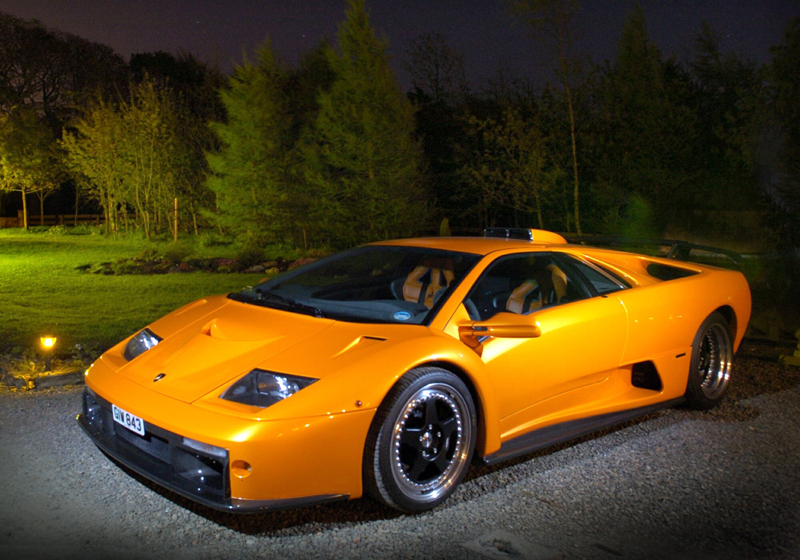
A friend has just e-mailed a photo of my car (taken before I bought it) which I would really like to use as a desktop background. However at full size, 2000x1400 pixels, it's obviously not as sharp as it could be. Two questions; would it benefit from the unsharp mask/tool in Photoshop and if so, how do you use it?
Thanks
Thanks
Nice Car! 8o)
My advice would be to adjust the levels in the full res version and make any other adjustments to the colour you want (though looks good anyhow on my uncalibrated laptop). Then resize to the size you want, then sharpen, either normal sharpen or USM (if you are happy to play). Then go and reduce the effect of your sharpen as you will almost always overdo it. I know I do!
Couple of points:
- If rescaling an image it's best to scale by a factor of one over two ie half/quarter eighth etc. This is so two pixels can be averaged to one px, rather then a fraction of a pixel, which will soften it.
- When rescaling a large amount blur the image slightly before scaling to smooth sharp lines then scael and resharpen. Try scaling an image with a phone line in it and see the difference - without doing this it will be more jagged. I didn't say this for this image as you say it is already slightly soft.
- If you are happy with photoshop everything abover should be done using 16 bit color then reduced at the end to 8 bit if required. As you are scaling done this is less critical.
- Unsharp masking should be done at the end of the process, after scaling and levels etc. Generally you want most bars as far to the left as you can get away with. Keep the % to less than 120 ish if at all possible.
My advice would be to adjust the levels in the full res version and make any other adjustments to the colour you want (though looks good anyhow on my uncalibrated laptop). Then resize to the size you want, then sharpen, either normal sharpen or USM (if you are happy to play). Then go and reduce the effect of your sharpen as you will almost always overdo it. I know I do!
Couple of points:
- If rescaling an image it's best to scale by a factor of one over two ie half/quarter eighth etc. This is so two pixels can be averaged to one px, rather then a fraction of a pixel, which will soften it.
- When rescaling a large amount blur the image slightly before scaling to smooth sharp lines then scael and resharpen. Try scaling an image with a phone line in it and see the difference - without doing this it will be more jagged. I didn't say this for this image as you say it is already slightly soft.
- If you are happy with photoshop everything abover should be done using 16 bit color then reduced at the end to 8 bit if required. As you are scaling done this is less critical.
- Unsharp masking should be done at the end of the process, after scaling and levels etc. Generally you want most bars as far to the left as you can get away with. Keep the % to less than 120 ish if at all possible.


 Excellent.
VxDuncan said:
Briefly you need to record a custom action (macro) in the actions palette then file..automate..batch then run the action on your selected images. Can be a bit more complicated if you have different sized images etc, but give that a go first.
eventually got there in the end with tools photoshop photoprocessor, although there werent many options and your method probably works best. 


lambochick said:
Shame, as I enjoyed your video from the last one. 
Weren't you in the white Countach on the run? Just realised that the mad orange Diablo is yurs!! Thats awesome! I'm soooo jelous! Is it the latest audi diablo? Don't think it is but it looks a bit that way.
Sorry for the thread Hijack...............
Greg
Hi Greg - yep, that was me in the Countach. I wouldn't call this particular Diablo an Audi offering. It first appeared in 1999, which was only a year after Audi took over, so would have been on the drawing board some time before they got involved.
I need to check my history as I am not sure who at Lamborghini was responsible for the development and production of the GT, but if I ever meet them they will be getting a big hug and kiss from me!
I need to check my history as I am not sure who at Lamborghini was responsible for the development and production of the GT, but if I ever meet them they will be getting a big hug and kiss from me!
Gassing Station | Photography & Video | Top of Page | What's New | My Stuff