
Discussion


Help!
This has been going on for the last few days.
For some reason sometimes I go to post and it tells me to log in, despite, on the same page saying "Hello, NiceCupOfTea". I dutifully log in, it tells me I have been successful, and then dumps me on the main page. Any attempt to post asks me to log in again. I have tried logging out and then in, I have even created a new account, logged into that, and then logged out before trying again. The only thing that helps sometimes is wiping the cache, but why does this happen and how can I stop it? How can it on the one hand know who I am and tell me I am logged in (and sometimes show "My Stuff" but then tell me I am not logged in?

 so frustrating!
This has been going on for the last few days.
For some reason sometimes I go to post and it tells me to log in, despite, on the same page saying "Hello, NiceCupOfTea". I dutifully log in, it tells me I have been successful, and then dumps me on the main page. Any attempt to post asks me to log in again. I have tried logging out and then in, I have even created a new account, logged into that, and then logged out before trying again. The only thing that helps sometimes is wiping the cache, but why does this happen and how can I stop it? How can it on the one hand know who I am and tell me I am logged in (and sometimes show "My Stuff"
but then tell me I am not logged in? so frustrating!Argh
Just happened again:
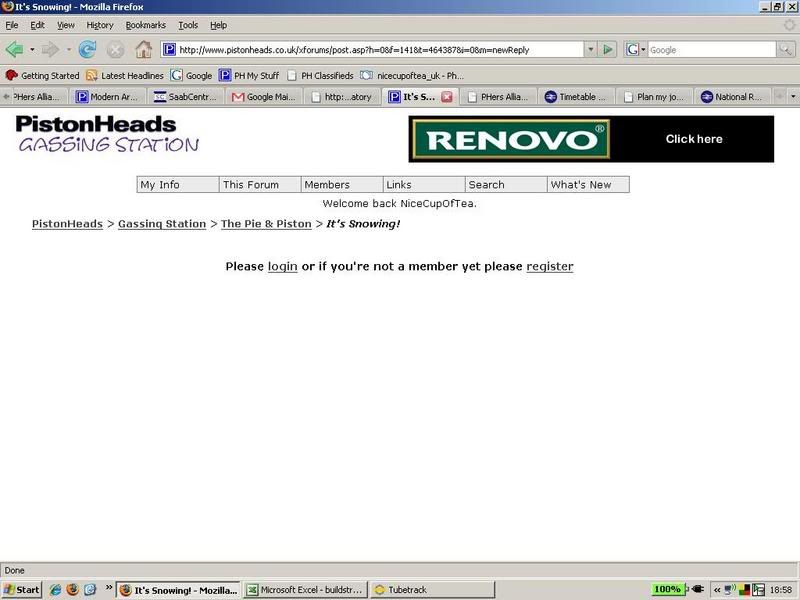
Note my name at the top (ie, logged in!) and the request to login in underneath!
By the time I had got the bloody thing working the topic had been closed . And then I had to log in again 30 seconds later to post on this
  topic again!
Is somebody trying to tell me something!?
Just happened again:
Note my name at the top (ie, logged in!) and the request to login in underneath!
By the time I had got the bloody thing working the topic had been closed
. And then I had to log in again 30 seconds later to post on this topic again!Is somebody trying to tell me something!?
You could try clearing your cookies, seems your using firefox so:
How to delete cookies in Firefox
To delete cookies Firefox 2.0
1. Select "Tools"
2. Select "Options".
3. Select "Privacy".
4. In Private area click "Clear Now".
5. In "Clear Private Data" window put the check mark for "Cookies" and click "Clear Private Data Now".
6. Click OK.
To delete cookies Firefox 1.x
1. Select "Tools"
2. Select "Options".
3. Select "Privacy".
4. Open "Cookies" tab and click "Clear Cookies Now".
5. Click OK.
How to delete cookies in Firefox
To delete cookies Firefox 2.0
1. Select "Tools"
2. Select "Options".
3. Select "Privacy".
4. In Private area click "Clear Now".
5. In "Clear Private Data" window put the check mark for "Cookies" and click "Clear Private Data Now".
6. Click OK.
To delete cookies Firefox 1.x
1. Select "Tools"
2. Select "Options".
3. Select "Privacy".
4. Open "Cookies" tab and click "Clear Cookies Now".
5. Click OK.

David Godfrey said:
You could try clearing your cookies, seems your using firefox so:
How to delete cookies in Firefox
To delete cookies Firefox 2.0
1. Select "Tools"
2. Select "Options".
3. Select "Privacy".
4. In Private area click "Clear Now".
5. In "Clear Private Data" window put the check mark for "Cookies" and click "Clear Private Data Now".
6. Click OK.
To delete cookies Firefox 1.x
1. Select "Tools"
2. Select "Options".
3. Select "Privacy".
4. Open "Cookies" tab and click "Clear Cookies Now".
5. Click OK.
How to delete cookies in Firefox
To delete cookies Firefox 2.0
1. Select "Tools"
2. Select "Options".
3. Select "Privacy".
4. In Private area click "Clear Now".
5. In "Clear Private Data" window put the check mark for "Cookies" and click "Clear Private Data Now".
6. Click OK.
To delete cookies Firefox 1.x
1. Select "Tools"
2. Select "Options".
3. Select "Privacy".
4. Open "Cookies" tab and click "Clear Cookies Now".
5. Click OK.
FWIW I had exactly the same "glitch" as NCOT last week, with I.E. 7!
Even though I was logged in with my handle appearing at the top of the page I re-logged in, problem went away.
Condition hasn't been repeated.
Gassing Station | Website Feedback | Top of Page | What's New | My Stuff