
Flat screen squashed image
Discussion


Can anyone explain to me why the images on a flat screen t.v. are squashed.
I remember when a friend proudly showed me his new t.v. many years ago, & I said "but everyone's squashed...short people with squashed faces" He couldn't see it.
My parents bought a new t.v. yesterday.
Got a phone call from my father this morning. That t.v. is going back it's hopeless.....everyone appears squashed.
So, why would you want to take an image & strech it along the horizontal plane without making the necessary adjustment on the vertical plane. It's like being in a hall of mirrors.
Do flat screen t.vs exist that don't do this. I can only assume the answer to this must be "yes" otherwise what would be the point in buying something that provided a distorted image.
We would like to buy a flat screen because of their compactness, but would have to have some special glasses made to correct the image
 "The Emperor's New Clothes"
I remember when a friend proudly showed me his new t.v. many years ago, & I said "but everyone's squashed...short people with squashed faces" He couldn't see it.
My parents bought a new t.v. yesterday.
Got a phone call from my father this morning. That t.v. is going back it's hopeless.....everyone appears squashed.
So, why would you want to take an image & strech it along the horizontal plane without making the necessary adjustment on the vertical plane. It's like being in a hall of mirrors.
Do flat screen t.vs exist that don't do this. I can only assume the answer to this must be "yes" otherwise what would be the point in buying something that provided a distorted image.
We would like to buy a flat screen because of their compactness, but would have to have some special glasses made to correct the image
"The Emperor's New Clothes"Souonds like it's stretching a 4x3 image to fit a 16x9 screen. Is it using a seperate freview/sky/whatever box to generate the signal? If so check the format that it's outputting is set to widescreen, and then check the same settings on the TV. Amazes me how often you see people wathcing stuff like this.

ChrisnChris said:
Just out of interest, why was the aspect ratio changed from 4x3 to 16x9.....someone trying to improve something that didn't need improving?
I'm pretty sure the answer is 'films'. I have never seen a 4x3 cinema screen. As a result the film transfer had to be cropped to make it fit a 4x3 screen, or run with big borders. TVs were then made to show true widescreen, and then TV slowly started changing it's broadcasts to widescreen.As to why films are 16x9, I would imagine it has something to do with the human eye's field of vision. The more picture that fills our field of view, the more involved and absorbed we will be.
There seems to be two opinions on 16x9. Some feel that they are getting a 4x3 image that has been cropped at the top and bottom. Others feel (correctly) that you are getting a 4x3 image with extra stuff on the left and right. I'm in the latter camp and would be a happy man if everything was broadcast in widescreen.
Films are usually a 1.85:1 or 2.39:1 aspect ratio in cinemas which is wider than a 16:9 ratio.

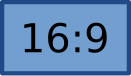

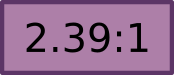
Why 16:9 was chosen said:
When the 16:9 aspect ratio was proposed by Dr. Kerns H. Powers, a member of the SMPTE Working Group On High-Definition Electronic Production, nobody was creating 16:9 videos. The popular choices in 1980 were: 4:3 (based on television standard's ratio at the time), 1.66:1 (the European "flat" ratio), 1.85:1 (the American "flat" ratio), 2.20:1 (the ratio of 70 mm films and Panavision) and 2.35:1 (the CinemaScope ratio for anamorphic widescreen films). Dr. Powers cut out rectangles with equal areas and shaped them to match each of the popular aspect ratios. When overlapped with their center points aligned, he found that all of those aspect ratio rectangles fit within an outer rectangle with an aspect ratio of 1.78:1 and all of them also covered a smaller common inner rectangle with the same aspect ratio 1.78:1. The geometric mean of the extreme aspect ratios, 4:3 (1.33:1) and 2.35:1, is also 1.77:1 which is coincidentally close to 16:9 (1.78:1).
While 16:9 (1.78:1) was initially selected as a compromise format, the subsequent popularity of HDTV broadcast has solidified 16:9 as perhaps the most important video aspect ratio for the future. Most 4:3 (1.33:1) and 2.39:1 video is now recorded using a "shoot and protect" technique that keeps the main action within a 16:9 (1.78:1) inner rectangle to facilitate HD broadcast. Conversely it is quite common to use a technique known as center-cutting, to approach the challenge of presenting material shot (typically 16:9) to both a HD and legacy 4:3 audience simultaneously without having to compromise image size for either audience. Content creators frame critical content or graphics to fit within the 1.33 raster space. Audiences generally do not see such centrally framed information as distracting.However, audiences of 16:9 ratio scenes can find odd moving elements that are centrally framed. 4:3 content upconverted to a 16:9 standard is generally referred to as pillar boxed and many high definition television networks have adopted decoratively branded logos to fill the null area.
After the original 16:9 Action Plan of the early 1990s, the European Union has instituted the 16:9 Action Plan, just to accelerate the development of the advanced television services in 16:9 aspect ratio, both in PAL and also in HDTV. The Community fund for the 16:9 Action Plan amounted to €228 million.
While 16:9 (1.78:1) was initially selected as a compromise format, the subsequent popularity of HDTV broadcast has solidified 16:9 as perhaps the most important video aspect ratio for the future. Most 4:3 (1.33:1) and 2.39:1 video is now recorded using a "shoot and protect" technique that keeps the main action within a 16:9 (1.78:1) inner rectangle to facilitate HD broadcast. Conversely it is quite common to use a technique known as center-cutting, to approach the challenge of presenting material shot (typically 16:9) to both a HD and legacy 4:3 audience simultaneously without having to compromise image size for either audience. Content creators frame critical content or graphics to fit within the 1.33 raster space. Audiences generally do not see such centrally framed information as distracting.However, audiences of 16:9 ratio scenes can find odd moving elements that are centrally framed. 4:3 content upconverted to a 16:9 standard is generally referred to as pillar boxed and many high definition television networks have adopted decoratively branded logos to fill the null area.
After the original 16:9 Action Plan of the early 1990s, the European Union has instituted the 16:9 Action Plan, just to accelerate the development of the advanced television services in 16:9 aspect ratio, both in PAL and also in HDTV. The Community fund for the 16:9 Action Plan amounted to €228 million.
To the OP - there will be an aspect ratio button, this will have a choice of ratios and zooms, flick between them to get the best undistorted image, which is either the original aspect ratio (so you'll see a squarish picture in the middle of your oblong screen with black borders down each side), or a zoomed original aspect ratio (so you'll see your screen filled with picture, no borders but maybe a bit 'close' looking).
HTH
HTH
andy_s said:
To the OP - there will be an aspect ratio button, this will have a choice of ratios and zooms, flick between them to get the best undistorted image, which is either the original aspect ratio (so you'll see a squarish picture in the middle of your oblong screen with black borders down each side), or a zoomed original aspect ratio (so you'll see your screen filled with picture, no borders but maybe a bit 'close' looking).
HTH
and then there will be complaints about 'the picture not filling the screen' and those 'bloody black bars' etcHTH
I find most women and people over the age of 50 dont understand the concept of aspect ration and it drives me nuts...
My Father is in his 60s and complains about the picture on the TV they have, it is a new-ish wide screen type TV and he keeps it set to the old 4:3 format, then moans about what a waste of space on the TV due to the black bars either side.
He cannot watch my TV at my house because he says it looks wrong.
He is also incapable of operating a basic mobile phone.
I try to help him but he is an old dog and will not learn those new tricks.
He cannot watch my TV at my house because he says it looks wrong.
He is also incapable of operating a basic mobile phone.
I try to help him but he is an old dog and will not learn those new tricks.
Merry said:
andy_s said:
To the OP - there will be an aspect ratio button, this will have a choice of ratios and zooms, flick between them to get the best undistorted image, which is either the original aspect ratio (so you'll see a squarish picture in the middle of your oblong screen with black borders down each side), or a zoomed original aspect ratio (so you'll see your screen filled with picture, no borders but maybe a bit 'close' looking).
HTH
and then there will be complaints about 'the picture not filling the screen' and those 'bloody black bars' etcHTH
I find most women and people over the age of 50 dont understand the concept of aspect ration and it drives me nuts...
andy_s said:
Merry said:
andy_s said:
To the OP - there will be an aspect ratio button, this will have a choice of ratios and zooms, flick between them to get the best undistorted image, which is either the original aspect ratio (so you'll see a squarish picture in the middle of your oblong screen with black borders down each side), or a zoomed original aspect ratio (so you'll see your screen filled with picture, no borders but maybe a bit 'close' looking).
HTH
and then there will be complaints about 'the picture not filling the screen' and those 'bloody black bars' etcHTH
I find most women and people over the age of 50 dont understand the concept of aspect ration and it drives me nuts...
Ah the fools who think all old TV shows must fill a wide-screen TV screen and if they don't they change the TV aspect ratio setting from Auto to 16:9 to make it.
I can spot an incorrect aspect ratio for a transmission immediately whether it is a 4:3 stretched to widescreen or a 16:9 squashed into a 4:3. I'm staggered when I point it out (family member) and they say they didn't realise. I have even changed their Sky output aspect ratio to the correct 16:9 for their widescreen and the TV setting to auto so that it changes depending on the original transmission. Yet after doing this I find they have change the TV setting back to 16:9 because they "paid for a widescreen TV" so they watch the old programmes like Fawlty Towers in stretch-o-vision and if their other half is using the Sky feed upstairs and they are watching TV through the Aerial everything is stretched.
It's simply bonkers.
I can spot an incorrect aspect ratio for a transmission immediately whether it is a 4:3 stretched to widescreen or a 16:9 squashed into a 4:3. I'm staggered when I point it out (family member) and they say they didn't realise. I have even changed their Sky output aspect ratio to the correct 16:9 for their widescreen and the TV setting to auto so that it changes depending on the original transmission. Yet after doing this I find they have change the TV setting back to 16:9 because they "paid for a widescreen TV"
so they watch the old programmes like Fawlty Towers in stretch-o-vision and if their other half is using the Sky feed upstairs and they are watching TV through the Aerial everything is stretched.It's simply bonkers.
FourWheelDrift said:
Ah the fools who think all old TV shows must fill a wide-screen TV screen and if they don't they change the TV aspect ratio setting from Auto to 16:9 to make it.
I can spot an incorrect aspect ratio for a transmission immediately whether it is a 4:3 stretched to widescreen or a 16:9 squashed into a 4:3. I'm staggered when I point it out (family member) and they say they didn't realise. I have even changed their Sky output aspect ratio to the correct 16:9 for their widescreen and the TV setting to auto so that it changes depending on the original transmission. Yet after doing this I find they have change the TV setting back to 16:9 because they "paid for a widescreen TV" so they watch the old programmes like Fawlty Towers in stretch-o-vision and if their other half is using the Sky feed upstairs and they are watching TV through the Aerial everything is stretched.
It's simply bonkers.
Thanks for that...all of the above. I can spot an incorrect aspect ratio for a transmission immediately whether it is a 4:3 stretched to widescreen or a 16:9 squashed into a 4:3. I'm staggered when I point it out (family member) and they say they didn't realise. I have even changed their Sky output aspect ratio to the correct 16:9 for their widescreen and the TV setting to auto so that it changes depending on the original transmission. Yet after doing this I find they have change the TV setting back to 16:9 because they "paid for a widescreen TV"
so they watch the old programmes like Fawlty Towers in stretch-o-vision and if their other half is using the Sky feed upstairs and they are watching TV through the Aerial everything is stretched.It's simply bonkers.
I couldn't care less if it's in wide screen or not but I would like to buy a set that shows 4:3 when it's being transmitted in that format and 16:9 when the transmission is 16:9
My father bought a 22" flat screen & has realised that this isn't big enough so it will go back anyway.
But what you are saying is that everything can be set up to detect the ratio & automatically configure the t.v. to switch from one to the other without you doing anything....sorry if I'm being dense.
Very simply, if it's a Sky box and a new widescreen TV.
Sky box - Services screen,System Setup/Picture Settings - picture format set to 16:9 (if a widecsreen TV or set to 4:3L if not a widescreen TV.)
TV - remote button for TV aspect ratio - set to Auto.
The TV picture should then change between 4:3 and 16:9 depending on the picture recieved.
Eg. Watching Fawlty Towers on Dave. Fawlty Towers will be in 4:3 but as soon as the commercials come on the picture jumps to 16:9, then when Fawlty Towers comes back on it goes back to 4:3. (As long as Dave does 16:9 but you get the idea. Then you change channel to BBC (through Sky) and it changes to 16:9 for widescreen, change channel to 522 Discovery Knowledge and it changes to 4:3

Sky box - Services screen,System Setup/Picture Settings - picture format set to 16:9 (if a widecsreen TV or set to 4:3L if not a widescreen TV.)
TV - remote button for TV aspect ratio - set to Auto.
The TV picture should then change between 4:3 and 16:9 depending on the picture recieved.
Eg. Watching Fawlty Towers on Dave. Fawlty Towers will be in 4:3 but as soon as the commercials come on the picture jumps to 16:9, then when Fawlty Towers comes back on it goes back to 4:3. (As long as Dave does 16:9
but you get the idea. Then you change channel to BBC (through Sky) and it changes to 16:9 for widescreen, change channel to 522 Discovery Knowledge and it changes to 4:3FourWheelDrift said:
Very simply, if it's a Sky box and a new widescreen TV.
Sky box - Services screen,System Setup/Picture Settings - picture format set to 16:9 (if a widecsreen TV or set to 4:3L if not a widescreen TV.)
TV - remote button for TV aspect ratio - set to Auto.
The TV picture should then change between 4:3 and 16:9 depending on the picture recieved.
Eg. Watching Fawlty Towers on Dave. Fawlty Towers will be in 4:3 but as soon as the commercials come on the picture jumps to 16:9, then when Fawlty Towers comes back on it goes back to 4:3. (As long as Dave does 16:9 but you get the idea. Then you change channel to BBC (through Sky) and it changes to 16:9 for widescreen, change channel to 522 Discovery Knowledge and it changes to 4:3
Thanks....it's not sky but virgin media, I assume that's ostensibly the same thing...virgin is cable.Sky box - Services screen,System Setup/Picture Settings - picture format set to 16:9 (if a widecsreen TV or set to 4:3L if not a widescreen TV.)
TV - remote button for TV aspect ratio - set to Auto.
The TV picture should then change between 4:3 and 16:9 depending on the picture recieved.
Eg. Watching Fawlty Towers on Dave. Fawlty Towers will be in 4:3 but as soon as the commercials come on the picture jumps to 16:9, then when Fawlty Towers comes back on it goes back to 4:3. (As long as Dave does 16:9
but you get the idea. Then you change channel to BBC (through Sky) and it changes to 16:9 for widescreen, change channel to 522 Discovery Knowledge and it changes to 4:3Thanks for your input, much appreciated.
I knew I would find the answer here.

If it's that simple, why oh why do people want to watch a squashed image...

Dear All,
regards,
Jet
Mr E Driver said:
On my TV I leave it set it to 4:3 and it automatically sets the screen to the correct picture. If it is set to auto then it streches a 4:3 to 16:9
Mine (Panasonic LCD) does the same. Mildly annoying till I discovered that auto = fill the screen rather than auto = correct aspect ratio,regards,
Jet
FourWheelDrift said:
Ah the fools who think all old TV shows must fill a wide-screen TV screen and if they don't they change the TV aspect ratio setting from Auto to 16:9 to make it.
I can spot an incorrect aspect ratio for a transmission immediately whether it is a 4:3 stretched to widescreen or a 16:9 squashed into a 4:3. I'm staggered when I point it out (family member) and they say they didn't realise. I have even changed their Sky output aspect ratio to the correct 16:9 for their widescreen and the TV setting to auto so that it changes depending on the original transmission. Yet after doing this I find they have change the TV setting back to 16:9 because they "paid for a widescreen TV" so they watch the old programmes like Fawlty Towers in stretch-o-vision and if their other half is using the Sky feed upstairs and they are watching TV through the Aerial everything is stretched.
It's simply bonkers.
I share your pain on that one! I've lost count how many times I've explained to my parents that just because you have 2 rear speakers behind you in the surround sound setup, it doesnt mean that you should be able to hear every bit of dialogue through those speakers! I can spot an incorrect aspect ratio for a transmission immediately whether it is a 4:3 stretched to widescreen or a 16:9 squashed into a 4:3. I'm staggered when I point it out (family member) and they say they didn't realise. I have even changed their Sky output aspect ratio to the correct 16:9 for their widescreen and the TV setting to auto so that it changes depending on the original transmission. Yet after doing this I find they have change the TV setting back to 16:9 because they "paid for a widescreen TV"
so they watch the old programmes like Fawlty Towers in stretch-o-vision and if their other half is using the Sky feed upstairs and they are watching TV through the Aerial everything is stretched.It's simply bonkers.
I'd always walk in to find they'd switched off dolby 5.1 and put it on 'stadium' mode which just made everything sound like it was echoing as if we were in a church!
My tv works, automatically switching from 4:3 to 16:9 but only if I use the scart connector.
If I use the HDMI it assumes all transmissions are wide screen and therefore squashes onld stuff off UK gold.
Consequently I have a HD tv and SKY+ HD but spend nearly all the time connected via scart.
If I use the HDMI it assumes all transmissions are wide screen and therefore squashes onld stuff off UK gold.
Consequently I have a HD tv and SKY+ HD but spend nearly all the time connected via scart.
Gassing Station | TV, Film, Streaming & Radio | Top of Page | What's New | My Stuff