
Palm WebOS update
Discussion


For any Palm Pre users on here who don't know it - WebOS 1.4 is out and making it's way round the update system. You should get an auto-update alert sometime in the next 24 hours unless the carriers are doing something very silly. I haven't had mine yet  , but judging by the reports on PreCentral it's moving along well.
Major news - video recording with sound is now enabled in the camer app.
A new splash screen has appeared on app launch so that you get a more immediate notification and the underlying work for Flash has been included (though we still have to wait for Adobe to release it in the App. Catalogue). Rumours of improved battery life abound too, and some minor bugfixes for e-mail, SMS and IM.
, but judging by the reports on PreCentral it's moving along well.Major news - video recording with sound is now enabled in the camer app.
A new splash screen has appeared on app launch so that you get a more immediate notification and the underlying work for Flash has been included (though we still have to wait for Adobe to release it in the App. Catalogue). Rumours of improved battery life abound too, and some minor bugfixes for e-mail, SMS and IM.
Looks like it's hitting O2 even as we speak - a few screenshots on PreCentral have O2 as the carrier.
http://discussion.treocentral.com/palm-pre/232527-...
http://discussion.treocentral.com/palm-pre/232527-...
If the Update app doesn't find it, you can download the WebOS Doctor package from Palm - but that will wipe everything off your Pre as it's designed to be a last resort to recover the device from "almost a brick" mode.
Which network are you on ? Do you have a good data connection ? Are you updating over phone connection or WiFi ?
Which network are you on ? Do you have a good data connection ? Are you updating over phone connection or WiFi ?
Stubby Pete said:
marshalla said:
If the Update app doesn't find it . . . .
What a stupid c#nt I am, didn't see that because it was at just off the bottom of one of the screens! Sounds like you need to install Preware and get a couple of patches to increase the number of icons per page and add extra pages.
Does anyone know why I might be getting this:
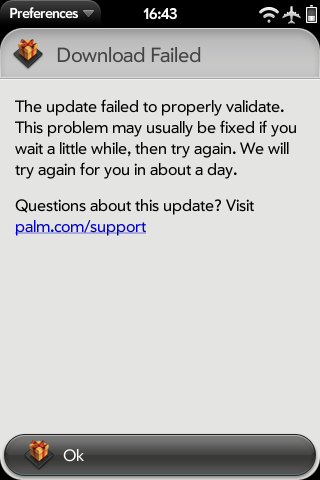
Some googling says that what I need to do is a full hard reset of the device - but there's NO way of backing up the phone properly. I don't really want to lose call history and messages, but there's no method of backing up these.
I've used synctoy to get the USB data, but that doesn't capture the OS type stuff....
Some googling says that what I need to do is a full hard reset of the device - but there's NO way of backing up the phone properly. I don't really want to lose call history and messages, but there's no method of backing up these.
I've used synctoy to get the USB data, but that doesn't capture the OS type stuff....
Looks like a corrupt download - AFAIK WebOS downloads the update file and then checksums it - including some deep checksumming. It looks like yours has failed that stage. Were you downloading over 2G/3G or WiFi ?
The usual advice is to try a complete power down (battery swap) with about 30 seconds of off time at least and then try the download again over a reliable WiFi connection if possible.
The usual advice is to try a complete power down (battery swap) with about 30 seconds of off time at least and then try the download again over a reliable WiFi connection if possible.
marshalla said:
Looks like a corrupt download - AFAIK WebOS downloads the update file and then checksums it - including some deep checksumming. It looks like yours has failed that stage. Were you downloading over 2G/3G or WiFi ?
The usual advice is to try a complete power down (battery swap) with about 30 seconds of off time at least and then try the download again over a reliable WiFi connection if possible.
I've tried it over 3G and a number of different WiFi spots - about every 3-4 days.The usual advice is to try a complete power down (battery swap) with about 30 seconds of off time at least and then try the download again over a reliable WiFi connection if possible.
It does, or seems to, do the full download then fails - it did this for 1.3.5 and 1.4 and always happens.
The most reliable WiFi point is my home one and that's what I've tried a number of times.
I've powered off a number of times to see if that makes any difference and it doesn't.
marshalla said:
Have you applied any themes or patches from Preware ? ISTR that some of them can interfere with the update process.
Nope, nothing, nada - it's completely standard bar ringtone changes.marshalla said:
How much free space do you have on the device ?
Loads - It's got very little copied on to it - 500Mb at most.Gassing Station | Computers, Gadgets & Stuff | Top of Page | What's New | My Stuff