
PS3 DNLA advice
Discussion


I am looking to substitute my HTPC in the lounge for something a little more manageable, and reliable. I was considering a PS3 and using to stream the media from my NAS. Has anyone done this? and how easy was it? I understand the PS3 supports DNLA and so does my NAS but that's all well and good if it works, which it may not.
Many thanks
Peter
Many thanks
Peter
Should work.
Apparantly the downside with doing it that way is that you're limited to streaming media that the PS3 has codecs for.
If you have the NAS already, just enable the Media Server on the NAS and see what the PS3 makes of it.
Plenty of info on Google about it, just search for "PS3 Streaming from xxxx" (where xxxx is the model of your NAS)
Apparantly the downside with doing it that way is that you're limited to streaming media that the PS3 has codecs for.
If you have the NAS already, just enable the Media Server on the NAS and see what the PS3 makes of it.
Plenty of info on Google about it, just search for "PS3 Streaming from xxxx" (where xxxx is the model of your NAS)
Er...how about this:
http://boardsus.playstation.com/t5/PlayStation-3-M...
For the record, we have a DLNA tv and we stream files from both PC and PS3. The nice thing about both is that you can connect external HDDs to them (bear in mind PS3 will only read FAT32 drives). Amazingly my tv will read an HD media file (MKV) and play it, yet all of the literature says it can't...
Hope the link helps.
http://boardsus.playstation.com/t5/PlayStation-3-M...
For the record, we have a DLNA tv and we stream files from both PC and PS3. The nice thing about both is that you can connect external HDDs to them (bear in mind PS3 will only read FAT32 drives). Amazingly my tv will read an HD media file (MKV) and play it, yet all of the literature says it can't...
Hope the link helps.
I'd move the HTPC into another room then install PS3 Media Server on it. This will find the PS3 and stream stuff to it. If it's a file the PS3 won;t play, you can either transcode or remux them so the PS3 can recognise them.
Transcode - convert stuff on the fly so the PS3 can read it.
Remux - effectively just changes the file extension so the PS3 will read it.
I'm doing this at home and the PS3 will play 97% of my stuff.
Transcode - convert stuff on the fly so the PS3 can read it.
Remux - effectively just changes the file extension so the PS3 will read it.
I'm doing this at home and the PS3 will play 97% of my stuff.
Thanks Greg, great web page find. Th reason you may be able to play the mkv file is that it's only a cointainer file it's not the file itself, it can be used to cointain any file video or otherwise so may in fact be an avi of some description.
Bodhi, whilst that is a good idea I was trying to get away from leaving the PC on all the time. I am happy to re-encode any movies if needed but I believe that at least the PS3 plays VOBs so I should be ok.
Bodhi, whilst that is a good idea I was trying to get away from leaving the PC on all the time. I am happy to re-encode any movies if needed but I believe that at least the PS3 plays VOBs so I should be ok.
FunkyGibbon said:
sgrimshaw said:
If you have the NAS already, just enable the Media Server on the NAS and see what the PS3 makes of it.
Yep - this works fine for me using a Buffalo Linkstation which has Twonky Media Server embedded.Road2Ruin said:
FunkyGibbon said:
sgrimshaw said:
If you have the NAS already, just enable the Media Server on the NAS and see what the PS3 makes of it.
Yep - this works fine for me using a Buffalo Linkstation which has Twonky Media Server embedded.FunkyGibbon said:
Road2Ruin said:
FunkyGibbon said:
sgrimshaw said:
If you have the NAS already, just enable the Media Server on the NAS and see what the PS3 makes of it.
Yep - this works fine for me using a Buffalo Linkstation which has Twonky Media Server embedded.Road2Ruin said:
FunkyGibbon said:
Road2Ruin said:
FunkyGibbon said:
sgrimshaw said:
If you have the NAS already, just enable the Media Server on the NAS and see what the PS3 makes of it.
Yep - this works fine for me using a Buffalo Linkstation which has Twonky Media Server embedded.Loads of stuff on avforms.com about doing this.
PS3 has lots of codecs and I find it works with most stuff, sometimes need to convert media files to a suitable format but there are plenty of free tools to do this.
I eventually got cheesed off with the slow performance of the wireless and my NAS box so I binned the NAS for a 1TB USB hard drive, simply plug it into one of the USB ports of the PS3 and all your stuff is there.
PS3 has lots of codecs and I find it works with most stuff, sometimes need to convert media files to a suitable format but there are plenty of free tools to do this.
I eventually got cheesed off with the slow performance of the wireless and my NAS box so I binned the NAS for a 1TB USB hard drive, simply plug it into one of the USB ports of the PS3 and all your stuff is there.
Road2Ruin said:
I am happy to re-encode any movies if needed but I believe that at least the PS3 plays VOBs so I should be ok.
Yup, it plays VOBs fine; I've ripped all of my DVDs to single VOB files and stream them from the PC upstairs. Needs to be a wired connection though; the wireless kept on dropping out.I do this. I have a PS3 in the lounge and stream to it through 200mbps homeplugs from a QNAP TS-210 NAS in the loft.
The PS3 doesn't support the widest range of containers and codecs (will not play MKV) but as all my files were mp4 or mpeg everything plays perfectly.
Add a blu-ray remote and it becomes quite wife-friendly too.
A Popcorn Hour is probably a better streaming machine but you can't get Gran Turismo for the PCH
The PS3 doesn't support the widest range of containers and codecs (will not play MKV) but as all my files were mp4 or mpeg everything plays perfectly.
Add a blu-ray remote and it becomes quite wife-friendly too.
A Popcorn Hour is probably a better streaming machine but you can't get Gran Turismo for the PCH
The only problem I have with vobs is subtitles (although this is probably a PS3 problem).
I get 99% success in streaming vob and avi over wireless. You just need to make sure all the critical components are on fixed IP addresses. Get the router to assign IP by MAC and then set the PS3 to a fixed IP address.
Twonky is fine for music, photos and movies but the interface is a bit rubbish.
I looked at popcorn hour for a slicker interface and decided against it but ended up using some custom software to get a PCH interface on my PS3.
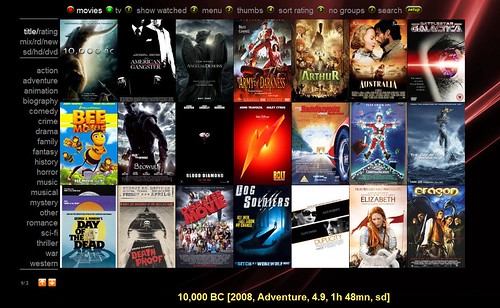
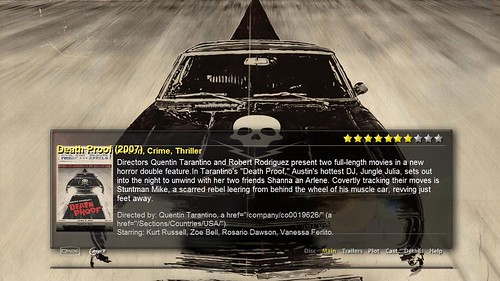
Basically it's a web server/front end for the yamj application. You get the covers and film details by naming the files in a certain format and the app goes off to imdb to get the data.
Just need to figure out how to get it to format dynamically.
I get 99% success in streaming vob and avi over wireless. You just need to make sure all the critical components are on fixed IP addresses. Get the router to assign IP by MAC and then set the PS3 to a fixed IP address.
Twonky is fine for music, photos and movies but the interface is a bit rubbish.
I looked at popcorn hour for a slicker interface and decided against it but ended up using some custom software to get a PCH interface on my PS3.
Basically it's a web server/front end for the yamj application. You get the covers and film details by naming the files in a certain format and the app goes off to imdb to get the data.
Just need to figure out how to get it to format dynamically.
Gassing Station | Computers, Gadgets & Stuff | Top of Page | What's New | My Stuff