
Xbox red ring help
Discussion


Mine died from rrod 3 weeks ago. Out of warranty (yes I was amazed it lasted that long), so I took it apart and tried to fix the heatsink / cpu myself. Unfortunately it didn't work, so I stripped it of parts, and am awaiting a free one from my friend (he has two, one of which he has never used, so is kindly giving me it  )
)
)Jimski said:
I have checked the cables and they seem to be ok so its looking like an internal failure
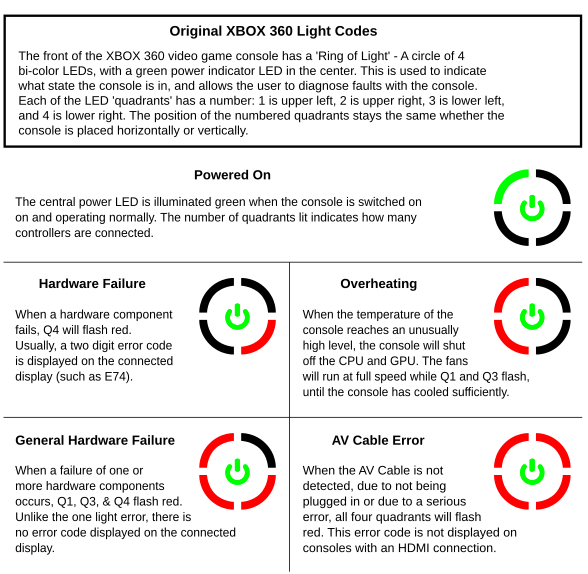
Does it give an error message on the screen when you switch the unit on? One red light can also indicate overheating - Does it power on okay after allowing the unit to cool down?Also, I think the Elites are still prone to the RROD, just less likely ... supposedly!
Edited by Ikemi on Wednesday 2nd June 10:31
Ikemi said:
Jimski said:
I have checked the cables and they seem to be ok so its looking like an internal failure
Does it give an error message on the screen when you switch the unit on? One red light can also indicate overheating - Does it power on okay after allowing the unit to cool down?Also, I think the Elites are still prone to the RROD, just less likely ... supposedly!
Edited by Ikemi on Wednesday 2nd June 10:31
One red light - http://support.microsoft.com/kb/907536/en-gb
Two red lights - http://support.microsoft.com/kb/907533/en-us
Three red lights - http://support.microsoft.com/kb/907534/en-gb
Four red lights - http://support.microsoft.com/kb/906652/en-gb
shakotan said:
Ikemi said:
Jimski said:
I have checked the cables and they seem to be ok so its looking like an internal failure
Does it give an error message on the screen when you switch the unit on? One red light can also indicate overheating - Does it power on okay after allowing the unit to cool down?Also, I think the Elites are still prone to the RROD, just less likely ... supposedly!
Edited by Ikemi on Wednesday 2nd June 10:31
One red light - http://support.microsoft.com/kb/907536/en-gb
Two red lights - http://support.microsoft.com/kb/907533/en-us
Three red lights - http://support.microsoft.com/kb/907534/en-gb
Four red lights - http://support.microsoft.com/kb/906652/en-gb

Gassing Station | Video Games | Top of Page | What's New | My Stuff