
Selective colouring
Author
Discussion

Gad-Westy

Original Poster:

16,576 posts

242 months

Tuesday 4th January 2011
quotequote all
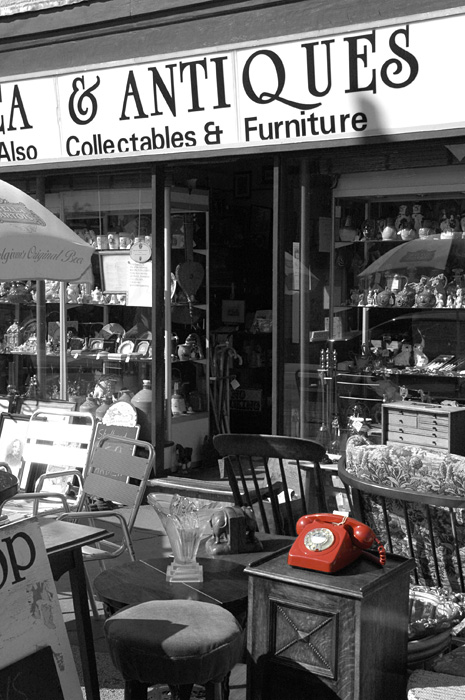
I know it may be slightly cliche these days but I fancy having a go at some 'selective colouring' like this:


I've read a bit on how this is done in Photoshop Elements but I don't have Photoshop Elements (been putting that off until I buy a new Computer in case I go for a Mac).

I have a Nikon D5000. Is there anything I can do in-camera to achieve this effect. Or maybe some free software that would work?

toasty

8,405 posts

249 months

Tuesday 4th January 2011
quotequote all
GIMP is free and can do selective colouring.

http://www.gimp.org/tutorials/Selective_Color/

Gad-Westy

Original Poster:

16,576 posts

242 months

Tuesday 4th January 2011
quotequote all
toasty said:
GIMP is free and can do selective colouring.

http://www.gimp.org/tutorials/Selective_Color/
Cheers, will give it a whirl later. Have an idea I want to try.

Gemm

1,833 posts

244 months

Tuesday 4th January 2011
quotequote all
While you are at it, make sure you desaturate the background behind the glass/window as the photographer who edited the image above forgot to do. wink

Gad-Westy

Original Poster:

16,576 posts

242 months

Tuesday 4th January 2011
quotequote all
Gemm said:
While you are at it, make sure you desaturate the background behind the glass/window as the photographer who edited the image above forgot to do. wink
Ha ha , well spotted!

Simpo Two

92,743 posts

294 months

Tuesday 4th January 2011
quotequote all
Been there myself. I think 'red spot phone boxes' should be added to the 'Stages of a Photographer' graph. You can't avoid it, just keep your head down and work through it smile

Here's one from 'Bloke - The Early Years':


OK so somebody's nicked the box...

Edited by Simpo Two on Tuesday 4th January 17:00

Gad-Westy

Original Poster:

16,576 posts

242 months

Tuesday 4th January 2011
quotequote all
My first effort, thanks all for the help.


Colour Selection by G.A.D, on Flickr

toasty

8,405 posts

249 months

Tuesday 4th January 2011
quotequote all
Gad-Westy said:
My first effort, thanks all for the help.


Colour Selection by G.A.D, on Flickr
Yep that works but 2 problems.

1. It's not a telephone box.
2. It's not red.

wink

dblack1

230 posts

190 months

Wednesday 5th January 2011
quotequote all
might also look into tintii, its free too.. from indii.org

Gad-Westy

Original Poster:

16,576 posts

242 months

Wednesday 5th January 2011
quotequote all
toasty said:
Gad-Westy said:
My first effort, thanks all for the help.


Colour Selection by G.A.D, on Flickr
Yep that works but 2 problems.

1. It's not a telephone box.
2. It's not red.

wink
Funny you say that. The actual paint was a very dark green/blue. The very first colour I tried was red but decided better of it. I do feel that a red telephone box may be a right of passage though!

mcflurry

9,189 posts

282 months

Thursday 6th January 2011
quotequote all
Gad-Westy said:
1. It's not a telephone box.
2. It's not red.

wink
There's the red for you tongue out


Edited by mcflurry on Thursday 6th January 14:46

Gemm

1,833 posts

244 months

Thursday 6th January 2011
quotequote all
hehe

daveake

687 posts

255 months

Thursday 6th January 2011
quotequote all
After seeing this thread I thought I'd have a go myself, so here's my first attempt, using GIMP, which I've included in my 365 on blipfoto. No telephone boxes or red phones or indeed any red at all smile


james_tigerwoods

16,347 posts

226 months

Thursday 6th January 2011
quotequote all
Lightroom has those really, really simple sliders that make doing this a doddle:


Paid for. Of course. whistle

The second was done a while back when I didn't quite understand what I was doing - not that I do now....

Gad-Westy

Original Poster:

16,576 posts

242 months

Thursday 6th January 2011
quotequote all
mcflurry said:
Gad-Westy said:
1. It's not a telephone box.
2. It's not red.

wink
There's the red for you tongue out


Edited by mcflurry on Thursday 6th January 14:46
Class! biglaugh

Allyc85

7,225 posts

215 months

Friday 7th January 2011
quotequote all
One from Wales the other week smile


Welcome to the Valleys by Allyc85, on Flickr

Manee

5,299 posts

222 months

Friday 7th January 2011
quotequote all


photoshop makes it really easy to do this with snap selection on the cutting tool.

Edited by Manee on Friday 7th January 20:35

mcflurry

9,189 posts

282 months

Friday 7th January 2011
quotequote all
Manee said:
photoshop makes it really easy to do this with snap selection on the cutting tool.
Aye, or select the area you want, inverse and desaturate if you have older or Open source software smile