
OSX Finder app with tree structure
Discussion


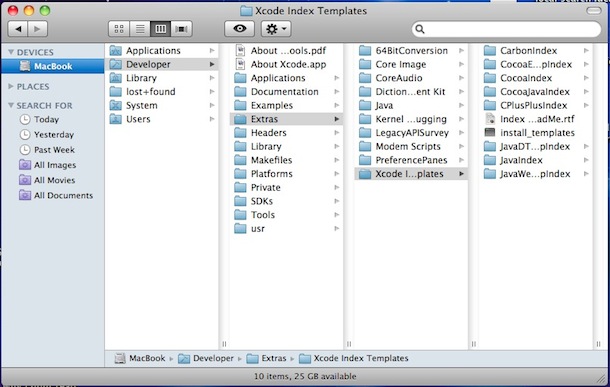
Does anyone know of a Finder alternative that displays folders in a non-linear way e.g. the tree structure in Windows Explorer?
I do a lot of file management with deep folder structures, and it's driving me nuts having to navigate through folder structures one at a time. I've tried a few Finder alternatives and am currently reaching the end of a PathFinder trial, but I'd rather not pay for it if there's something that has non-linear navigation.
Amazingly Google seems to suggest there isn't such a thing but I seriously can't believe that.
I do a lot of file management with deep folder structures, and it's driving me nuts having to navigate through folder structures one at a time. I've tried a few Finder alternatives and am currently reaching the end of a PathFinder trial, but I'd rather not pay for it if there's something that has non-linear navigation.
Amazingly Google seems to suggest there isn't such a thing but I seriously can't believe that.
If you mean 'tree structure' as in having an expanding folder structure on the click of an arrow/plus sign on the left of the folder name, then OSX can do it natively, as long as you change your view preferences from Column/Thumbnail/Icon to List.
Just click the expand triangle next to the folder name to show the contents as a hierarchy.

Just click the expand triangle next to the folder name to show the contents as a hierarchy.
Yeah sorry, I do mean that tree structure but in Finder (and Path Finder) you can only operate within one folder at a time.
So for example, in this screenshot the files in the right pane can be dragged directly into any folder by expanding the tree structure in the left pane.

To do the same in Finder you either have to copy, navigate, paste; drag the files through the tree one level at a time; or have multiple windows open. The latter is the quickest but I'm not keen on having lots of windows open if I can avoid it.
So for example, in this screenshot the files in the right pane can be dragged directly into any folder by expanding the tree structure in the left pane.
To do the same in Finder you either have to copy, navigate, paste; drag the files through the tree one level at a time; or have multiple windows open. The latter is the quickest but I'm not keen on having lots of windows open if I can avoid it.

XFile looks like it may be overkill as I'm really just moving code about but I'll have a look anyway.
This is for work so as long as I can justify it to the boss the price shouldn't be a major issue. Having said that, I'm not sure how I will justify it to the boss - I already had to explain that Dreamweaver is not the ultimate coding application so I could buy Textmate (I tried Coda but that really is too expensive).
Incidentally, did you know about these already or find them? I had a fruitless scout around on Google but after reading comments on the PathFinder website, the people there seemed to think such a thing didn't exist on OSX.
This is for work so as long as I can justify it to the boss the price shouldn't be a major issue. Having said that, I'm not sure how I will justify it to the boss - I already had to explain that Dreamweaver is not the ultimate coding application so I could buy Textmate (I tried Coda but that really is too expensive).
Incidentally, did you know about these already or find them? I had a fruitless scout around on Google but after reading comments on the PathFinder website, the people there seemed to think such a thing didn't exist on OSX.
Well, in finder, I find it is easier to simply use the list option, thusly wussly...

And then rather than navigating to the bit you want to on the left, [i]then[i] dragging, just pick up the file you want, and then drag it where you want. Folder will open, and open the next one, etc, until you get where you need to be, which is not particularly different, I don't think, unless I've grasped the wrong end of the stick?
And then rather than navigating to the bit you want to on the left, [i]then[i] dragging, just pick up the file you want, and then drag it where you want. Folder will open, and open the next one, etc, until you get where you need to be, which is not particularly different, I don't think, unless I've grasped the wrong end of the stick?
TheHeretic said:
Well, in finder, I find it is easier to simply use the list option, thusly wussly...
And then rather than navigating to the bit you want to on the left, [i]then[i] dragging, just pick up the file you want, and then drag it where you want. Folder will open, and open the next one, etc, until you get where you need to be, which is not particularly different, I don't think, unless I've grasped the wrong end of the stick?
Also I just drag folders into the 'quick use list' on the far left of the finder, very handy.And then rather than navigating to the bit you want to on the left, [i]then[i] dragging, just pick up the file you want, and then drag it where you want. Folder will open, and open the next one, etc, until you get where you need to be, which is not particularly different, I don't think, unless I've grasped the wrong end of the stick?
 Very useful tip.
Globs said:
Also I just drag folders into the 'quick use list' on the far left of the finder, very handy.
Yep, I do that for my main folders but this is more to do with moving files around in subfolders e.g. copying a template from one subfolder to a new project.@TheHeretic My folder structure tends to be at least 7 or 8 levels deep so it's a bit awkward to hold the mouse button down while you drag, pause until open, drag, pause until open etc. With a deep folder structure it's much quicker to use a tree to expand the target folder in preparation then drag the file in one go.
Thanks all, much appreciated.
TonyRPH said:
mmm-five said:
Impressive - this is really quick.Looks like I'm going to have to buy a licence now.
Gassing Station | Computers, Gadgets & Stuff | Top of Page | What's New | My Stuff